 FORGE
FORGEOrder flow MBO
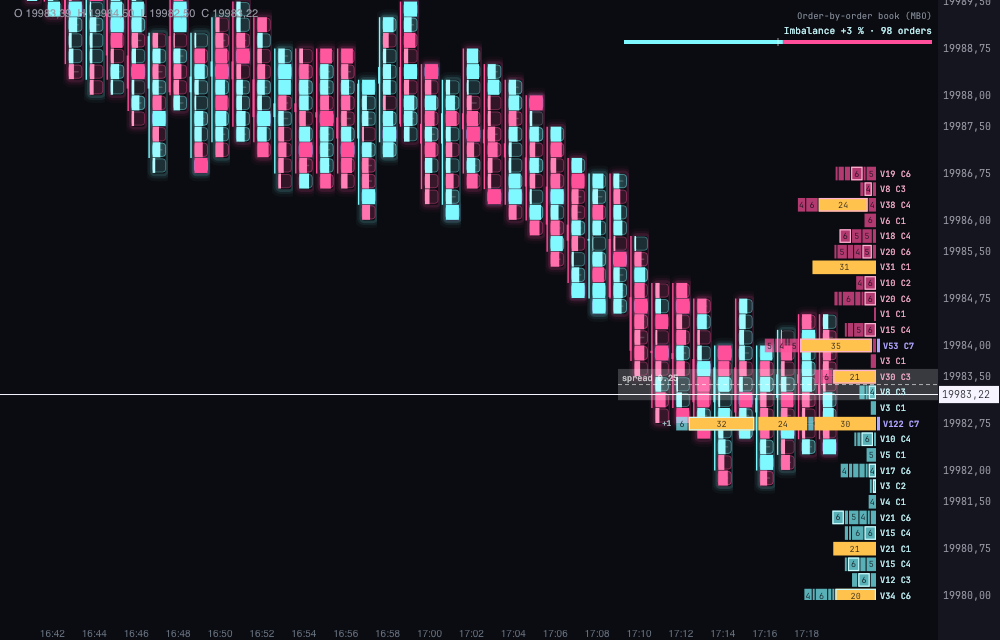
The order-by-order book attached to the axis, with every order in the queue in view.
What it is
The Order flow MBO draws the order-by-order order book attached to the price axis, like the Volume Profile Composite: each book level sits at the height of its price on the candles.
- In each level, every order in the queue is its own packet with its size inside. The front of the queue, the order that executes first, touches the axis.
- Large orders come out in another color, gold by default, and walls (levels with a large total) carry a violet mark next to their label. The largest order of each level has a border.
- A new order comes out with an outline that fades in a few seconds, and one that changes size, with a dashed outline.
- The best bid and the best ask are highlighted in a band, and the spread, with a line and its value.
- Next to each level, V… C…: the level’s volume and the number of orders. V15 C4 is 15 contracts in 4 orders.
- At the top, a header with the book’s imbalance in % and a strength bar.
- If a level has more orders than fit, +N shows the ones that aren’t visible.
We explain how to read an order-by-order book on the blog.
You need to have order-by-order depth data (Level 2 / MBO). Without it nothing is made up: the book says “waiting for the order book…”.
Built-in strategies
What the indicator already has inside and can mark for you on the chart. They show what has happened; they are not recommendations.
Icebergs
On by default- What it marks
- A circle at the price where an order reloads again and again. Large and with its number when the volume passes “Iceberg: show its number from”; with a thick stroke if price respected it.
- Alert
- No alert: it shows on the chart.
- Turned on with
- «Icebergs», in Signals on the chart; the thresholds, in Detectors.
Stop runs
On by default- What it marks
- A vertical bar over the prices swept in a cascade of aggressive orders, with its volume and the number of aggressors.
- Alert
- No alert: it shows on the chart.
- Turned on with
- «Stop runs», in Signals on the chart; the thresholds, in Detectors.
Sweeps
On by default- What it marks
- A wider bar when a single aggressor eats through several levels at once.
- Alert
- No alert: it shows on the chart.
- Turned on with
- «Sweeps», in Signals on the chart.
Composite setups
On by default- What it marks
- A diamond when a stop run ends near an iceberg.
- Alert
- No alert: it shows on the chart.
- Turned on with
- «Composite setups», in Signals on the chart; the distance, in Detectors.
Outcome of each signal
On by default- What it marks
- The signal is painted red if price didn’t respect it within the move you choose.
- Alert
- No alert: it shows on the chart.
- Turned on with
- «Color of a signal that failed», in Signals on the chart; the move, in Detectors.
Adding it to the chart
In the chart bar, Indicators ▾ › More Indicators…. You’ll find it in the Order Book / DOM category. How to add and adjust an indicator is in Indicators. The Depth Of Market is still the book by levels.
Settings
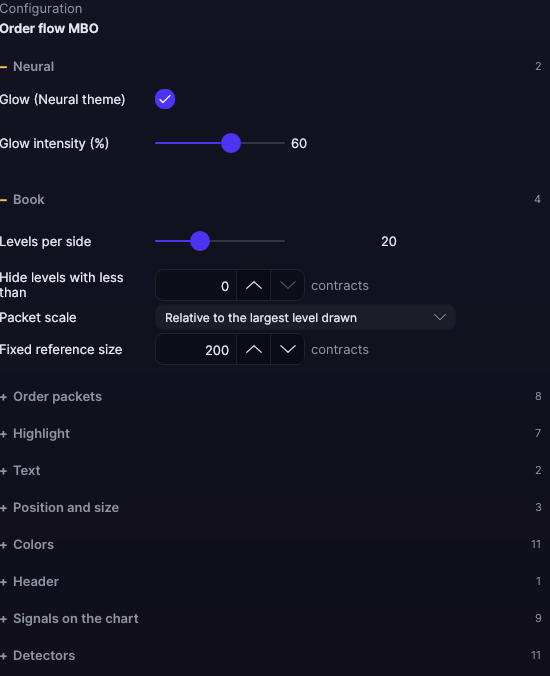
Open them with the ⚙ on its row in Indicators ▾. Everything is chosen in the panel, with no free-text fields.
| Setting | Default | What it does |
|---|---|---|
| Book | ||
| Levels per side | 20 | The ones closest to price, from 1 to 60. |
| Hide levels with less than | 0 contracts | The smallest levels aren’t drawn. With 0, all of them are drawn. |
| Packet scale | Relative to the largest level drawn | Or Relative to a fixed size. |
| Fixed reference size | 200 contracts | With the fixed size, the total that fills the full width. |
| Order packets | ||
| One packet per order | Yes | Off, each level is a single bar with the total, like a DOM. |
| Width of each packet | Proportional to its size | Or All the same width. |
| Width of equal packets | 26 px | With all the same width, from 8 to 80 px. |
| Minimum packet width | 3 px | So that a 1-contract order is still visible, from 1 to 12 px. |
| Gap between packets | 1 px | From 0 to 4 px. |
| Each order's size inside its packet | Yes | The number in each packet. |
| Its queue position, in the packet's corner | No | The place of each order in its queue. |
| Queue summary (3×5 · 2×1…) | No | How many orders there are of each size. |
| Highlight | ||
| Large order from | 10 contracts | Orders of this size or more come out in their own color. |
| Wall: level with a total from | 50 contracts | Levels with this total or more carry the wall mark. |
| Border on the largest order of each level | Yes | A border on the largest of each level. |
| Flag new orders for | 3 s | The outline of a new order, from 0 to 30 s. With 0, no flag. |
| Flag orders that change size | Yes | The dashed outline of an order that changes. |
| Highlight the best bid and the best ask | Yes | The band of the two best prices. |
| Mark the spread | Yes | The spread line with its value. |
| Text | ||
| Volume and number of orders (V… C…) | Yes | The text of each level. |
| Font size (0 = automatic, follows the zoom) | Automatic | From 0 to 20 px. |
| Position and size | ||
| Side of the chart | Next to the price axis | Or To the left of the chart. |
| Book width | 320 px | From 140 to 900 px. |
| Height of each row | 90% | Of the price cell’s height, from 10 to 100%. |
| Colors | ||
| Buys (bid) · Sells (ask) | Ice · Pink | The packets on each side. |
| Large order · Wall | Gold · Violet | Large orders and the wall mark. |
| New order · Order that changes size | White · Light yellow | The flag outlines. |
| Number of each order | The theme background | The size written in each packet. |
| Text of the buys (V… C…) · Text of the sells (V… C…) | Light ice · Light pink | The text on each side. |
| Best bid and ask, and spread | Translucent white | The band and the spread line. |
| Book background (transparent = none) | Transparent | A background behind the book. |
| Header | ||
| Title, imbalance and strength bar | Yes | The book’s header. |
| Signals on the chart | ||
| Icebergs · Sweeps · Stop runs · Composite setups | Yes | Each signal is turned on and off separately. |
| Iceberg color · Stop run color · Sweep color · Setup color | Blue · Amber · Green · Magenta | The color of each signal. |
| Color of a signal that failed | Red | The color of a signal that price didn’t respect. |
| Detectors | ||
| Stop run: cascade window | 750 ms | The time in which the aggressive orders have to arrive, from 100 to 5,000 ms. |
| Stop run: minimum volume | 200 contracts | From 10 to 10,000 contracts. |
| Stop run: minimum levels swept | 3 | From 1 to 20 levels. |
| Stop run: volume in the dominant direction | 80% | What share of the volume goes one way, from 50 to 100%. |
| Sweep: a single aggressor from | 100 contracts | From 10 to 5,000 contracts. |
| Iceberg: minimum reloads | 50 reloads | From 2 to 500 reloads. |
| Iceberg: minimum volume | 200 contracts | From 10 to 10,000 contracts. |
| Iceberg: minimum duration | 0 ms | From 0 to 60,000 ms. |
| Iceberg: show its number from | 100 contracts | From this volume on, the circle comes out large and with its number. |
| Outcome: move that decides whether it held | 1.0 ATR | From 0.1 to 5 ATR. |
| Setup: distance between stop run and iceberg | 2 ticks | From 0 to 20 ticks. |
| Neural | ||
| Glow (Neural theme) | Yes, when added | A halo of light on large orders and walls, like the one on the Neural theme candles. A newly added indicator comes with it checked; the ones you already had saved don’t. |
| Glow intensity (%) | 60% | From 0 to 100%. |
Settings belong to each chart: changing the Order flow MBO on one chart doesn’t change it on another.