 FORGE
FORGEDepth Of Market
The order book drawn next to price, order by order.
What it is
The Depth Of Market draws the order book on one side of the chart, aligned with the price axis: each book level sits at the height of its price on the candles.
- One bar per level: buy orders (bid) in ice and sell orders (ask) in pink. Its length is the size of the level.
- Each bar is split by orders: one segment for each order in the queue, with its size written inside.
- Next to it, V… C…: the level’s volume and the number of orders that make it up.
- At the top, a header: Order book · order by order; the Imbalance, which is the book’s buy volume minus its sell volume, in % (from −100 to +100), with the number of levels; and Buys/sells, the ratio between the two volumes.
We explain how to read an order-by-order book on the blog.
The levels you see depend on the book depth your data connection provides.
Adding it to the chart
In the chart bar, Indicators ▾ › More Indicators…. You’ll find it in the Order Book / DOM category. How to add and adjust an indicator is in Indicators.
Settings
Open them with the ⚙ on its row in Indicators ▾. With the default settings, the book looks the way it always has.
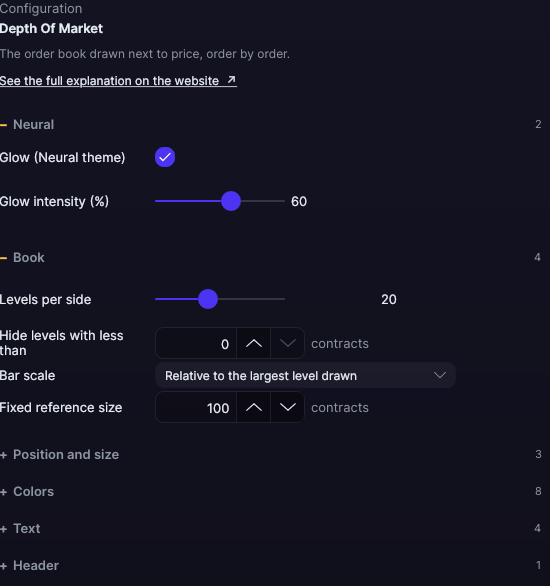
| Setting | Default | What it does |
|---|---|---|
| Book | ||
| Levels per side | 20 | The ones closest to price, from 1 to 50. |
| Hide levels with less than | 0 contracts | Smaller levels aren’t drawn. |
| Bar scale | Relative to the largest level drawn | Or Relative to a fixed size. |
| Fixed reference size | 100 contracts | With the fixed size, the size that fills the full width. |
| Position and size | ||
| Side of the chart | Next to the price axis | Or To the left of the chart. |
| Book width | 210 px | From 100 to 600 px. |
| Height of each bar | 100% | Of the price cell’s height, from 10 to 100%. |
| Colors | ||
| Buys (bid) · Sells (ask) | Ice · Pink | The bars on each side. |
| Separator between orders | Translucent black | The line between one order and the next. |
| Text of the buys (V… C…) · Text of the sells (V… C…) | Light ice · Light pink | The text on each side. |
| Number of each order | White | The size written in each segment. |
| Highlight the largest level · Border of the largest level | No · Amber | A border on the level with the most contracts among those drawn. |
| Text | ||
| Split each bar by orders | Yes | One segment per order. |
| Size of each order inside the bar | Yes | The number in each segment. |
| Volume and number of orders (V… C…) | Yes | The text for each level. |
| Font size (0 = automatic, follows the zoom) | Automatic | From 0 to 20 px. |
| Header | ||
| Title, strength and number of levels | Yes | The book’s header: title, imbalance, levels and buy/sell ratio. |
| Neural | ||
| Glow (Neural theme) | Yes, when added | A halo of light in the color of each line or mark, like the one on the Neural theme candles. A newly added indicator comes with it checked; the ones you already had saved don’t. |
| Glow intensity (%) | 60% | From 0 to 100%. |
Settings belong to each chart: changing the Depth Of Market on one chart doesn’t change it on another.