 FORGE
FORGECluster Finder
Describe what you’re looking for inside the candle and Forge marks it on the footprint.
What it does
The Cluster Finder scans the footprint candles and marks the clusters that meet what you ask for: groups of prices where a lot of volume traded, where one side dominated the other or where there was an imbalance, in the part of the candle, the type of candle and the time window you choose.
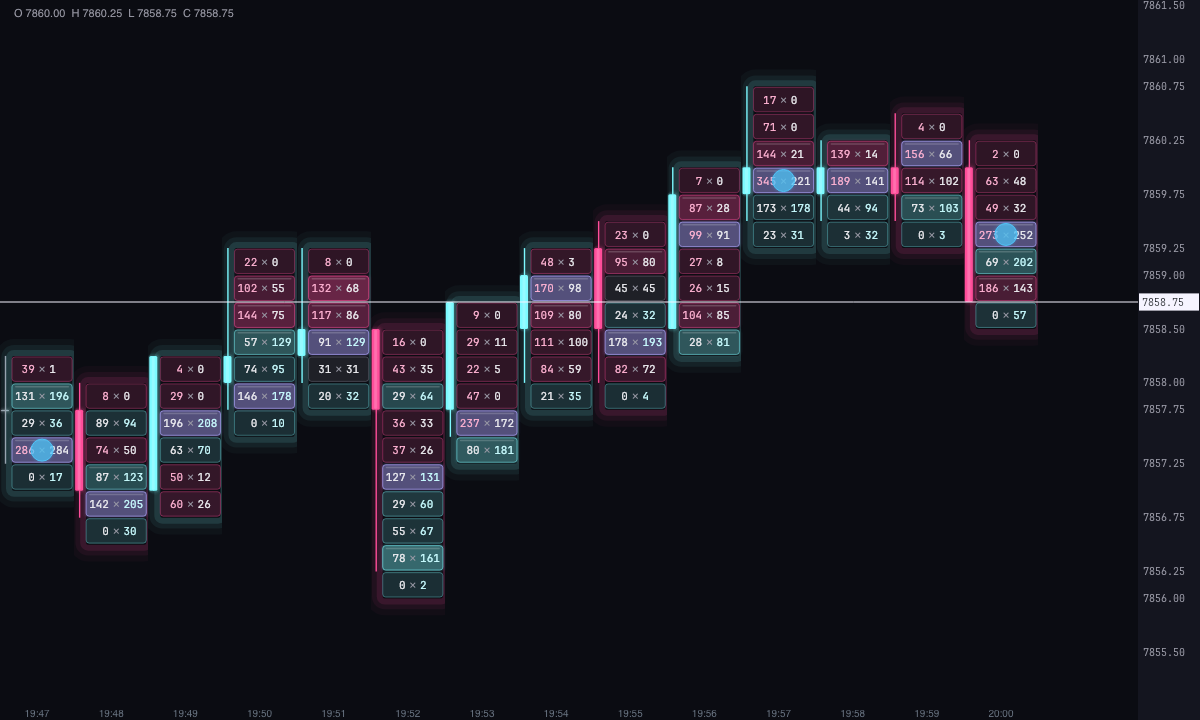
It doesn’t come with a fixed idea of what an important cluster is: you write it with its settings. With the defaults it marks the prices where at least 1,000 contracts traded in a candle, in ice if buyers were in control there and in pink if sellers were.
How it searches
What gets measured is a block: one or more consecutive prices (Prices per cluster) with what traded in one or more candles (Candles added together: the candle being checked and the previous ones). One block is measured for each price in the candle.
Each block goes through the conditions you have turned on, each with its checkbox and its limits:
- Volume: what traded in the block, with a minimum, an optional maximum and what share of the candle’s volume it makes up.
- Delta: buys at market minus sells at market in the block, on the side you choose, with a minimum, an optional maximum and what share of the block’s volume is delta.
- Buys and sells: what was bought or sold at market in the block, each with its own minimum.
- Imbalance: one side against the other, at the same price or diagonally, with a minimum ratio and a minimum volume on the dominant side.
With All conditions, the block has to meet every one that is turned on; with Any of them, one is enough. With none turned on, nothing is marked.
Then the filters are applied. They don’t look at the block but at the candle or the location:
- Candle: its direction (bullish, bearish or doji), its height and its body in ticks.
- Where inside the candle: at the high, at the low, in the body, in a wick, or within a few ticks of the high or the low.
- Schedule: only the candles in a time window, in New York time, UTC or your computer’s time. A window can cross midnight.
- Only the candle’s highest-volume price: on top of the above, the block has to contain the price where the most traded.
The imbalance in Diagonal compares the buys at one price with the sells at the price below, and the sells with the buys at the price above, which is how a footprint is read. In Same price it compares the two sides of each price.
How it draws it
Each cluster found is marked with a shape over its footprint cell: rectangle, square, circle, ellipse, diamond, triangle, hexagon or just the border of the cells.
- Color: by delta side, ice if more was bought than sold in the block and pink if the other way around, or a single color for all. The fill has its own transparency, so what’s underneath stays readable, and the border can be the same color, its own color or no border at all.
- Size: fixed, or by strength, between a minimum size for the weakest and a maximum size for the strongest of those in view. The strength is the value of the first condition turned on: the volume, the delta, the buys or the sells (with the imbalance, the volume). The size is in pixels, so it doesn’t change with the zoom.
- Written value: if you turn it on, each cluster shows its volume, its delta, its buys or its sells.
- Only the strongest of each candle: leaves one cluster per candle instead of all of them.
The alert
With Alert when a new one appears, Forge shows you an alert, with a bell if you want, each time a cluster appears in the most recent candle: the instrument, the price, its volume and its delta. It only alerts on what’s new: clusters that were already there when the chart opened don’t alert.
How many days it looks at
Days back (5 by default) is how many days with candles, counting back from the last one, are analyzed. A weekend doesn’t count. It doesn’t download anything: it works with the candles the chart already has. With Closed candles only, the candle that is still forming is not checked.
Built-in strategies
What the indicator already has inside and can mark for you on the chart. They show what has happened; they are not recommendations.
Cluster search
On by default- What it marks
- A shape over each group of prices that meets your conditions: volume, delta, buys, sells or imbalance, in the part of the candle, the type of candle and the time window you choose.
- Alert
- If you turn it on, an on-screen alert, with an optional bell, each time a cluster appears in the most recent candle.
- Turned on with
- The search always runs; the alert, with «Alert when a new one appears», in Alert (off by default).
Adding it to the chart
In the chart bar, Indicators ▾ › More Indicators…. You’ll find it in the Volume / Order Flow category. It’s drawn over the footprint cells. How to add and adjust an indicator is in Indicators.
Settings
Open them with the ⚙ on its row in Indicators ▾. Each section collapses and expands on its own.
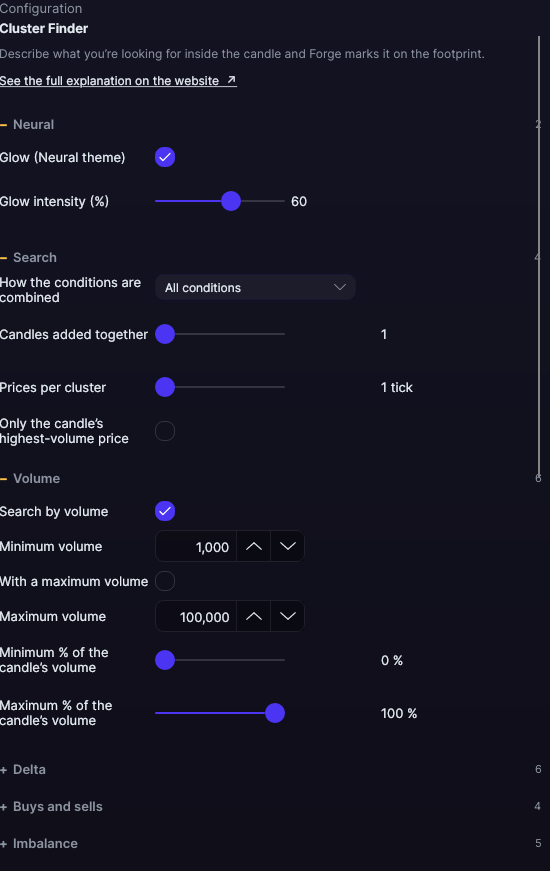
| Setting | Default | What it does |
|---|---|---|
| Search | ||
| How the conditions are combined | All conditions | All conditions or Any of them. |
| Candles added together | 1 | How many candles go into each block, from 1 to 20. |
| Prices per cluster | 1 tick | How many consecutive prices make up a block, from 1 to 20. |
| Only the candle’s highest-volume price | No | The block has to contain the highest-volume price. |
| Volume | ||
| Search by volume | Yes | Turns on the volume condition. |
| Minimum volume | 1,000 | Contracts traded in the block, at least. |
| With a maximum volume · Maximum volume | No · 100,000 | A cap, if you want one. |
| Minimum % · Maximum % of the candle’s volume | 0% · 100% | What share of the candle’s volume the block has to make up. |
| Delta | ||
| Search by delta | No | Turns on the delta condition. |
| Delta side | Any | Any, Buyer (positive delta) or Seller (negative). |
| Minimum delta | 300 | The block’s delta, in absolute value, at least. |
| With a maximum delta · Maximum delta | No · 100,000 | A cap, if you want one. |
| Minimum delta relative to the cluster volume | 0% | What share of the block’s volume has to be delta: how much one side dominated. |
| Buys and sells | ||
| Search by buys · Minimum buys | No · 500 | What was bought at market in the block, at least. |
| Search by sells · Minimum sells | No · 500 | What was sold at market in the block, at least. |
| Imbalance | ||
| Search for imbalance | No | Turns on the imbalance condition. |
| Side | Any | Any, Buyer or Seller. |
| How it is compared | Diagonal | Diagonal or Same price. |
| Minimum ratio | 3× | How many times larger the dominant side has to be, from 1 to 20×. |
| Minimum volume of the dominant side | 50 | So imbalances of two or three contracts don’t count. |
| Candle | ||
| Candle direction | Any | Any, Bullish, Bearish or Doji. |
| Limit the height · Minimum height · Maximum height | No · 1 · 100 ticks | Only candles of that height, from high to low. |
| Limit the body · Minimum body · Maximum body | No · 0 · 100 ticks | Only candles with that body, from open to close. |
| Where inside the candle | ||
| Candle zone | Anywhere | Anywhere, At the high, At the low, At the high or low, In the body, In the upper wick, In the lower wick or In any wick. |
| Near the high · How many ticks from the high | No · 2 ticks | The block has to be within that distance of the high. |
| Near the low · How many ticks from the low | No · 2 ticks | The same with the low. With both boxes checked, being near either one is enough. |
| Schedule | ||
| Only within a schedule | No | Turns on the time filter. |
| Time zone | New York | New York, UTC or This computer. |
| From · Until | 9:30 · 16:00 | The time window. If both times are the same, the whole day counts. |
| Calculation | ||
| Days back | 5 days | Days with candles that are analyzed, from 1 to 365. |
| Closed candles only | No | Skips the candle that is still forming. |
| Drawing | ||
| Shape | Rectangle | Rectangle, Square, Circle, Ellipse, Diamond, Triangle, Hexagon or Border only. |
| Fill color | By delta side | By delta side or Single color. |
| Buyer fill · Seller fill · Single fill | Ice · Pink · Light blue | The colors for each case. |
| Fill opacity | 35% | From 5 to 100%. |
| Size | By strength | By strength or Fixed. |
| Fixed size · Minimum size · Maximum size | 24 · 12 · 80 px | From 4 to 200 px. |
| Only the strongest of each candle | No | One cluster per candle. |
| Write the value · Which value | No · Volume | Volume, Delta, Buys or Sells. |
| Font size · Font color | 9 px · White | The font of the value, from 6 to 20 px. |
| Border | ||
| Border | Same as the fill | Same as the fill, Own color or No border. |
| Border color | White | With Own color. |
| Border opacity · Border width | 100% · 1 px | From 0 to 100% and from 0.5 to 6 px. |
| Alert | ||
| Alert when a new one appears | No | One alert for each new cluster in the most recent candle. |
| With sound · Alert color | Yes · Light blue | The bell and the color of the alert. |
| Neural | ||
| Glow (Neural theme) | Yes, when added | A halo of light in the color of each line or mark, like the one on the Neural theme candles. A newly added indicator comes with it checked; the ones you already had saved don’t. |
| Glow intensity (%) | 60% | From 0 to 100%. |
Settings belong to each chart: changing the Cluster Finder on one chart doesn’t change it on another.