 FORGE
FORGEOpen Interest Change
Whether each session’s move came from new positions or from positions being closed.
What open interest is
Open interest (OI) is how many futures contracts are still open at the end of the day. Every contract has a buyer and a seller, so:
- if open interest rises, new positions were opened that day: money came in;
- if it falls, positions were closed: money went out.
The number itself (hundreds of thousands of contracts) tells you nothing at a glance. What you read is how much it changes from one session to the next, and which way price moved in the meantime.
The reading for each session
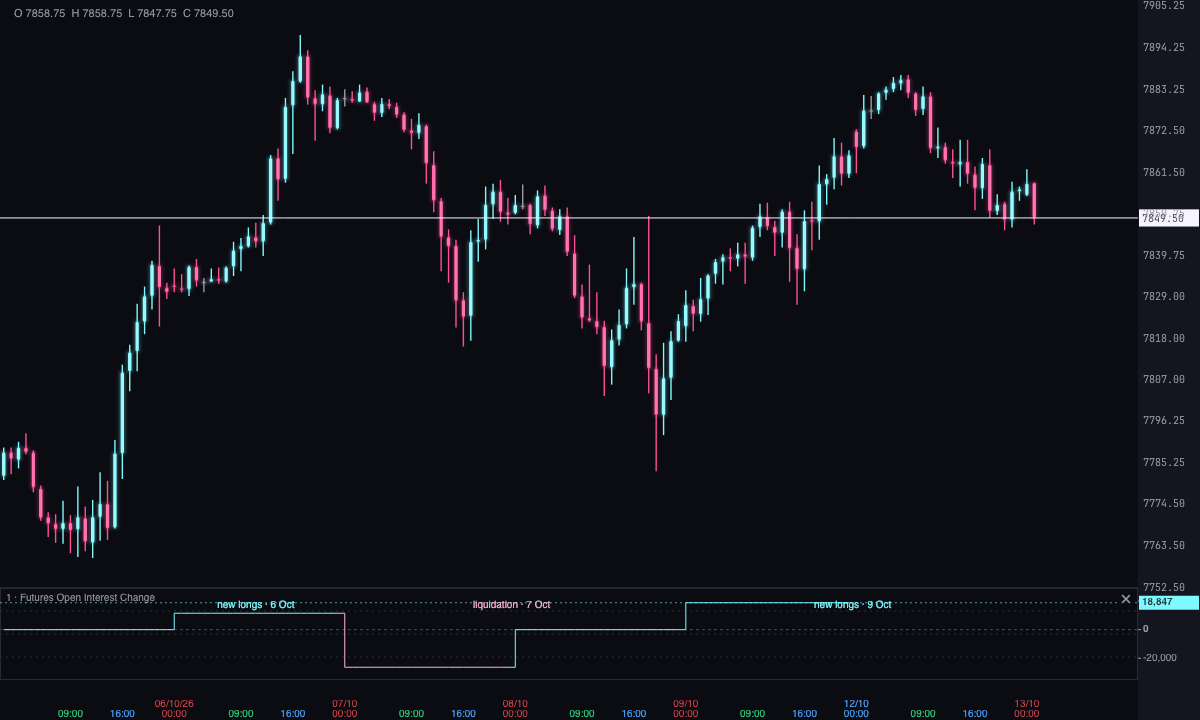
Forge compares the change in open interest with the change in price over that same session (close to close), writes the reading and the date above its segment (for example, new longs · Oct 13) and paints it in that reading’s color:
| Price | Open interest | Reading and color | What it means |
|---|---|---|---|
| Up | Up | new longs · ice | The rally is driven by buyers opening positions. |
| Down | Up | new shorts · pink | The decline is driven by sellers opening positions. |
| Up | Down | short covering · light ice | It rises because shorts are closing, not because new buying is coming in. |
| Down | Down | liquidation · light pink | It falls because longs are closing, not because new selling is coming in. |
If open interest suddenly drops more than 20% in a session, Forge writes rollover? in gray instead of a reading: most likely traders are rolling their positions into the next contract, and any of the four readings would be misleading.
When each data point comes out
Open interest is published once a day, the next morning: the previous session’s close arrives around 14:04 UTC. That’s why:
- each segment is a whole session, already closed, with a constant value;
- today’s session shows no segment and the label pending until its data is published, tomorrow;
- it’s not an intraday signal: it’s a snapshot of the previous session.
How it helps when trading
It tells you whether the previous session’s move had new positions behind it or was traders closing out, so you can prepare the session with that context:
- a rally with new longs had new buying behind it; a rally from short covering was pushed by shorts closing, and that push runs out once they’re done closing;
- on the way down, the same: new shorts versus liquidation of longs.
It’s context for your plan, not an entry trigger, and on its own it doesn’t anticipate what price will do.
Adding it to the chart
In the chart bar, Indicators ▾ › More Indicators…, and search for Futures Open Interest Change. It’s drawn in its own strip, below the candles, with one segment per session. How to adjust a strip is in Indicators.
Settings
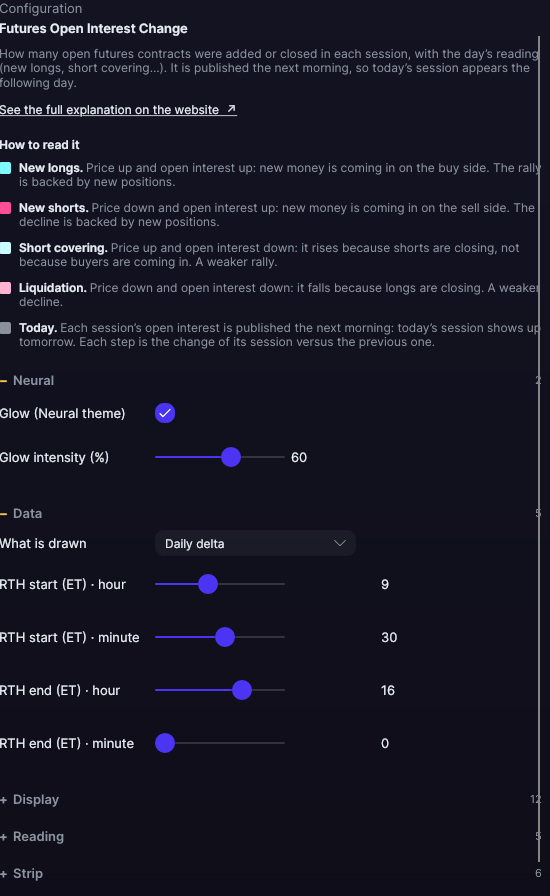
Open them by double-clicking its strip, or with the ⚙ on its row in Indicators ▾. Below the indicator’s name, the panel explains How to read it for each color.
| Setting | Default | What it does |
|---|---|---|
| Data | ||
| Regular session start (hour · minute) | 9 · 30 | The New York time the regular session starts. Hour from 0 to 23; minute from 0 to 55, in steps of 5. |
| Regular session end (hour · minute) | 16 · 0 | The New York time it ends. Same ranges. |
| What is drawn | Daily delta | Daily delta: each session’s change versus the previous one, which is the reading that matters. Level: open interest at the close of each session. |
| Display | ||
| Drawing mode | Step | One step per session. |
| Width | 1 px | From 0.5 to 6 px. |
| Color by | The session’s reading | Or The sign of the change: ice if it rises and pink if it falls. |
| Color when rising · Color when falling | Ice · Pink | The colors of the The sign of the change mode. |
| Label the reading · Reading size | Yes · 10 px | Each session’s reading above its segment, from 7 to 14 px. |
| Numbers per candle · Number size | No · 9 px | The value, written out, from 6 to 24 px. |
| Number color (0 = the bar’s own) | 0 (the bar’s own) | A color of its own for the numbers. |
| Reading color (0 = the bar’s own) | 0 (the bar’s own) | A color of its own for each session’s reading. |
| Grid | Yes | Reference lines inside the strip. |
| Reading | ||
| New longs · New shorts · Short covering · Liquidation · No reading (possible rollover) | Ice · Pink · Light ice · Light pink · Gray | The color of each reading. |
| Strip | ||
| Value on the axis · Strip height | Yes · 92 px | From 40 to 400 px. |
| Zero line | Yes | The zero reference. |
| Zero line color (0 = automatic) | Automatic | If you don’t change it, it reads on any background. |
| Grid color (0 = automatic) | Automatic | If you don’t change it, it reads on any background. |
| Grid divisions | 4 | From 2 to 10. |
| Neural | ||
| Glow (Neural theme) | Yes, when added | A halo of light in the color of each line or mark, like the one on the Neural theme candles. A newly added indicator comes with it checked; the ones you already had saved don’t. |
| Glow intensity (%) | 60% | From 0 to 100%. |