 FORGE
FORGEDaily Lines
The previous days’ high, low, open and close, over today’s price.
What it does
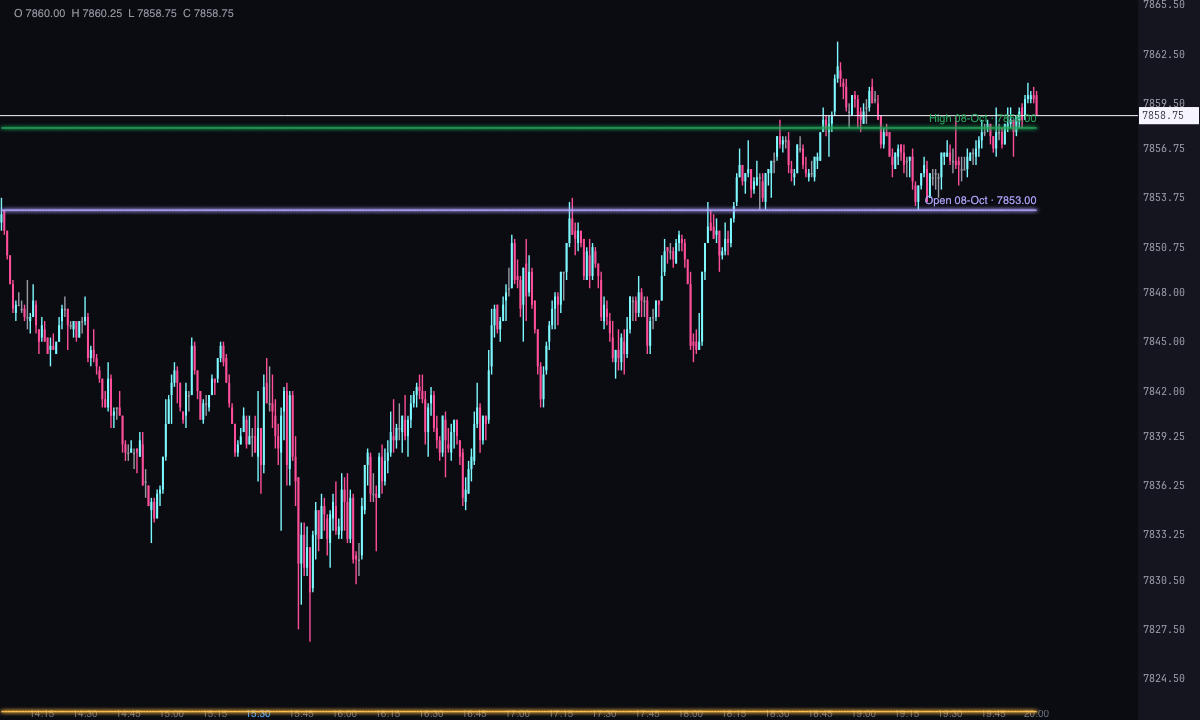
Daily Lines draws four levels from each previous day on the chart: its High, its Low, its Open and its Close. Each line starts on the first candle of the following day, so with the default settings you see yesterday’s levels over today.
Each line carries a label, for example Low 13-oct · 21345.25 · naked: the level, the day it comes from, its price and, as long as price hasn’t come back to it, the naked tag.
What a day is
With Where each day is cut off you choose how one day is separated from the next, always in New York time:
- Trading day (from the overnight open): the default. It starts with the overnight session, at 18:00, and carries the date of the day it ends on: Sunday afternoon belongs to Monday.
- Regular session: only the market’s regular hours.
- New York midnight: from 00:00 to 00:00.
- Custom hours: the start and end you set. If the end is equal to or earlier than the start, the day crosses midnight.
Days considered (including today) decides how many days are included: with 2 (the default), yesterday and today; with 5, the lines of the previous four appear over the days that follow them.
When a line is touched
A line is touched when price comes back to it. If the day opens on top of a line, as usually happens with yesterday’s close, that doesn’t count: price first has to move away from it. With Ticks before the line that already count as a touch you can allow a margin, from 0 to 20 ticks.
What happens after the touch is chosen in When the price touches it: the lines They continue (the default), Cut off at the touch or They disappear. And each line lasts Next day only (the default) or To the end of the chart.
The alert
Each line has its own Alert when touched and With sound, both on by default. Forge alerts you once per line, with the level, the day and the price, and only for what happens live: opening the chart doesn’t fire any alerts for touches that had already happened.
Built-in strategies
What the indicator already has inside and can mark for you on the chart. They show what has happened; they are not recommendations.
Previous day’s naked levels
On by default- What it marks
- The high, low, open and close of each previous day, with “naked” in their label as long as price hasn’t come back to them.
- Alert
- See the touch, below.
- Turned on with
- «Show» for each line and «Mark “naked” if it hasn’t been touched», in Text.
Level touch
On by default- What it marks
- Depending on what you choose, the line continues, is cut at the touch or disappears.
- Alert
- An on-screen alert, with a bell, the first time price comes back to each line, live only.
- Turned on with
- «Alert when touched» and «With sound», on each line (High, Low, Open and Close).
Adding it to the chart
In the chart bar, Indicators ▾ › More Indicators…. You’ll find it in the Other category. It’s drawn over price; each line’s price goes in its label, not on the axis. How to add and adjust an indicator is in Indicators.
Settings
Open them with the ⚙ on its row in Indicators ▾. Each section collapses and expands on its own.
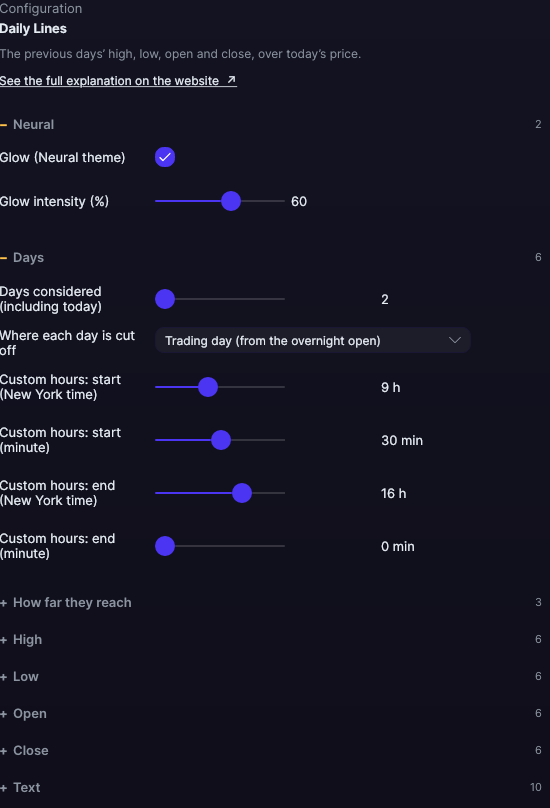
| Setting | Default | What it does |
|---|---|---|
| Days | ||
| Days considered (including today) | 2 | From 2 to 30. |
| Where each day is cut off | Trading day (from the overnight open) | Or Regular session, New York midnight or Custom hours. |
| Custom hours: start · end | 9:30 · 16:00 | Hour and minute, in New York time. Only with Custom hours. |
| How far they reach | ||
| Duration of each line | Next day only | Or To the end of the chart. |
| When the price touches it | They continue | Or Cut off at the touch or They disappear. |
| Ticks before the line that already count as a touch | 0 ticks | From 0 to 20. |
| High · Low · Open · Close | ||
| Show | Yes | Each line turns on and off separately. A line that’s off doesn’t alert either. |
| Color | Green · Red · Violet · Amber | Each line’s own. |
| Width | 1.5 px | From 0.5 to 6 px. |
| Line style | Solid · Solid · Dashed · Dashed | Solid, Dashed, Dotted, Dash-dot, Long dash, Long dash-dot or Even dashes. |
| Alert when touched · With sound | Yes · Yes | That line’s alert and its bell. |
| Text | ||
| Write each line’s text | Yes | Turns the whole label on or off. |
| Font size · Bold | 11 px · No | From 6 to 30 px. |
| Text color (0 = its line’s) | Its line’s | One color for all labels, or each line’s own. |
| Names | Full | Full (High, Low, Open, Close) or Short (Hi, Lo, Op, Cl). |
| Write the date of the origin day · Write the price | Yes · Yes | The parts of the label. |
| Mark “naked” if it hasn’t been touched | Yes | Adds “naked” as long as price hasn’t come back to the line. |
| Where the text goes | At the end of the line | Or At the start of the line. |
| Text relative to the line | Above the line | Or Below the line. |
| Neural | ||
| Glow (Neural theme) | Yes, when added | A halo of light in the color of each line or mark, like the one on the Neural theme candles. A newly added indicator comes with it checked; the ones you already had saved don’t. |
| Glow intensity (%) | 60% | From 0 to 100%. |
Settings belong to each chart: changing Daily Lines on one chart doesn’t change it on another.