 FORGE
FORGECumulative Δ
The sum of each candle’s delta: who has been winning since the session started.
What it measures
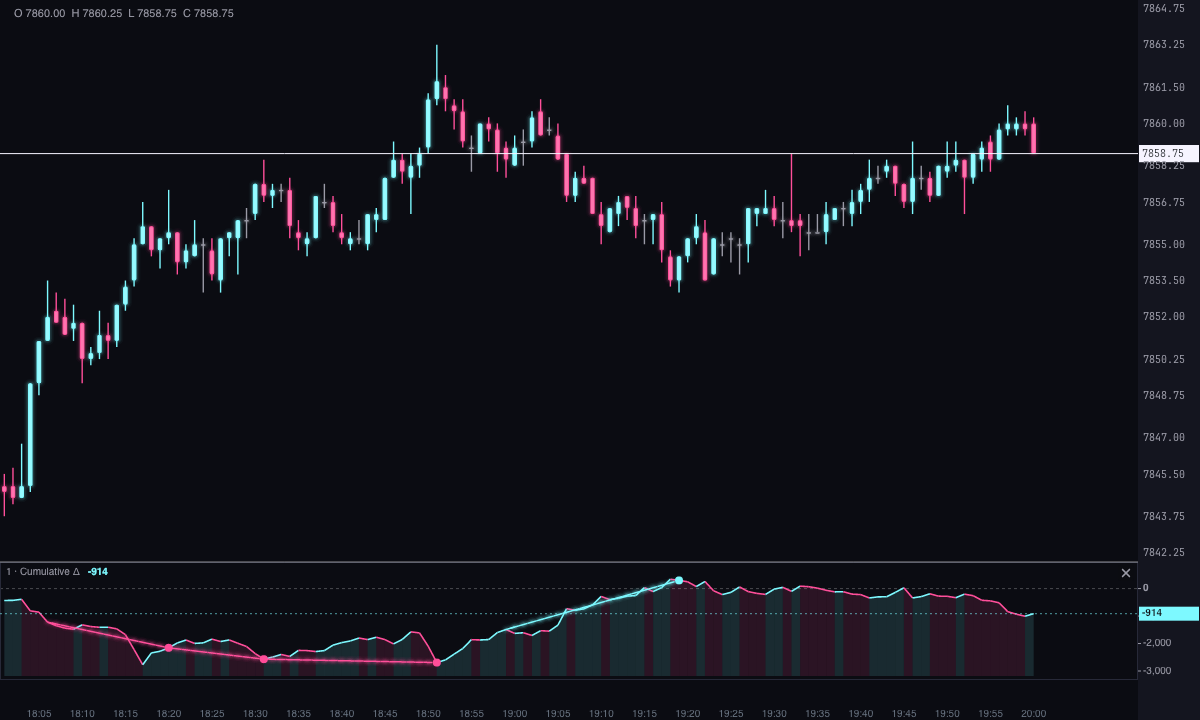
A candle’s delta is what was bought at market minus what was sold at market in it. The Cumulative Δ adds each candle’s delta to that of the previous ones, since the last reset. What you read is not so much the number as its slope and which side of zero it’s on: if it’s rising, aggressive buyers are winning; if it’s falling, sellers are.
It’s not the same as the Average Delta, which averages the delta of the last candles and oscillates around zero: cumulative delta draws a trend, like a price.
When it goes back to zero
With Reset you choose where the sum starts from, always in New York time:
- Chart session (9:30 New York): the default, with your chart’s session hours.
- Trading day (18:00 New York): from the open of the overnight session.
- Week or Never.
- Custom time (New York): at the hour and minute you set.
How to read it
- Slope: with the default color, ice while it rises and pink while it falls.
- Side of zero: above it, more has been bought at market than sold so far in the session; below it, the other way around.
- Against price: price rising with cumulative delta rising has aggressive buying behind it; price rising with cumulative delta flat or falling doesn’t.
Divergences
They’re on by default. Forge looks for pivots in price and in cumulative delta, with a few candles on each side (5 by default) and at most 60 candles apart:
- Bearish: price makes a higher high than the previous one and cumulative delta a lower one.
- Bullish: price makes a lower low and cumulative delta a higher one.
They’re marked in the strip with a dot on each pivot and a line between the two, and optionally with a triangle on price too. They don’t count if cumulative delta has reset between the two pivots, because they can no longer be compared.
A pivot is only confirmed once the candles after it have passed: the divergence appears a few candles later than the pivot, on the candle that confirms it.
Strategies
They’re off by default and each has its own colors. They’re marked with dots in the cumulative delta strip.
- Trend confirmation: the close and cumulative delta both break above the high (or below the low) of the last candles, 20 by default.
- Absorption: the candle’s delta is several times its average (3 by default) but the candle closes against it: heavy aggressive buying and a bearish candle, or heavy aggressive selling and a bullish candle.
- Zero cross: cumulative delta goes from negative to positive or the other way around. The jump to zero on a reset doesn’t count.
Signals are looked for over the last days with candles (Days with signals, 5 by default).
Alerts
New signals from the last two candles blink (by default). You can also turn on an On-screen alert with With sound for each new signal, and an alert for when cumulative delta reaches a value, from above or from below. Alerts are only for what happens live: opening the chart doesn’t fire any.
Built-in strategies
What the indicator already has inside and can mark for you on the chart. They show what has happened; they are not recommendations.
Divergences
On by default- What it marks
- A dot on each pivot and a line between the two, in the strip, when price makes a higher high and cumulative delta a lower one (bearish), or the other way around with the lows (bullish). Optionally, a triangle on price.
- Alert
- Blinks when it appears; on-screen alert and sound if you turn them on.
- Turned on with
- «Detect divergences», in Divergences.
Trend confirmation
Off by default- What it marks
- A dot in the strip when the close and cumulative delta both break the high (or the low) of the last 20 candles.
- Alert
- Blinks when it appears; on-screen alert and sound if you turn them on.
- Turned on with
- «Mark trend confirmation», in Strategy · Confirmation.
Absorption
Off by default- What it marks
- A dot in the strip when the candle’s delta is at least 3 times its average but the candle closes against it.
- Alert
- Blinks when it appears; on-screen alert and sound if you turn them on.
- Turned on with
- «Mark absorption», in Strategy · Absorption.
Zero cross
Off by default- What it marks
- A dot in the strip when cumulative delta goes from negative to positive or the other way around.
- Alert
- Blinks when it appears; on-screen alert and sound if you turn them on.
- Turned on with
- «Mark the zero cross», in Strategy · Zero cross.
Cumulative delta level
Off by default- What it marks
- Nothing on the chart: it watches a cumulative delta value.
- Alert
- An alert when cumulative delta reaches the value you set, from above or below.
- Turned on with
- «Alert on reaching a value», in Alerts.
Adding it to the chart
In the chart bar, Indicators ▾ › More Indicators…. You’ll find it in the Volume / Order Flow category. It’s drawn in its own strip, below the candles. How to adjust a strip is in Indicators.
Settings
Open them by double-clicking its strip, or with the ⚙ on its row in Indicators ▾. Each section collapses and expands on its own.
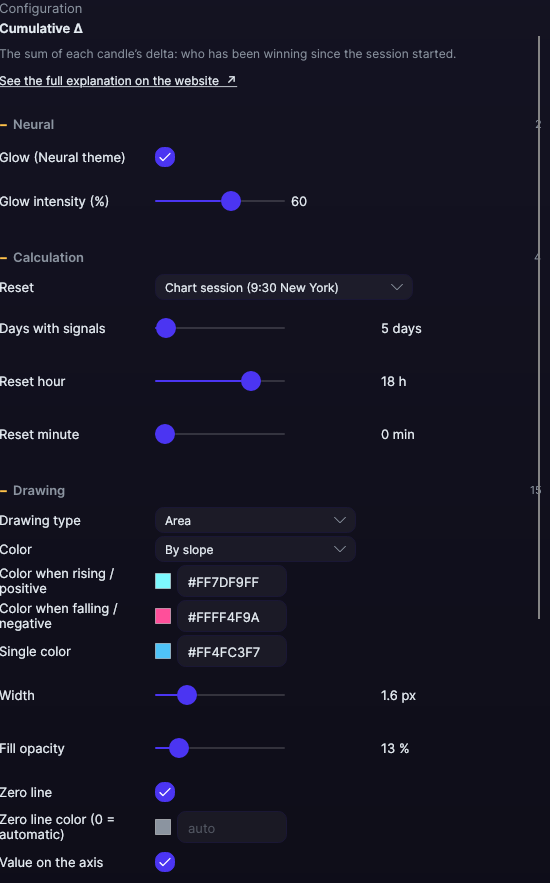
| Setting | Default | What it does |
|---|---|---|
| Calculation | ||
| Reset | Chart session (9:30 New York) | Or Trading day (18:00 New York), Week, Never or Custom time (New York). |
| Days with signals | 5 days | How many days divergences and strategies are looked for in, from 1 to 365. |
| Reset hour · Reset minute | 18 h · 0 min | Only with Custom time (New York). |
| Drawing | ||
| Drawing type | Area | Area, Line, Candles, Stepped, Histogram or Bars. Candles and bars have no wicks: from the value at the previous candle to the value at this one. |
| Color | By slope | By slope, By sign (above or below zero) or Single color. |
| Color when rising / positive · falling / negative · Single color | Ice · Pink · Light blue | The color for each case. |
| Width | 1.6 px | From 0.5 to 6 px. |
| Fill opacity | 13% | The area’s fill, from 0 to 100%. |
| Zero line · Zero line color (0 = automatic) | Yes · Automatic | The zero reference inside the strip. Automatic is dark on a light background and light on a dark background. |
| Value on the axis | Yes | The value, on the right edge of the strip. |
| Grid · Grid color (0 = automatic) · Divisions | No · Automatic · 4 | Horizontal reference lines, from 2 to 10 divisions. |
| Strip height | 118 px | From 60 to 400 px. If you drag the strip’s divider, what you drag wins. |
| The scale starts at zero | No | Keeps zero always inside the scale. |
| Divergences | ||
| Detect divergences | Yes | Turns them on and off. |
| Candles on each side of the pivot | 5 | From 2 to 20. |
| Maximum distance between pivots | 60 candles | From 5 to 300. |
| Bullish · bearish divergence color | Ice · Pink | The colors of the marks. |
| Draw the line · Line width | Yes · 1.5 px | The line between the two pivots, from 0.5 to 4 px. |
| Mark size | 4 px | The size of the dots, from 2 to 8 px. |
| Also mark on the price | No | A triangle at the price of the second pivot. |
| Strategy · Confirmation | ||
| Mark trend confirmation | No | Turns the signal on. |
| Candles for the high/low | 20 | From 5 to 200. |
| Bullish · bearish confirmation color | Cyan · Violet | The colors of the marks. |
| Strategy · Absorption | ||
| Mark absorption | No | Turns the signal on. |
| Candles for the delta average | 20 | From 5 to 200. |
| Minimum delta (times the average) | 3 × | From 1.5 to 10 ×. |
| Bullish · bearish absorption color | Amber · Orange | The colors of the marks. |
| Strategy · Zero cross | ||
| Mark the zero cross | No | Turns the signal on. |
| Upward cross color · downward cross color | Light ice · Light pink | The colors of the marks. |
| Alerts | ||
| Blink on new signals | Yes | Those from the last two candles. |
| On-screen alert · With sound · Alert color | No · No · Light blue | One alert for each new signal. |
| Alert on reaching a value · Alert value | No · 10,000 | Alerts you when cumulative delta reaches that value, from above or from below. |
| Neural | ||
| Glow (Neural theme) | Yes, when added | A halo of light in the color of each line or mark, like the one on the Neural theme candles. A newly added indicator comes with it checked; the ones you already had saved don’t. |
| Glow intensity (%) | 60% | From 0 to 100%. |
Settings belong to each chart: changing the Cumulative Δ on one chart doesn’t change it on another.