 FORGE
FORGEAverage Delta
Which side the market is on in a sustained way, without the noise of each candle.
What it measures
A candle’s delta is what was bought at market minus what was sold at market in it. Positive if aggressive buyers were in control; negative if sellers were. Volume traded without a known aggressor counts in volume, but not in delta.
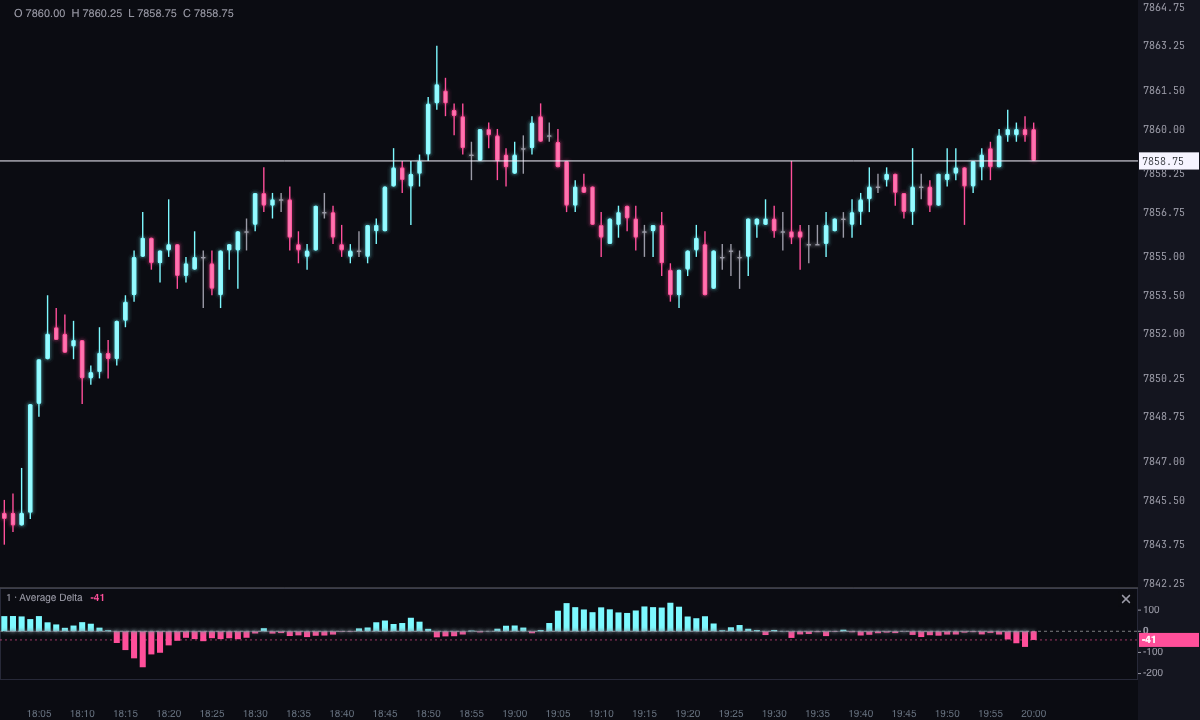
Candle by candle, delta jumps around a lot. The Average Delta is the average delta of the last candles: it shows who is in control in a sustained way, buyers or sellers, without the noise of a single candle.
By default it’s painted as a histogram, ice if the average is positive and pink if it’s negative. The color tells you which side the market is on, not whether the average is rising or falling.
It’s not cumulative delta
The names are similar, but they say different things:
| Average Delta | Cumulative delta | |
|---|---|---|
| What it does with delta | Averages it over a period | Adds it up candle after candle |
| How it moves | Oscillates around zero | Draws a trend, like a price |
| What it answers | Who is in control now, and how strongly? | Who has been in control since the start? |
How it’s calculated
With the Simple average, the default, each value is the sum of the delta of the period’s last candles divided by the period. The window moves one candle at a time.
Average Delta = (delta₁ + delta₂ + … + deltaₙ) ÷ n
With the Exponential average, recent candles weigh more and the average reacts sooner. It starts with the simple average of the first candles, and from there each new candle corrects the average by a fixed share:
average = previous average + 2 ÷ (n + 1) × (delta − previous average)
The strip stays blank until it has a full period of candles: with a period of 14, the first value appears on candle 14. An average of two or three candles is not the 14-candle average, so it isn’t painted.
How to read it
- Side: above zero, in ice, market buyers have the edge over the period; below, in pink, sellers do.
- Strength: the bar’s height is how many contracts of difference there are, on average, per candle. A tall bar is clear control; short bars around zero are a balanced market.
- Side changes: a switch from ice to pink, or the other way, marks that the side in control has changed over the period.
- Against price: compare it with what the candles are doing. Price rising while the average delta loses strength, or turns pink, says the rally has less and less aggressive buying behind it.
The value depends on the instrument and the timeframe: on a high-volume instrument or on long candles, the figures are larger. Compare it with its own history, not with another instrument’s.
Adding it to the chart
In the chart bar, Indicators ▾ › More Indicators…. You’ll find it in the Volume / Order Flow category. It’s drawn in its own strip, below the candles. How to move and adjust a strip is in Indicators.
Settings
Open them by double-clicking its strip, or with the ⚙ on its row in Indicators ▾.
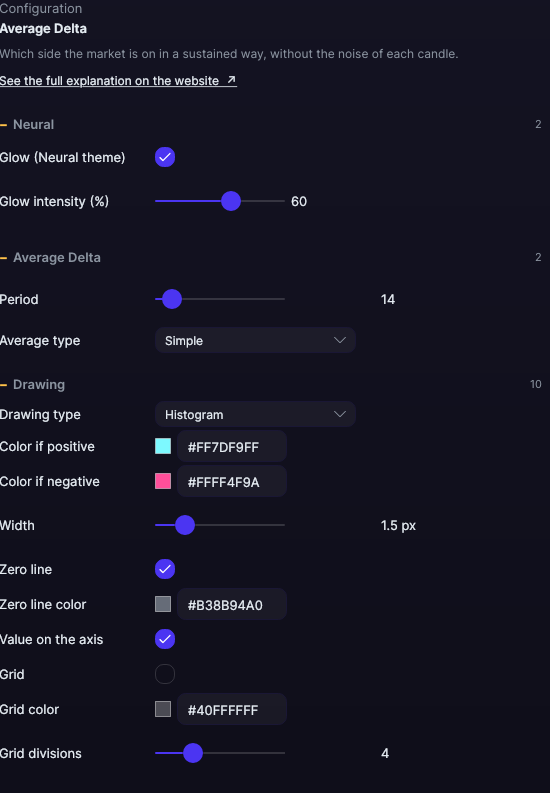
| Setting | Default | What it does |
|---|---|---|
| Average Delta | ||
| Period | 14 | How many candles go into the average, from 1 to 200. Shorter reacts sooner; longer is steadier. |
| Average type | Simple | Simple, all candles weigh the same; or Exponential, recent candles weigh more. |
| Drawing | ||
| Drawing type | Histogram | Histogram, Line, Area, Stepped or Dots. |
| Color if positive | Ice | The color when the average is above zero. |
| Color if negative | Pink | The color when the average is below zero. |
| Width | 1.5 px | From 0.5 to 6 px. |
| Zero line | Yes | The boundary between buying and selling, inside the strip. It stays visible even when everything in view is on the same side. |
| Zero line color | Gray | It reads on both the dark and the light theme. |
| Value on the axis | Yes | The value, on the right edge of the strip: that of the candle under your mouse, or of the last one. |
| Grid | No | Horizontal reference lines inside the strip. |
| Grid color | Translucent white | The color of those lines. |
| Grid divisions | 4 | How many parts the strip is divided into, from 2 to 10. |
| Neural | ||
| Glow (Neural theme) | Yes, when added | A halo of light in the color of each line or mark, like the one on the Neural theme candles. A newly added indicator comes with it checked; the ones you already had saved don’t. |
| Glow intensity (%) | 60% | From 0 to 100%. |
Settings belong to each chart: changing the Average Delta on one chart doesn’t change it on another.