 FORGE
FORGECRT (Candle Range Theory)
The three-candle pattern: one candle sweeps the previous candle’s range, closes back inside and the next one breaks out.
What it measures
The CRT looks for a three-candle pattern on 15-minute, 30-minute or 1-hour candles that the indicator builds from the chart’s. It reads best on a 1-minute chart.
The bullish one (the bearish one is the same, reversed): candle 2 sweeps the low of candle 1 and closes inside its range, without reaching its high. The entry comes when candle 3 breaks the high of candle 2. If candle 3 as a whole doesn’t break it, the pattern ends.
It’s a Pro plan indicator. It marks what has happened; it isn’t a recommendation or a buy or sell signal.
How it’s calculated
- Entry: the break of candle 2’s high plus the ticks you choose (1 by default). Or the rebreak: it breaks, pulls back at least the percentage you choose and breaks again; it needs chart candles smaller than the pattern’s.
- Target: candle 1’s high.
- Stop: where the target is worth 1.5 times the risk, adjustable from 1 to 5 R.
- Which ones are traded: candle 3 has to fall inside a time window; the first pattern that forms is traded (if they tie, the one with the larger candle) and only that one until it exits, with a cap on trades per window (1 by default). Mondays can be skipped.
- If the target and the stop are both reached within one candle, there’s no way to know which came first: by default the order that platforms assume is used; it can also count as a loss or not count.
How to read it
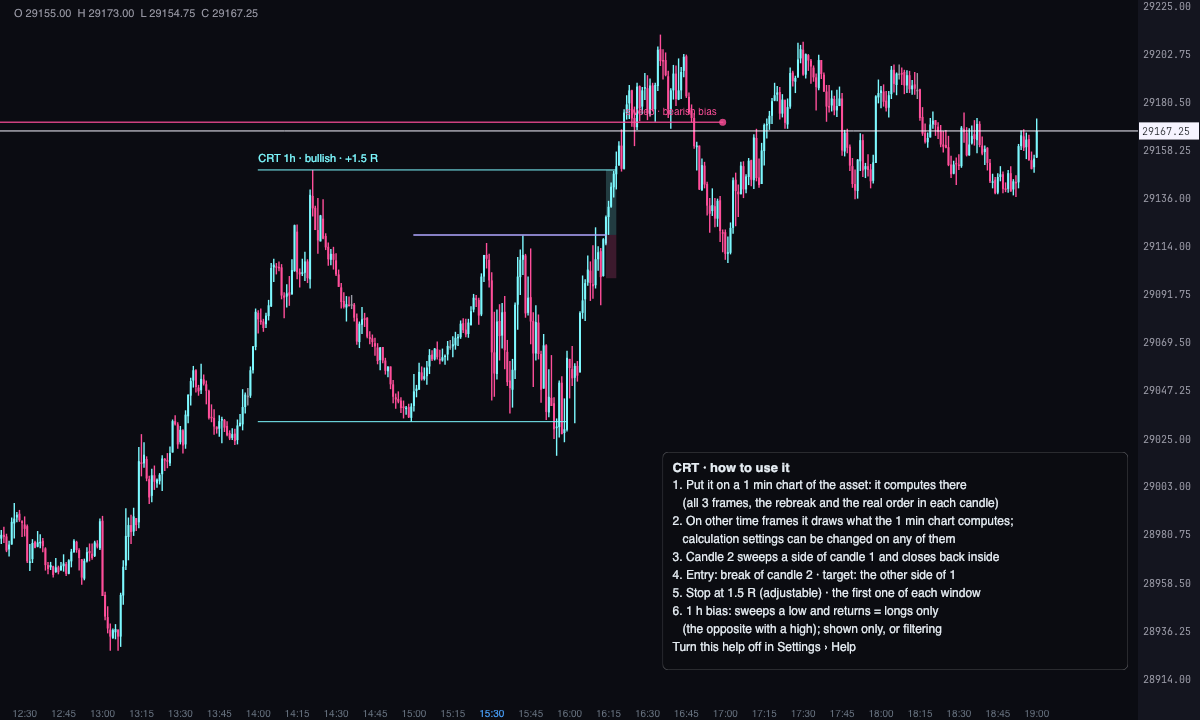
- Candle 1’s range frames the pattern; the entry line, in violet, marks the break.
- Each trade has its target box and its stop box, and a text with its result in R.
- With the higher time frame bias, on 1-hour (or 4-hour) candles, sweeping an extreme low and coming back inside makes the bias bullish; sweeping a high, bearish. A level is valid for 10 days by default. By default it’s only shown and marks “against the bias”; it can also be not used or filter the entries.
- A results panel in a corner summarizes the trades of the loaded period.
Which chart to put it on
Put it on a 1-minute chart of the asset: everything is computed there. That covers all three timeframes, the rebreak and the real order of what happens inside each candle. The rebreak happens within minutes, inside candle 3, and only shows with 1-minute candles.
On a chart of another time frame of the same asset, the CRT draws what the 1-minute chart computes, each thing on the candle that contains its time. It does so through the setting “On other time frames, draw what the 1 min chart computes”, under Pattern, on by default.
- Calculation settings can be changed on any chart of the asset. These are the timeframes, entry, stop, windows, bias and the rest of Pattern, Entry and exit, When and Higher time frame bias. The last chart where you change them rules on all of them, and the others show them set in their settings window. A newly opened chart takes the latest change.
- Drawing settings belong to each chart: colours, widths, text, panel, help and “Show the ones not traded”.
- You get patterns for the days the 1-minute chart has loaded.
- With no 1-minute chart open, or if it falls behind, the CRT computes with its own chart’s candles. A timeframe smaller than those candles doesn’t appear then: a 30-minute chart has no 15-minute CRT. There’s no rebreak either. The panel says so: “Rebreak and all 3 frames: open a 1 min chart with the CRT”.
The panel always says where what you see comes from. It shows “Source for the other charts of this asset” on the 1-minute chart and “Computed on the 1 min chart” on the others. “Calculation settings: those of the … chart” tells you which chart the settings come from. After a change made on another chart, the 1-minute chart picks it up within seconds; meanwhile the panel shows “Waiting for the 1 min chart with the new settings”.
A help box inside the indicator, bottom left, sums it up on the chart itself. Turn it off under Help › “Show how to use it”.
Built-in strategies
What the indicator already has inside and can mark for you on the chart. They show what has happened; they are not recommendations.
CRT pattern
On by default- What it marks
- Candle 1’s range on each armed pattern, with where the entry, the target and the stop would go; the entry and the exit of each trade, with target and stop boxes and its result in R.
- Alert
- If you turn it on: an alert when the pattern is armed (candle 2 closes), on entry and on reaching the target or the stop, with optional sound.
- Turned on with
- «15-minute candles», «30-minute candles», «1-hour candles», «Bullish» and «Bearish», in Pattern; the alerts, in Alerts.
Higher time frame bias
On by default- What it marks
- The sweeps of the extremes on 1-hour (or 4-hour) candles and, on each pattern, whether it goes «against the bias».
- Alert
- It doesn’t alert: you see it on the chart.
- Turned on with
- «Bias», in Higher time frame bias: «Shown only» by default; «Filters the entries» leaves only the ones that go with the bias.
Adding it to the chart
In the chart bar, Indicators ▾ › More Indicators…. You’ll find it in the ICT category. How to add and adjust an indicator is in Indicators.
Settings
Open them with the ⚙ on its row in Indicators ▾. All times are New York time.
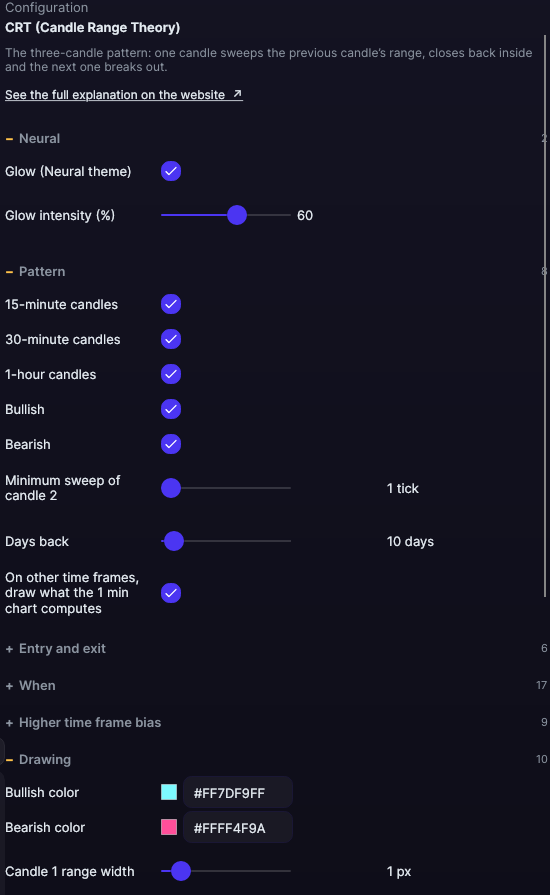
| Setting | Default | What it does |
|---|---|---|
| Pattern | ||
| 15-minute candles · 30-minute candles · 1-hour candles | Yes | Which candles the pattern is looked for on. |
| Bullish · Bearish | Yes | Which direction is looked for. |
| Minimum sweep of candle 2 | 1 tick | How far candle 2 has to go past candle 1’s extreme, from 1 to 50 ticks. |
| Days back | 10 days | How many days are analyzed, from 1 to 365. |
| On other time frames, draw what the 1 min chart computes | Yes | The asset’s other charts draw what the 1-minute chart computes. |
| Entry and exit | ||
| Entry | Direct breakout | Or Rebreak (breaks, pulls back and breaks again). |
| Ticks beyond candle 2 to enter | 1 tick | From 0 to 20 ticks. |
| Minimum pullback for the rebreak | 25% | From 5 to 100%. |
| Target / risk | 1.5 R | Where the stop goes: the target is worth this many times the risk, from 1 to 5 R. |
| If the order within a candle is unknown | The usual platform assumption | Or Counts as a loss or Not counted (unclear). |
| Minimum distance from entry to target | 0 ticks | Discards patterns with little room to run, from 0 to 400 ticks. |
| When | ||
| New York window | Yes, from 9:30 to 12:00 | With its start and end hours and minutes. |
| Asia window | Yes, from 20:00 to 22:00 | Same, in New York time. |
| Third window | No (from 3:00 to 5:00) | One more window, with its hours. |
| Trades per window | 1 | From 1 to 5. |
| Skip Mondays | No | Mondays aren’t traded. |
| Higher time frame bias | ||
| Bias | Shown only | Or Not used or Filters the entries. |
| Bias candles | 1 hour | Or 4 hours. |
| Candles on each side of an extreme | 5 candles | To call a high or a low an extreme, from 1 to 20. |
| Candles closing outside to count it as broken | 2 candles | From 1 to 6. |
| Maximum age of a level | 10 days | From 1 to 30 days. |
| Draw the sweeps | Yes | Paints the bias sweeps. |
| Bullish sweep color · Bearish sweep color | Ice · Pink | The colors of the sweeps. |
| Level line width | 1.5 px | From 0.5 to 6 px. |
| Drawing | ||
| Bullish color · Bearish color | Ice · Pink | Candle 1’s range by direction. |
| Candle 1 range width | 1 px | From 0.5 to 6 px. |
| Entry color · Entry width | Violet · 1.5 px | The entry line. |
| Target fill · Stop fill · Stop color | Ice · Pink · Pink | The boxes of each trade. |
| Show the ones not traded | No | Also paints the discarded patterns. |
| Opacity of the ones not traded | 35% | From 10 to 100%. |
| Text | ||
| Write the text of each pattern | Yes | The text with the direction and the result in R. |
| Font size | 11 px | From 6 to 30 px. |
| Text color (0 = its direction’s) | Its direction’s | A fixed color for the text. |
| Results panel | ||
| Show the panel | Yes | The summary of the trades of the loaded period. |
| Corner | Top left | The four corners. |
| Font size | 12 px | From 8 to 24 px. |
| Background color · Border color · Text color | Dark background · Translucent white · White | The colors of the panel. |
| Alerts | ||
| When armed (candle 2 closes) · When entering · When reaching the target or the stop | No | One alert at each moment. |
| With sound | No | The alerts, with sound. |
| Help | ||
| Show how to use it | Yes | The box explaining how to use the CRT. |
| Help corner | Bottom left | The four corners. |
| Neural | ||
| Glow (Neural theme) | Yes, when added | A halo of light in the color of each line or mark, like the one on the Neural theme candles. A newly added indicator comes with it checked; the ones you already had saved don’t. |
| Glow intensity (%) | 60% | From 0 to 100%. |
Calculation settings belong to the asset: changed on any chart, they apply to every chart of the same asset. Drawing settings belong to each chart.