 FORGE
FORGEStacked Imbalance
Several consecutive levels where one side overwhelms the opposite one, left as lines extending forward.
What it measures
An imbalance is a price level where one side of the market traded much more than the opposite level: the buys at one price against the sells at the price above, or the other way around. When several consecutive levels show an imbalance in the same direction, that’s a stacked imbalance.
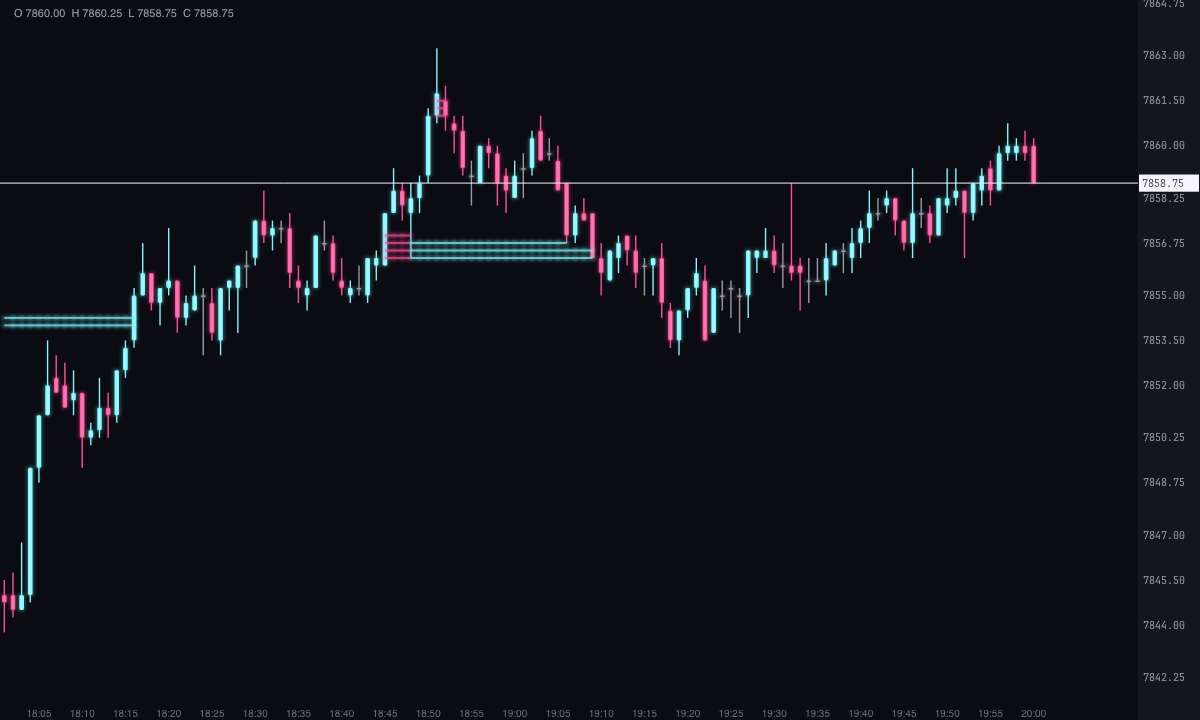
This indicator looks for them inside each candle and marks the price of every matching level with a line to the right. It doesn’t draw cells or clusters: only the lines over the price.
How it’s calculated
Inside each candle, Forge compares the volume of each level with that of the adjacent level, diagonally:
- Buy imbalance: the buys (ask) at one level against the sells (bid) at the level above.
- Sell imbalance: the sells (bid) at one level against the buys (ask) at the level below.
there is an imbalance if own side ≥ ratio ÷ 100 × opposite side
The ratio is a percentage: 300 % means one side is three times the opposite one. In addition, the level must add up to at least the imbalance volume you set. When as many consecutive levels as the imbalance range specifies (3 by default) chain together, it counts as stacked and each of those levels leaves its line, not just one per group.
If the opposite side is zero, Forge takes it as 1 and almost any volume comes out as an imbalance. With Ignore zero values on, if there is nothing opposite there is no imbalance.
How to read it
- Ice line: a stacked buy imbalance, at the level’s price.
- Pink line: a stacked sell imbalance.
- Until touched: by default, the line continues to the right until the candle whose range contains that price, where it’s cut off. A line that reaches the right edge is a level that price hasn’t touched again yet.
- With a fixed duration: without Line until touched, each line lasts the number of candles you specify (the origin candle plus that many more), whether or not price touches it.
The lines mark what happened on the chart: where one side dominated several consecutive levels. They are not recommendations.
Built-in strategies
What the indicator already has inside and can mark for you on the chart. They show what has happened; they are not recommendations.
Stacked imbalances
On by default- What it marks
- A horizontal line at the price of each level that is part of a group of consecutive imbalances: green if it’s a buy imbalance, red if it’s a sell imbalance. It lasts until price touches it again, or for the number of candles you choose.
- Alert
- It doesn’t alert: you see it on the chart.
- Turned on with
- Always on; what counts as stacked is set with «Imbalance ratio (%)», «Imbalance range» and «Imbalance volume», in Settings.
Adding it to the chart
In the chart bar, Indicators ▾ › More Indicators…. You’ll find it in the Volume / Order Flow category. It’s drawn over the price, on the chart’s own candles. How to add and adjust an indicator is in Indicators.
Settings
Open them with the ⚙ on its row in Indicators ▾. Each section collapses and expands on its own.
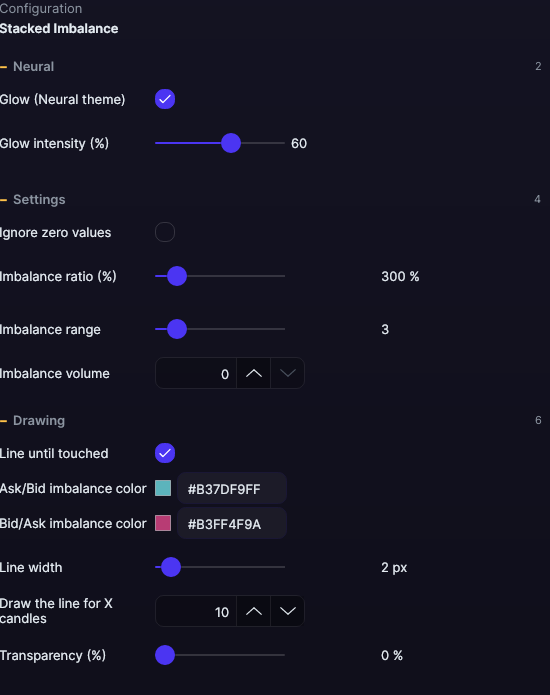
| Setting | Default | What it does |
|---|---|---|
| Settings | ||
| Ignore zero values | No | With no volume on the opposite side, there is no imbalance. |
| Imbalance ratio (%) | 300 % | How many times one side must exceed the opposite one, as a percentage. From 100 to 2,000, in steps of 10. |
| Imbalance range | 3 | Consecutive levels needed for it to count as stacked. From 1 to 20. |
| Imbalance volume | 0 | Minimum volume of the level. No upper limit. |
| Drawing | ||
| Line until touched | Yes | The line continues until a later candle touches its price; otherwise, to the end of the chart. |
| Ask/Bid imbalance color | Ice | The color of the buy lines. |
| Bid/Ask imbalance color | Pink | The color of the sell lines. |
| Line width | 2 px | From 1 to 20 px. |
| Draw the line for X candles | 10 | How long each line lasts with Line until touched off: the origin candle plus that many more. From 1 to 500. |
| Transparency (%) | 0 % | From 0 (the color as is) to 100 (invisible). It’s applied on top of the transparency the color already has. |
| Neural | ||
| Glow (Neural theme) | Yes, when added | A halo of light in the color of each line or mark, like the one on the Neural theme candles. A newly added indicator comes with it checked; the ones you already had saved don’t. |
| Glow intensity (%) | 60% | From 0 to 100%. |
Settings belong to each chart: changing the Stacked Imbalance on one chart doesn’t change it on another.