 FORGE
FORGESilver Bullet
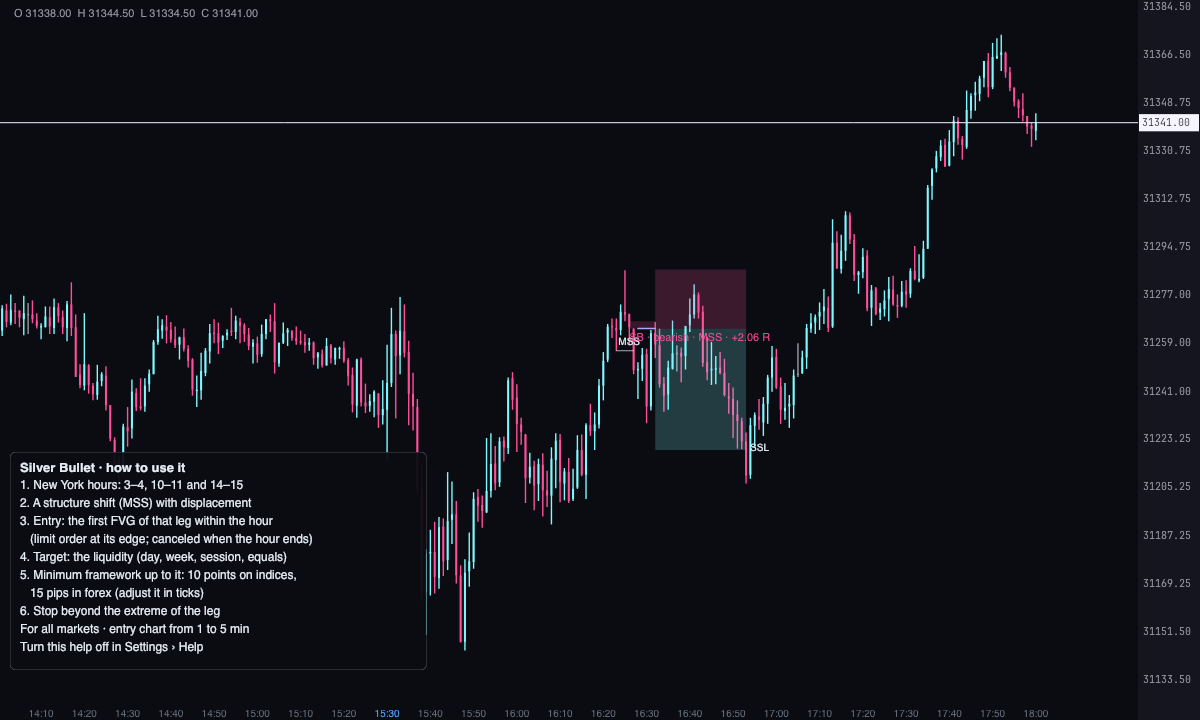
Inside one of ICT’s three hours, a structure shift leaves an FVG and the limit order waits on it, heading for the liquidity.
What it measures
ICT’s Silver Bullet is traded in one of three New York hours: 3:00 to 4:00 (London), 10:00 to 11:00 (AM) and 14:00 to 15:00 (PM). First you look at where price is heading, the liquidity ahead of it. Then you wait for a market structure shift (MSS) with displacement and the FVG it leaves, and the limit order waits on that FVG.
The indicator marks every FVG that follows an MSS inside the hour, with its entry, its stop and its target on the liquidity. It works on every market.
It’s a Pro plan indicator. It marks what has happened; it isn’t a recommendation or a buy or sell signal.
How it’s calculated
- Hours: the order is placed inside a window, in New York time. By default, ICT’s three: “Window 1”, from 10:00 to 11:00; “Window 2”, from 14:00 to 15:00; “Window 3”, from 3:00 to 4:00. The hour is decided by the FVG’s third candle. With “Only inside the windows” off, any hour counts.
- The pattern: an FVG that falls inside the displacement of a break — its middle candle, between the extreme the leg starts from and the candle that breaks — and that, by default, is a market structure shift (MSS) (“Require a structure shift (MSS) before the FVG”). With it off, a BOS counts too, and even an FVG with no break. Highs and lows are three-candle ones.
- Prior sweep: optional. With “Require a sweep before the FVG”, the FVG only counts if a low (for the bullish) or a high (for the bearish) was taken in the previous 30 candles (“Candles to look for the sweep in”).
- Entry: a limit order at the FVG’s edge (“At the edge of the zone” by default; also “At the midpoint (CE)” or “At the other edge of the zone”, under Entry and exit › “Entry”). It’s placed when the FVG’s third candle and the breaking candle have closed. The first one that forms inside the hour is the one traded.
- Stop: beyond the extreme of the leg, where the displacement starts, plus 1 tick (“Stop ticks beyond its level”). With “Stop” you can put it “Beyond candle 1 of the FVG”.
- Target: the nearest reference liquidity on the other side of the entry that hasn’t been taken yet: the previous day’s high and low (PDH, PDL) and the previous week’s (PWH, PWL), the highs and lows of the Asia, London, NY AM and NY PM sessions, equal highs and lows (EQH, EQL) and the 15-minute ones; also the chart’s own highs and lows (BSL, SSL), which only count as a target. You choose them under Liquidity. With no liquidity in sight, it isn’t traded. With “Target” set to “Fixed R”, the target is worth 2 R by default. The liquidity has to be at least 20 ticks (5 points on indices) from the entry (“Target no closer than”): the nearest one that offers it is chosen.
- Minimum range: from the extreme of the leg to the liquidity there have to be at least 40 ticks, 10 points on indices (“Minimum framework up to the liquidity (ICT: 40 ticks = 10 points on indices)”). If it doesn’t offer them, it isn’t traded (“short framework”). Set to 0 it’s off.
- Which ones are traded: one at a time. While an order is placed or a trade is open, the others are discarded (“another in play”), and at most 1 is traded per window (from 1 to 5 under “Trades per window”). Mondays can be skipped with “Skip Mondays”.
- What cancels the order: the limit order waits at most 30 candles (“Candles the order stays open”); it’s cancelled when its window ends (with “Cancel the order when the window ends”, on by default) and it’s lost if price reaches the target without having entered (“ran off, no entry”). If the trade has already entered, it stays open after the hour ends.
- What is discarded: a stop less than 4 ticks from the entry (“Minimum risk”; “stop too close”) and whatever falls outside the windows (“out of hours”). “Minimum R to trade” is 0: no filter.
- If the target and the stop are both reached within one candle, there’s no way to know which came first: by default the order that platforms assume is used (“If the order within a candle is unknown”); it can also count as a loss or not count.
- Time frame: the pattern comes from the chart’s candles or, with “Time frame of the pattern”, from larger candles built from them. The order is always simulated with the chart’s candles, and 10 days are analyzed (“Days back”).
How to read it
- The break that originates the displacement shows as a light grey line with its name, “MSS” or “BOS”.
- The FVG is filled ice if bullish and pink if bearish, and the entry line starts from it.
- When price enters, the target box (ice) and the stop box (pink) appear; while the order waits, the target and the stop are dashed lines. Bullish ones are ice, bearish ones pink.
- The text on each setup says “SB”, the direction, “MSS” or “BOS” and its state: “order placed”, “in progress”, the result in R, “not filled” or “ran off, no entry”. Turn it off with “Write the text of each setup”.
- With “Show the ones not traded” the discarded ones appear too, fainter and with the reason (“out of hours”, “another in play”…).
- A results panel in a corner summarizes the trades of the loaded period. A help box inside the indicator, bottom left, sums it up on the chart itself; turn it off under Help › “Show how to use it”.
Which chart to put it on
Put it on a 1 to 5 minute entry chart: the Silver Bullet is traded within one hour and the FVG is looked for with the chart’s candles. For the 3:00 to 4:00 hour you need a chart with electronic trading hours (ETH).
It works on every market. The minimum range is in ticks: 40 ticks are 10 points on indices; on forex ICT talks about 15 pips, and you adjust it in that same setting.
Built-in strategies
What the indicator already has inside and can mark for you on the chart. They show what has happened; they are not recommendations.
Silver Bullet
On by default- What it marks
- The FVG of each setup with the break that originates it (MSS or BOS), the entry line and where the target and the stop would go; the entry and the exit of each trade, with target and stop boxes and its result in R.
- Alert
- If you turn them on: an alert when the order is placed, on entry and on reaching the target or the stop, with optional sound.
- Turned on with
- “Bullish” and “Bearish”, in Pattern; the alerts, in Alerts.
Prior sweep
Off by default- What it marks
- Only the FVGs that come after a low (the bullish ones) or a high (the bearish ones) was taken in the previous candles.
- Alert
- The same alerts as the main strategy.
- Turned on with
- “Require a sweep before the FVG” and “Candles to look for the sweep in”, in Pattern.
Discarded setups
Off by default- What it marks
- The setups that aren’t traded, fainter and with the reason: “short framework”, “out of hours”, “another in play”…
- Alert
- It doesn’t alert: you see it on the chart.
- Turned on with
- “Show the ones not traded” and “Opacity of the ones not traded”, in Drawing.
Adding it to the chart
In the chart bar, Indicators ▾ › More Indicators…. You’ll find it in the ICT category. It’s a Pro plan indicator. How to add and adjust an indicator is in Indicators.
Settings
Open them with the ⚙ on its row in Indicators ▾. All times are New York time.
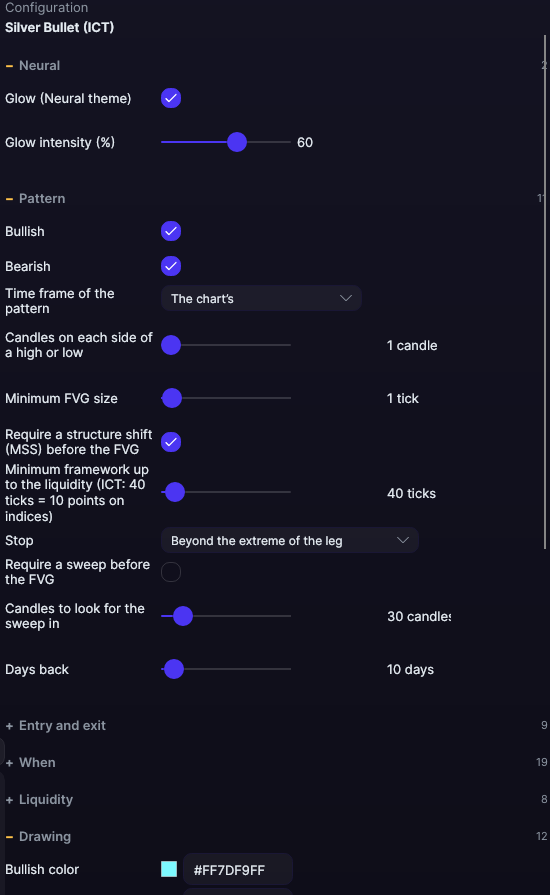
| Setting | Default | Range |
|---|---|---|
| Pattern | ||
| Bullish | Yes | |
| Bearish | Yes | |
| Time frame of the pattern | The chart’s | The chart’s · 5 minutes · 15 minutes · 30 minutes · 1 hour · 4 hours · Daily (trading day) |
| Candles on each side of a high or low | 1 candles | 1 to 10 |
| Minimum FVG size | 1 ticks | 0 to 200 |
| Require a structure shift (MSS) before the FVG | Yes | |
| Minimum framework up to the liquidity (ICT: 40 ticks = 10 points on indices) | 40 ticks | 0 to 1000 |
| Stop | Beyond the extreme of the leg | Beyond candle 1 of the FVG · Beyond the extreme of the leg |
| Require a sweep before the FVG | No | |
| Candles to look for the sweep in | 30 candles | 5 to 240 |
| Days back | 10 days | 1 to 365 |
| Entry and exit | ||
| Entry | At the edge of the zone | At the edge of the zone · At the midpoint (CE) · At the other edge of the zone |
| Stop ticks beyond its level | 1 ticks | 0 to 40 |
| Target | The reference liquidity (day, week, sessions, equals, highs and lows) | The reference liquidity (day, week, sessions, equals, highs and lows) · Fixed R |
| Target / risk (with fixed R) | 2 R | 1 to 10 |
| Minimum R to trade | 0 R | 0 to 5 |
| Minimum risk | 4 ticks | 1 to 400 |
| Candles the order stays open | 30 candles | 1 to 500 |
| If the order within a candle is unknown | The usual platform assumption (opens near the high: high first) | The usual platform assumption (opens near the high: high first) · Counts as a loss · Not counted (unclear) |
| Target no closer than | 20 ticks | 0 to 400 |
| When | ||
| Only inside the windows | Yes | |
| Window 1 | Yes | |
| Window 1: from (hour) | 10 | 0 to 23 |
| Window 1: from (minute) | 0 | 0 to 55 |
| Window 1: until (hour) | 11 | 0 to 23 |
| Window 1: until (minute) | 0 | 0 to 55 |
| Window 2 | Yes | |
| Window 2: from (hour) | 14 | 0 to 23 |
| Window 2: from (minute) | 0 | 0 to 55 |
| Window 2: until (hour) | 15 | 0 to 23 |
| Window 2: until (minute) | 0 | 0 to 55 |
| Window 3 | Yes | |
| Window 3: from (hour) | 3 | 0 to 23 |
| Window 3: from (minute) | 0 | 0 to 55 |
| Window 3: until (hour) | 4 | 0 to 23 |
| Window 3: until (minute) | 0 | 0 to 55 |
| Trades per window | 1 | 1 to 5 |
| Cancel the order when the window ends | Yes | |
| Skip Mondays | No | |
| Liquidity | ||
| Chart highs and lows (for the target) | Yes | |
| Time frame of the highs and lows | 15 minutes | The chart’s · 5 minutes · 15 minutes · 30 minutes · 1 hour · 4 hours · Daily (trading day) |
| Highs and lows of that time frame | Yes | |
| Equal highs and lows | Yes | |
| Maximum difference to count as equal | 2 ticks | 0 to 20 |
| Previous day’s high and low | Yes | |
| Previous week’s high and low | Yes | |
| Highs and lows of the sessions (Asia, London, New York) | Yes | |
| Drawing | ||
| Bullish color | #7DF9FF | |
| Bearish color | #FF4F9A | |
| Bullish entry zone fill | 7.80008e+08 | |
| Bearish entry zone fill | 7.88484e+08 | |
| Entry color | #B0A6FF | |
| Entry width | 1.5 px | 0.5 to 6 |
| Target fill | 8.63894e+08 | |
| Stop fill | 8.7237e+08 | |
| Stop color | #FF4F9A | |
| Pattern level color | #E6EDF3 | |
| Show the ones not traded | No | |
| Opacity of the ones not traded | 35 % | 10 to 100 |
| Text | ||
| Write the text of each setup | Yes | |
| Font size | 11 px | 6 to 30 |
| Text color (0 = its direction’s) | #000000 | |
| Results panel | ||
| Show the panel | Yes | |
| Corner | Top left | Top left · Top right · Bottom left · Bottom right |
| Font size | 12 px | 8 to 24 |
| Background color | 4.02726e+09 | |
| Border color | 1.09052e+09 | |
| Text color | 4.29332e+09 | |
| Alerts | ||
| When the order is placed | No | |
| When entering | No | |
| When reaching the target or the stop | No | |
| With sound | No | |
| Help | ||
| Show how to use it | Yes | |
| Help corner | Bottom left | Top left · Top right · Bottom left · Bottom right |
| Neural | ||
| Glow (Neural theme) | Yes, when added | |
| Glow intensity (%) | 60% | 0 to 100 |