 FORGE
FORGEPremium & Discount
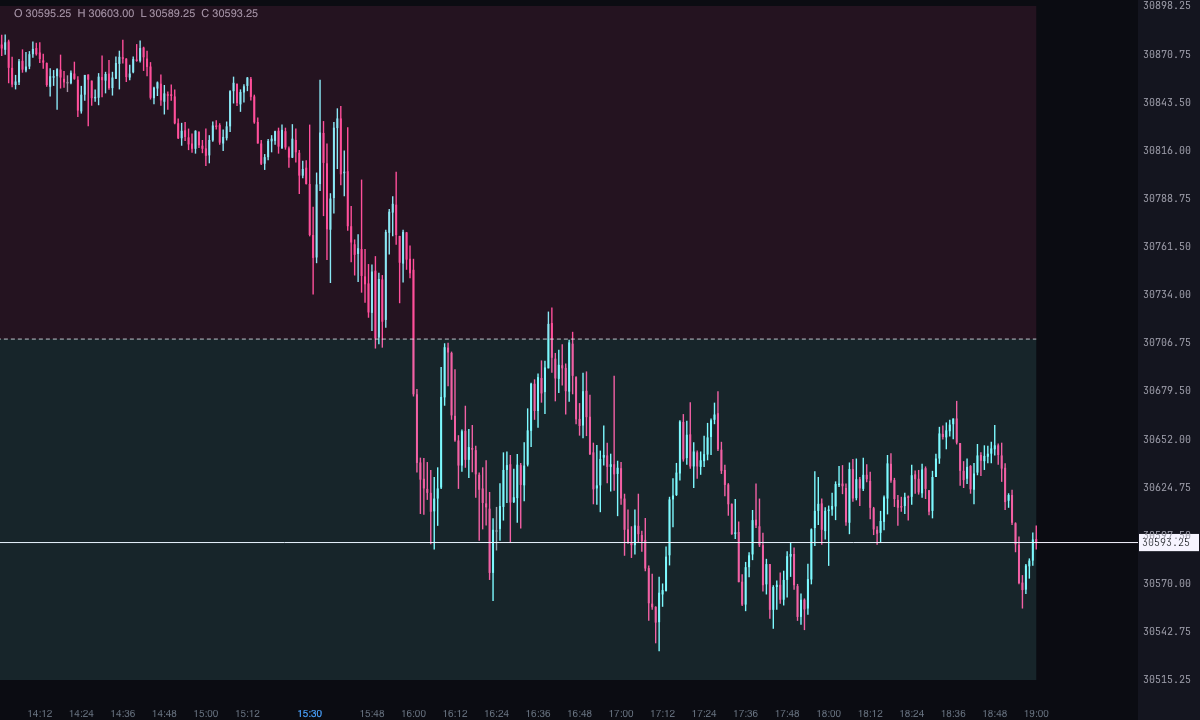
The dealing range split in half: above, what is dear (premium); below, what is cheap (discount).
What it measures
For ICT, a price move is a dealing range between a high and a low. Split in half, the equilibrium (50 %) leaves the expensive zone above, the premium, where ICT looks to sell; and the cheap zone below, the discount, where it looks to buy.
Besides the two halves, the indicator can mark the OTE band (optimal trade entry, 62 to 79 %) on each side and the range’s standard deviation projections, which ICT uses as targets.
It’s a Pro plan indicator. It marks what has happened; it isn’t a recommendation or a buy or sell signal.
How it’s calculated
- The range: “Dealing range” has three options. “The last confirmed high and low” (the default), “The previous day” and “The previous week”.
- With highs and lows: a high is higher than each of the candles before it and none of the candles after it exceeds it; a low is the reverse. “Candles on each side of a high or low” sets how many candles on each side: 10 by default, from 1 to 20. They are confirmed when the last of the candles after them closes. Each time a new one is confirmed, the range becomes that of the last low and the last high (both are needed, with the high above the low). It holds from the candle after the one that confirms the more recent of the two.
- When it stops holding: as soon as a candle closes beyond its high or its low (a wick isn’t enough), or when the next range begins. After a break there’s no range until another extreme is confirmed. If it was already broken when it became known, it isn’t drawn.
- With the previous day or week: the high and low of the previous trading day (from 6:00 pm to 5:00 pm New York time), or of the previous week (it starts on Monday), across the whole current day or week.
- Time frame: “Time frame of the highs and lows” (by default, “The chart’s”) only matters with confirmed highs and lows. With a higher one, the chart’s candles are grouped into New York time blocks and each extreme is drawn on the chart candle where it happened. A candle still forming decides nothing.
- Premium and discount: the premium is what lies above 50 % of the range; the discount, below.
- OTE bands: from 62 to 79 %. The buy one is measured from the high downwards, so it falls in the discount; the sell one, from the low upwards, and it falls in the premium. They come off.
- Projections: 1, 2, 2.5 and 4 times the size of the range, added to the high and subtracted from the low. They come off.
- How many ranges: by default, only the current one. If the last one is already broken, nothing is shown until another is born. With “Show the previous ranges”, the previous ones from the last “Days back” too (3 by default).
- Nothing repaints: a range only exists from the candle where it becomes known, and no later candle changes its high or its low.
How to read it
- The premium is a soft pink fill between 50 % and the range high; the discount, one in ice between the range low and 50 %. The boxes run from the candle where the range becomes known to the candle where it stops holding.
- The equilibrium is a light grey dashed line with the text “equilibrium”.
- The range high and low are two grey lines starting at the candle where they happened, with the texts “range high” and “range low”.
- The OTE bands, if you turn them on, are two violet boxes with the texts “OTE buy” and “OTE sell”.
- The projections, if you turn them on, are dashed orange lines with the texts +1, +2, +2.5 and +4 above and −1, −2, −2.5 and −4 below.
- With “Write the price”, each text also carries its price.
Which chart to put it on
With “The last confirmed high and low”, the range comes from the candles you see: a slower chart gives bigger ranges. To see the range of a higher time frame without changing charts, pick a higher time frame in “Time frame of the highs and lows”, or use “The previous day” or “The previous week”, which hold on any time frame.
Built-in strategies
What the indicator already has inside and can mark for you on the chart. They show what has happened; they are not recommendations.
Premium and discount
On by default- What it marks
- The range between its high and its low, with the premium (above 50 %) filled in pink and the discount (below) in ice.
- Alert
- It doesn’t alert: you see it on the chart.
- Turned on with
- “Premium (above equilibrium)” and “Discount (below equilibrium)”, in Zones; where the range comes from, “Dealing range”, in Range.
Equilibrium (50 %)
On by default- What it marks
- A dashed line at the middle of the range.
- Alert
- If you turn it on: an alert when price crosses the equilibrium, with optional sound.
- Turned on with
- “Equilibrium (50 %)”, in Zones; the alert, “When price crosses the equilibrium”, in Alerts.
OTE bands (62–79 %)
Off by default- What it marks
- Two bands: the buy one, from 62 to 79 % measured from the high downwards, and the sell one, measured from the low upwards.
- Alert
- It doesn’t alert: you see it on the chart.
- Turned on with
- “OTE bands (62–79 %) on each side”, in Zones.
Standard deviation projections
Off by default- What it marks
- Dashed lines at 1, 2, 2.5 and 4 times the size of the range, above the high and below the low.
- Alert
- It doesn’t alert: you see it on the chart.
- Turned on with
- “Standard deviation projections”, and “1 time the range”, “2 times”, “2.5 times” and “4 times”, in Projections.
Adding it to the chart
In the chart bar, Indicators ▾ › More Indicators…. You’ll find it in the ICT category. It’s a Pro plan indicator. How to add and adjust an indicator is in Indicators.
Settings
Open them with the ⚙ on its row in Indicators ▾. All times are New York time.
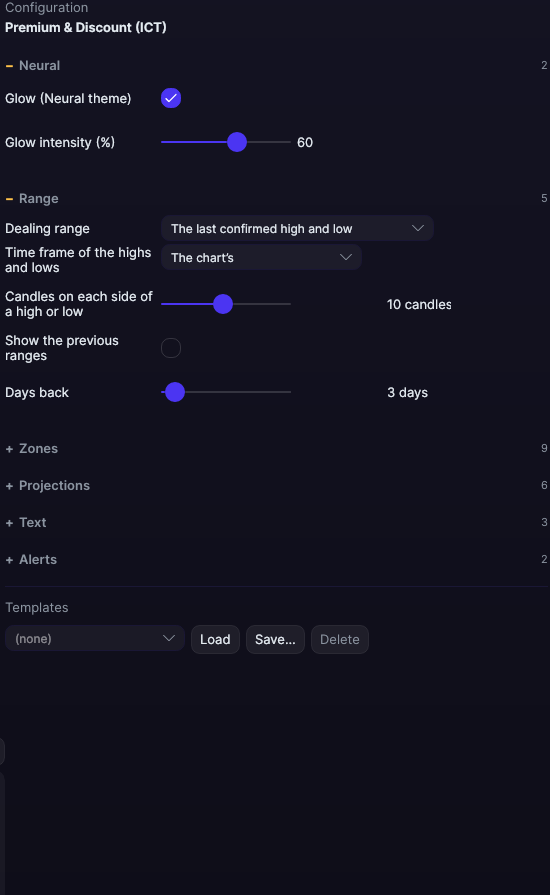
| Setting | Default | Range |
|---|---|---|
| Range | ||
| Dealing range | The last confirmed high and low | The last confirmed high and low · The previous day · The previous week |
| Time frame of the highs and lows | The chart’s | The chart’s · 5 minutes · 15 minutes · 30 minutes · 1 hour · 4 hours · Daily (trading day) |
| Candles on each side of a high or low | 10 candles | 1 to 20 |
| Show the previous ranges | No | |
| Days back | 3 days | 1 to 60 |
| Zones | ||
| Premium (above equilibrium) | Yes | |
| Discount (below equilibrium) | Yes | |
| Equilibrium (50 %) | Yes | |
| OTE bands (62–79 %) on each side | No | |
| Premium fill | #FF4F9A | |
| Discount fill | #7DF9FF | |
| Equilibrium color | #E6EDF3 | |
| OTE bands fill | #B0A6FF | |
| Range high and low color | #E6EDF3 | |
| Projections | ||
| Standard deviation projections | No | |
| 1 time the range | Yes | |
| 2 times | Yes | |
| 2.5 times | Yes | |
| 4 times | Yes | |
| Projections color | #FFB86B | |
| Text | ||
| Write the name of each level | Yes | |
| Font size | 10 px | 6 to 30 |
| Write the price | No | |
| Alerts | ||
| When price crosses the equilibrium | No | |
| With sound | No | |
| Neural | ||
| Glow (Neural theme) | Yes, when added | |
| Glow intensity (%) | 60% | 0 to 100 |