 FORGE
FORGEParabolic SAR
A stop that follows price and flips when the trend changes.
What it is
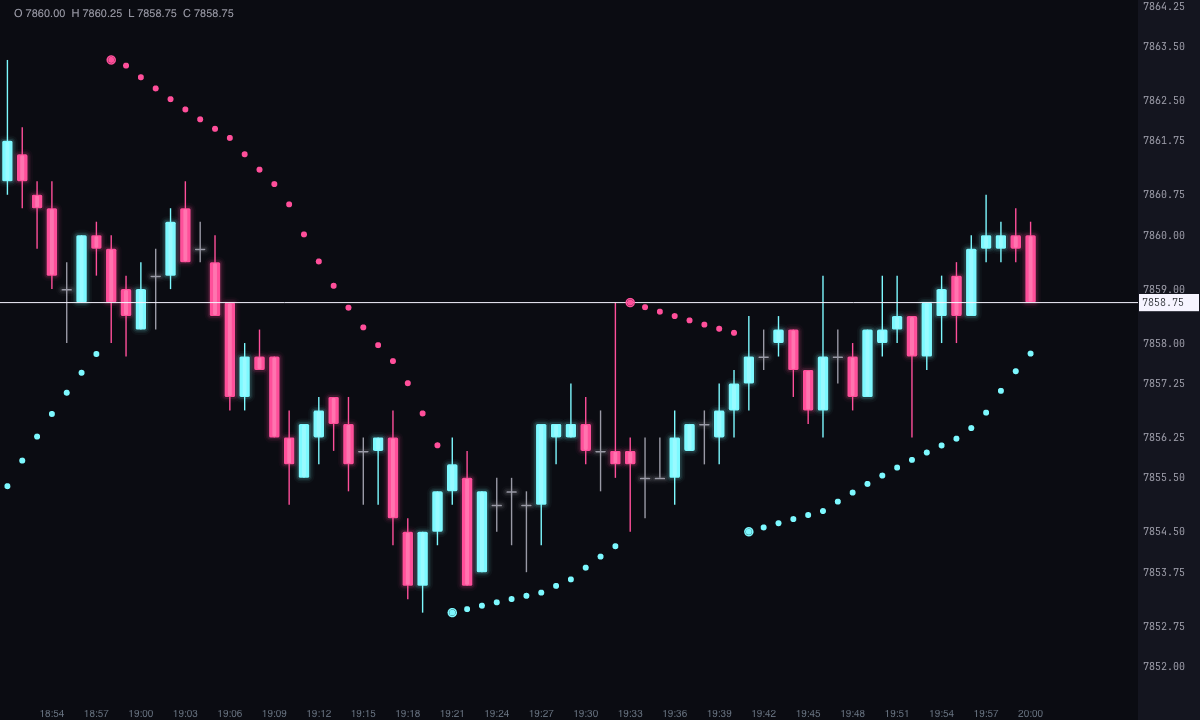
The Parabolic SAR (stop and reverse) is a line that runs below price while the trend is up and above it while the trend is down. It moves closer to price candle by candle, faster and faster, and when price crosses it, it flips: it jumps to the other side and a new trend begins.
That’s why it’s used as a stop that follows price (trailing stop) and to see where the trend changes.
How it’s calculated
On each candle, the SAR moves toward the trend’s extreme (the highest high in an uptrend, the lowest low in a downtrend) by a fraction of the distance between them. That fraction, the acceleration, starts at 0.02 and rises by 0.02 each time price makes a new extreme, up to 0.2.
SAR = previous SAR + acceleration × (extreme − previous SAR)
You can change all three values, apply Wilder’s rule (the SAR never moves into the range of the two previous candles) and have it reverse only on the close, not on the wick. Both are off by default, so the SAR is the classic one.
How to read it
- Below price: uptrend; the SAR is the level where it would flip.
- Above price: downtrend.
- The reversal: when price crosses the SAR, it switches sides. In sideways markets it reverses often.
How it’s drawn
By default it’s drawn as Dots and By trend: ice with the SAR below price (uptrend) and pink above it (downtrend), with a ring at each reversal. With Shape you can also choose Joined line, Broken line (without the vertical segment at each reversal) or Crosses, and with Coloring, Single color.
Built-in strategies
What the indicator already has inside and can mark for you on the chart. They show what has happened; they are not recommendations.
Reversal (stop and reverse)
On by default- What it marks
- A ring on the reversal candle, at the first point of the new trend: ice if it turns bullish and pink if it turns bearish.
- Alert
- Blinks when it appears; on-screen alert and sound if you turn them on.
- Turned on with
- «Mark the reversals (stop and reverse)», in Signals.
Only with the trend
Off by default- What it marks
- Keeps only the reversals in the direction of an exponential moving average (200 by default). It doesn’t change the SAR.
- Alert
- It filters the alerts too.
- Turned on with
- «Only with the trend (average)», in Signals.
Only in a strong trend
Off by default- What it marks
- Keeps only the reversals with Wilder’s ADX (14) above a minimum (25). It doesn’t change the SAR.
- Alert
- It filters the alerts too.
- Turned on with
- «Only with a strong trend (ADX)», in Signals.
Candles by trend
Off by default- What it marks
- Tints each candle ice with the SAR below and pink with the SAR above.
- Alert
- No alert: it shows on the chart.
- Turned on with
- «Color the candles by the SAR trend», in Signals.
Trailing stop
Off by default- What it marks
- A horizontal line at the current stop, extending to the right, with an offset in ticks if you want one.
- Alert
- If you turn it on, an alert when price comes within the number of ticks you choose of the stop (4 by default).
- Turned on with
- «Current stop line», in Trailing stop; the alert, «Alert when the price gets near the stop», in Alerts.
Adding it to the chart
In the chart bar, Indicators ▾ › More Indicators…. You’ll find it in the Averages / Trend category. It’s drawn over price. How to add and adjust an indicator is in Indicators.
Settings
Open them with the ⚙ on its row in Indicators ▾. Each section collapses and expands on its own.
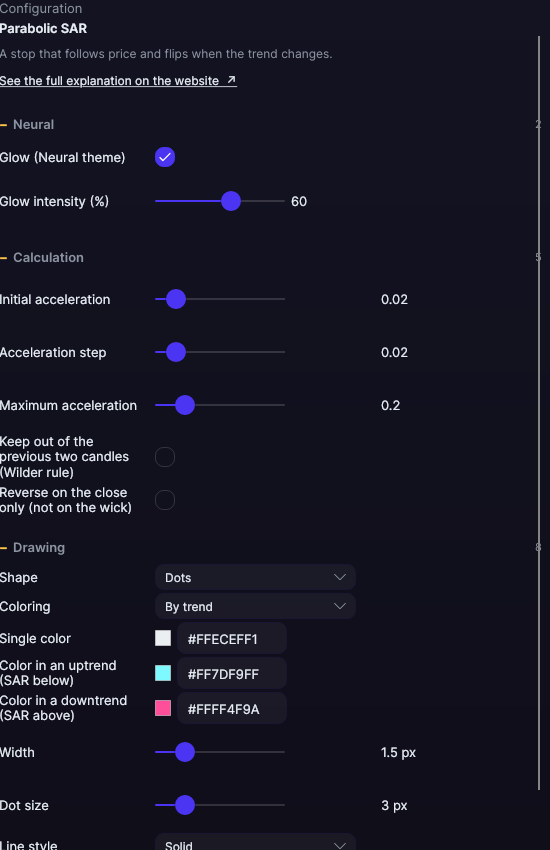
| Setting | Default | What it does |
|---|---|---|
| Calculation | ||
| Initial acceleration | 0.02 | From 0.001 to 0.2. |
| Acceleration step | 0.02 | How much it rises with each new extreme, from 0.001 to 0.2. |
| Maximum acceleration | 0.2 | The cap, from 0.02 to 1. |
| Keep out of the previous two candles (Wilder rule) | No | The SAR doesn’t move into the range of the two previous candles. |
| Reverse on the close only (not on the wick) | No | It only reverses if the candle closes on the other side. |
| Drawing | ||
| Shape | Dots | Dots, Joined line, Broken line or Crosses. |
| Coloring | By trend | Or Single color. |
| Single color | White | With Single color. |
| Color in an uptrend (SAR below) · downtrend (SAR above) | Ice · Pink | With By trend. |
| Width · Dot size | 1.5 px · 3 px | From 0.5 to 6 px and from 1 to 12 px. |
| Line style | Solid | Solid, Dashed, Dots, Dash-dot, Long dash, Long dash-dot or Even dashes. |
| Signals | ||
| Mark the reversals (stop and reverse) | Yes | A ring on the first point of each new trend. |
| Bullish reversal color · bearish · Mark size | Ice · Pink · 4 px | From 2 to 12 px. |
| Only with the trend (average) · Trend average period | No · 200 | Only marks and alerts the reversals in the direction of an exponential moving average, from 2 to 500. |
| Only with a strong trend (ADX) · ADX period · Minimum ADX | No · 14 · 25 | Only marks and alerts the reversals with the ADX above the minimum. |
| Color the candles by the SAR trend | No | Tints the candles ice or pink. |
| Days with signals | 5 days | How many days the reversals are marked for, from 1 to 365. |
| Trailing stop | ||
| Current stop line | No | A horizontal line at the current SAR, extending to the right. |
| Color · Width · Stop line style | Amber · 1 px · Dashed | How it’s drawn. |
| Stop margin (ticks) | 0 | Moves the line away from price, from 0 to 100 ticks. |
| Alerts | ||
| Blink on new signals | Yes | The marks on the last two candles. |
| On-screen alert · With sound · Alert color | No · No · Light blue | One alert for each new reversal. |
| Alert when the price gets near the stop · Alert distance (ticks) | No · 4 | From 1 to 100 ticks. |
| Neural | ||
| Glow (Neural theme) | Yes, when added | A halo of light in the color of each line or mark, like the one on the Neural theme candles. A newly added indicator comes with it checked; the ones you already had saved don’t. |
| Glow intensity (%) | 60% | From 0 to 100%. |
Settings belong to each chart: changing the Parabolic SAR on one chart doesn’t change it on another.