 FORGE
FORGEOrder Block
The last opposite candle before an impulse that breaks structure, and the breaker and mitigation block of the leg that fails, with their midpoint and life.
What it measures
The Order Block marks three ICT zones that come out of the same break of structure, a candle closing beyond the last confirmed high (or low):
- The order block: the last opposite candle before the impulse that breaks. On the bullish one, the last down candle before the rally; on the bearish one, the last up candle before the drop.
- The breaker and the mitigation block: before breaking, price made a leg that failed, and its exit candle is the last candle in favor, counting back from that high. If that leg swept the low before the high, the zone is a breaker; if it didn’t get to sweep it, a mitigation block. Both turn into support on the bullish side and resistance on the bearish side.
Each zone has its midpoint and its life: it’s born when it’s known, gets touched, gets mitigated and, in the end, breaks.
It’s a Pro plan indicator. It marks what has happened; it isn’t a recommendation or a buy or sell signal.
How it’s calculated
- The break: a candle closing beyond the last confirmed high (low, in the bearish one) that hasn’t been broken yet. A high is confirmed by a lower candle on each of its sides (“Candles on each side of a high or low”, 3 by default).
- Order block: the last opposite candle, counting back from the origin of the impulse, up to 10 candles. If there’s no opposite candle, there’s no block.
- Breaker and mitigation block: the last candle in favor, counting back from the broken high, up to 10 candles; it’s a breaker if the drop to the origin swept the low before that high, and a mitigation block if not.
- Only the ones that leave an FVG: with “Only those that leave an FVG on the break”, on by default, the impulse that breaks has to leave an FVG in its favor. The block is born when the break and that FVG are closed, never before.
- The zone: the whole candle, “Wick to wick” by default, or “Body only” (“Block zone”). The midpoint line is the middle point.
- Touched: price reaches the near edge of the zone. Mitigated: “When it reaches the midpoint” by default, or “When price enters” (“Counted as mitigated”). Broken: “When it closes on the other side” by default, or “When it touches the other side” (“Counted as broken”); once broken, its box ends. One candle can do all three.
- How many: the 5 most recent of each type and side (“How many of each type and side”), within the last 5 days with candles (“Days back”). Mitigated ones show fainter (40 %); broken ones don’t show, by default.
How to read it
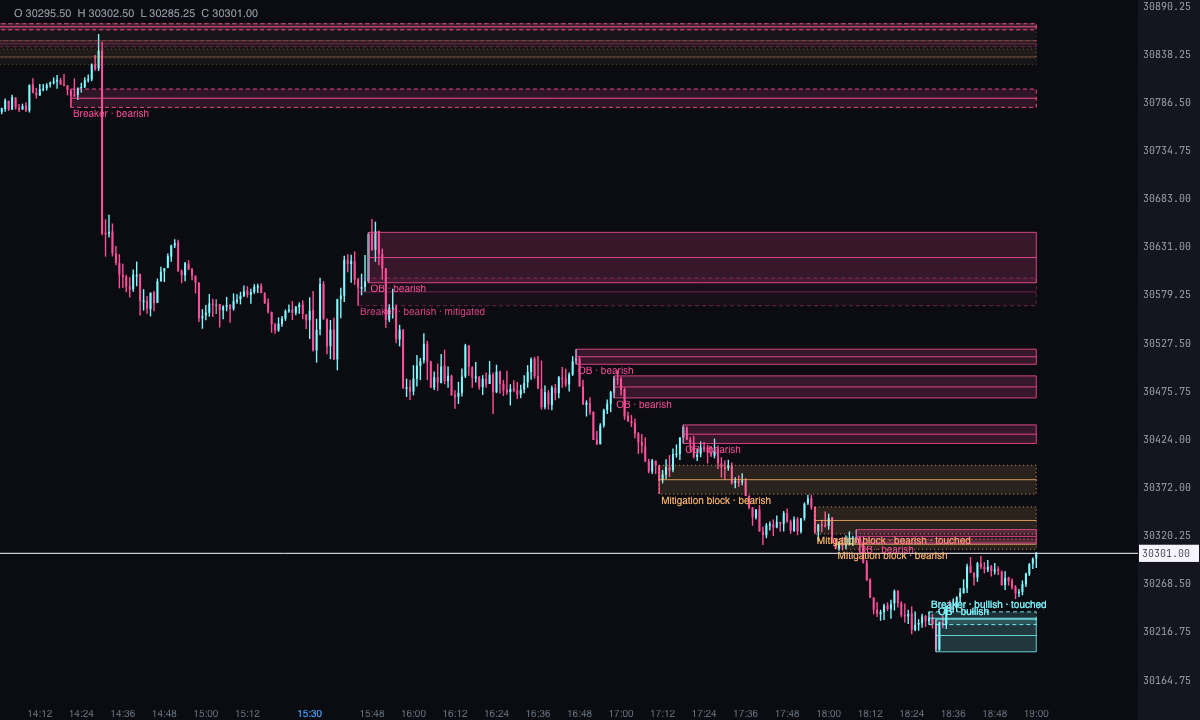
- The order block has a solid border, the breaker a dashed border and the mitigation block a dotted border. The bullish ones (buy) are ice, with the mitigation block in violet; the bearish ones (sell) are pink, with the mitigation block in soft orange.
- A line marks the midpoint of each zone (“Draw the midpoint line”).
- The box starts at the block’s candle and runs to the last candle or until it breaks. A text, above on the bullish ones and below on the bearish ones, gives the type, the direction, the time frame if it isn’t the chart’s, and the status (touched, mitigated or broken) when it has one.
- Mitigated ones show fainter. Broken ones only show with “Show the broken ones”.
Which chart to put it on
Any chart works. With “Time frame of the blocks”, “The chart’s” by default, the blocks can be calculated on “5 minutes”, “15 minutes”, “30 minutes”, “1 hour”, “4 hours” or “Daily (trading day)” candles that the indicator builds from the chart’s. They’re drawn over the chart’s candles, from the first one of the block’s candle, and the text gives their time frame (5m, 15m, 1h…).
Built-in strategies
What the indicator already has inside and can mark for you on the chart. They show what has happened; they are not recommendations.
Order block
On by default- What it marks
- The zone of the last opposite candle before the break: a box with a solid border, in ice (bullish, buy) or pink (bearish, sell), with its midpoint line and its text.
- Alert
- If you turn it on: an alert when a new one forms, when price touches it and when it breaks, with optional sound.
- Turned on with
- “Order blocks”, “Bullish (buy)” and “Bearish (sell)”, in Calculation; the alerts (“When a new one forms”, “When price touches it”, “When it breaks” and “With sound”), in Alerts.
Breaker block
On by default- What it marks
- The zone of the last candle in favor of the leg that fails, when that drop (rally, in the bearish one) swept the previous extreme: a box with a dashed border.
- Alert
- The same alerts as the order block.
- Turned on with
- “Breaker blocks”, in Calculation.
Mitigation block
On by default- What it marks
- The same zone when the leg that fails didn’t get to sweep the previous extreme: a box with a dotted border, in violet (bullish) or soft orange (bearish).
- Alert
- The same alerts as the order block.
- Turned on with
- “Mitigation blocks”, in Calculation.
Life of each zone
On by default- What it marks
- Whether the zone is touched, mitigated or broken, written in its text; mitigated ones show fainter and broken ones stop being drawn.
- Alert
- It alerts when touched and when broken, with the same alerts.
- Turned on with
- “Counted as mitigated”, “Counted as broken”, “Show the mitigated ones” and “Show the broken ones”, in States.
Adding it to the chart
In the chart bar, Indicators ▾ › More Indicators…. You’ll find it in the ICT category. It’s a Pro plan indicator. How to add and adjust an indicator is in Indicators.
Settings
Open them with the ⚙ on its row in Indicators ▾. All times are New York time.
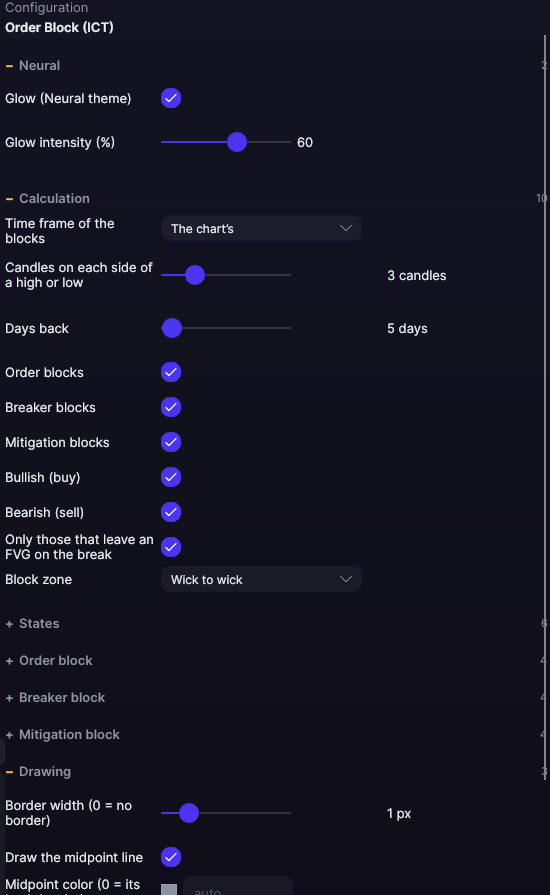
| Setting | Default | Range |
|---|---|---|
| Calculation | ||
| Time frame of the blocks | The chart’s | The chart’s · 5 minutes · 15 minutes · 30 minutes · 1 hour · 4 hours · Daily (trading day) |
| Candles on each side of a high or low | 3 candles | 1 to 10 |
| Days back | 5 days | 1 to 365 |
| Order blocks | Yes | |
| Breaker blocks | Yes | |
| Mitigation blocks | Yes | |
| Bullish (buy) | Yes | |
| Bearish (sell) | Yes | |
| Only those that leave an FVG on the break | Yes | |
| Block zone | Wick to wick | Wick to wick · Body only |
| States | ||
| Counted as mitigated | When it reaches the midpoint | When price enters · When it reaches the midpoint |
| Counted as broken | When it closes on the other side | When it closes on the other side · When it touches the other side |
| Show the mitigated ones | Yes | |
| Show the broken ones | No | |
| How many of each type and side | 5 | 1 to 50 |
| Opacity of the mitigated and broken ones | 40 % | 10 to 100 |
| Order block | ||
| Bullish fill | 7.80008e+08 | |
| Bullish border | 3.43081e+09 | |
| Bearish fill | 7.88484e+08 | |
| Bearish border | 3.43928e+09 | |
| Breaker block | ||
| Bullish fill | 6.4579e+08 | |
| Bullish border | 3.86702e+09 | |
| Bearish fill | 6.54266e+08 | |
| Bearish border | 3.87549e+09 | |
| Mitigation block | ||
| Bullish fill | 5.31671e+08 | |
| Bullish border | 3.43413e+09 | |
| Bearish fill | 5.36853e+08 | |
| Bearish border | 3.43931e+09 | |
| Drawing | ||
| Border width (0 = no border) | 1 px | 0 to 6 |
| Draw the midpoint line | Yes | |
| Midpoint color (0 = its box’s border) | #000000 | |
| Text | ||
| Write the text of each block | Yes | |
| Font size | 10 px | 6 to 30 |
| Text color (0 = its box’s border) | #000000 | |
| Write the time frame | Yes | |
| Write the status | Yes | |
| Alerts | ||
| When a new one forms | No | |
| When price touches it | No | |
| When it breaks | No | |
| With sound | No | |
| Neural | ||
| Glow (Neural theme) | Yes, when added | |
| Glow intensity (%) | 60% | 0 to 100 |