 FORGE
FORGEMarket Structure
The highs and lows of price, whether they rise or fall, and when a break follows the trend (BOS) or changes it (MSS).
What it measures
Market structure is the first thing an ICT trader looks at: where the highs and lows of price are, whether they are rising (HH and HL) or falling (LH and LL), and when a break follows the trend or changes it.
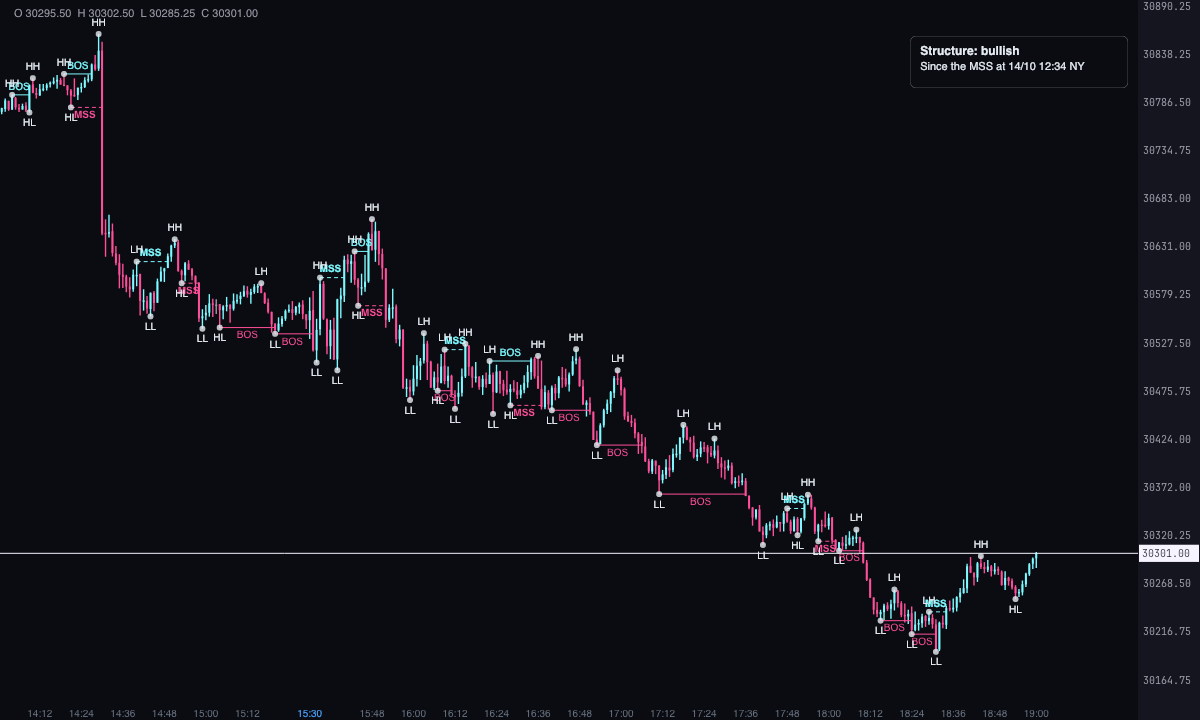
The indicator marks the confirmed highs and lows, each one compared with the previous one on its side; the BOS breaks (break of structure), which go with the trend; the MSS structure shifts (market structure shift, which others call CHoCH), which go against the previous break; and, if you turn them on, the displacement candles, the ones that move with force.
It’s a Pro plan indicator. It marks what has happened; it isn’t a recommendation or a buy or sell signal.
How it’s calculated
- High or low: a high is higher than each of the candles before it and none of the candles after it exceeds it; a low is the reverse. “Candles on each side of a high or low” sets how many candles on each side: 3 by default, from 1 to 20. It is confirmed when the last of the candles after it closes and that is when it appears, but the dot is drawn on the candle of the extreme.
- HH, LH, LL, HL: a high above the previous high is HH; otherwise, LH. A low below the previous low is LL; otherwise, HL. The first one on each side has no label: there’s nothing to compare it with.
- Break: what counts is a candle’s close beyond the last confirmed high (bullish break) or low (bearish break). A wick that passes it and closes back doesn’t break it. It is marked when the candle that breaks closes.
- BOS or MSS: if the break goes the same way as the previous one, or is the first, it’s a BOS. If it goes the other way, it’s an MSS. The trend is that of the last break.
- Displacement: a closed candle whose body is at least 2 times the average body of the previous 20 (from 1 to 5 times). It is measured only with the chart’s candles and is off by default.
- Time frame: “Time frame of the structure” is “The chart’s” by default. With 5 minutes, 15 minutes, 30 minutes, 1 hour, 4 hours or daily, the calculation candles are built by grouping the chart’s into New York time blocks (the 4-hour and daily ones from the overnight open). A calculation candle still forming decides nothing. Each thing is drawn on the chart candle where it happened.
- How far back it looks: the last “Days back” with candles (5 by default), plus a margin to have prior structure.
- When it’s drawn and when it isn’t: nothing repaints and nothing is erased. A high appears when it is confirmed and a break when the candle that breaks closes; what is marked stays as long as it falls within the days being looked at.
How to read it
- A light grey dot on each confirmed high and low, with its label (HH, LH, LL or HL) above the high or below the low.
- A horizontal line from the broken extreme to the candle that closes beyond it, with the text BOS or MSS in the middle. In ice if the break is bullish and in pink if it’s bearish. The BOS has a solid line; the MSS is dashed and bold (by default; change it with “Dashed structure shifts”).
- With “Tint the displacement candles”, the candle is tinted yellow if it’s bullish and orange if it’s bearish.
- A label in a corner (top right by default) that says “Structure: bullish”, “Structure: bearish” or “Structure: no breaks”, with the time frame if it isn’t the chart’s, and the New York time of the last BOS or of the MSS the trend started from.
Which chart to put it on
Put it on the chart you trade: by default it calculates with its candles. To see the structure of a higher time frame without changing charts, pick a time frame higher than the chart’s in “Time frame of the structure” (15 minutes or 1 hour on a 1-minute chart, for example). If the chart already has candles of the same size or larger, the chart’s are used. Displacement candles are always measured with the chart’s candles.
Built-in strategies
What the indicator already has inside and can mark for you on the chart. They show what has happened; they are not recommendations.
Highs and lows (HH, HL, LH, LL)
On by default- What it marks
- A dot on each confirmed high and low, labelled HH, LH, LL or HL against the previous one on its side.
- Alert
- It doesn’t alert: you see it on the chart.
- Turned on with
- “Highs and lows” and “Write HH, HL, LH and LL”, in What is drawn; “Candles on each side of a high or low”, in Calculation.
Break with the trend (BOS)
On by default- What it marks
- A line from the broken high or low to the candle that closes beyond it, with the text BOS.
- Alert
- If you turn it on: an alert on each BOS, with optional sound.
- Turned on with
- “Breaks with the trend (BOS)”, in What is drawn; the alert, “On each BOS”, in Alerts.
Structure shift (MSS)
On by default- What it marks
- The same when the break goes against the previous one: a dashed line and the text MSS in bold.
- Alert
- If you turn it on: an alert on each MSS, with optional sound.
- Turned on with
- “Structure shifts (MSS / CHoCH)” and “Dashed structure shifts”, in What is drawn and Colors; the alert, “On each MSS”, in Alerts.
Displacement candles
Off by default- What it marks
- Closed candles with a large body, tinted yellow if bullish and orange if bearish.
- Alert
- It doesn’t alert: you see it on the chart.
- Turned on with
- “Tint the displacement candles” and “Minimum displacement body (times the average of the previous 20)”, in What is drawn.
Trend
On by default- What it marks
- A label in a corner with the trend of the last break and the New York time of the last BOS or of the MSS the trend started from.
- Alert
- It doesn’t alert: you see it on the chart.
- Turned on with
- “Label with the trend” and “Label corner”, in What is drawn.
Adding it to the chart
In the chart bar, Indicators ▾ › More Indicators…. You’ll find it in the ICT category. It’s a Pro plan indicator. How to add and adjust an indicator is in Indicators.
Settings
Open them with the ⚙ on its row in Indicators ▾. All times are New York time.
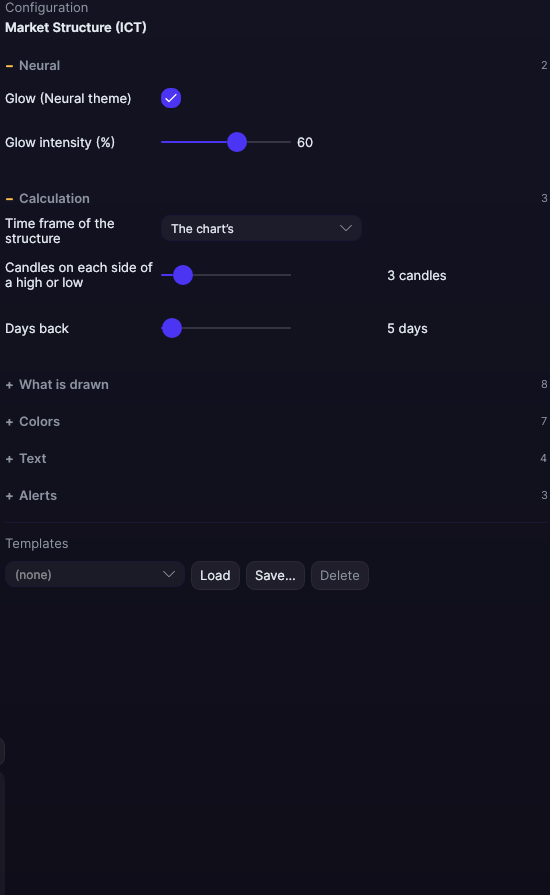
| Setting | Default | Range |
|---|---|---|
| Calculation | ||
| Time frame of the structure | The chart’s | The chart’s · 5 minutes · 15 minutes · 30 minutes · 1 hour · 4 hours · Daily (trading day) |
| Candles on each side of a high or low | 3 candles | 1 to 20 |
| Days back | 5 days | 1 to 365 |
| What is drawn | ||
| Highs and lows | Yes | |
| Write HH, HL, LH and LL | Yes | |
| Breaks with the trend (BOS) | Yes | |
| Structure shifts (MSS / CHoCH) | Yes | |
| Tint the displacement candles | No | |
| Minimum displacement body (times the average of the previous 20) | 2 times | 1 to 5 |
| Label with the trend | Yes | |
| Label corner | Top right | Top left · Top right · Bottom left · Bottom right |
| Colors | ||
| Bullish color | #7DF9FF | |
| Bearish color | #FF4F9A | |
| Highs and lows color | #E6EDF3 | |
| Bullish displacement candle | #FFD166 | |
| Bearish displacement candle | #FF9F43 | |
| Break width | 1 px | 0.5 to 6 |
| Dashed structure shifts | Yes | |
| Text | ||
| Font size | 10 px | 6 to 30 |
| Label background color | 4.02726e+09 | |
| Label border color | 1.09052e+09 | |
| Label text color | 4.29332e+09 | |
| Alerts | ||
| On each BOS | No | |
| On each MSS | No | |
| With sound | No | |
| Neural | ||
| Glow (Neural theme) | Yes, when added | |
| Glow intensity (%) | 60% | 0 to 100 |