 FORGE
FORGELiquidity
The stops waiting above the highs and below the lows nobody has taken, marked until price takes them.
What it measures
In ICT, price moves toward where the stops are waiting. Above a high nobody has taken wait the stops of those who are short and the orders of those who want to buy the breakout: that’s buy-side liquidity (BSL). Below an untaken low the same happens in reverse: sell-side liquidity (SSL). When two highs (or two lows) sit at almost the same height, the equals (EQH and EQL), more stops pile up. And the extremes of the previous day, week and month (PDH, PDL, PWH, PWL, PMH, PML) are the references everyone has in front of them.
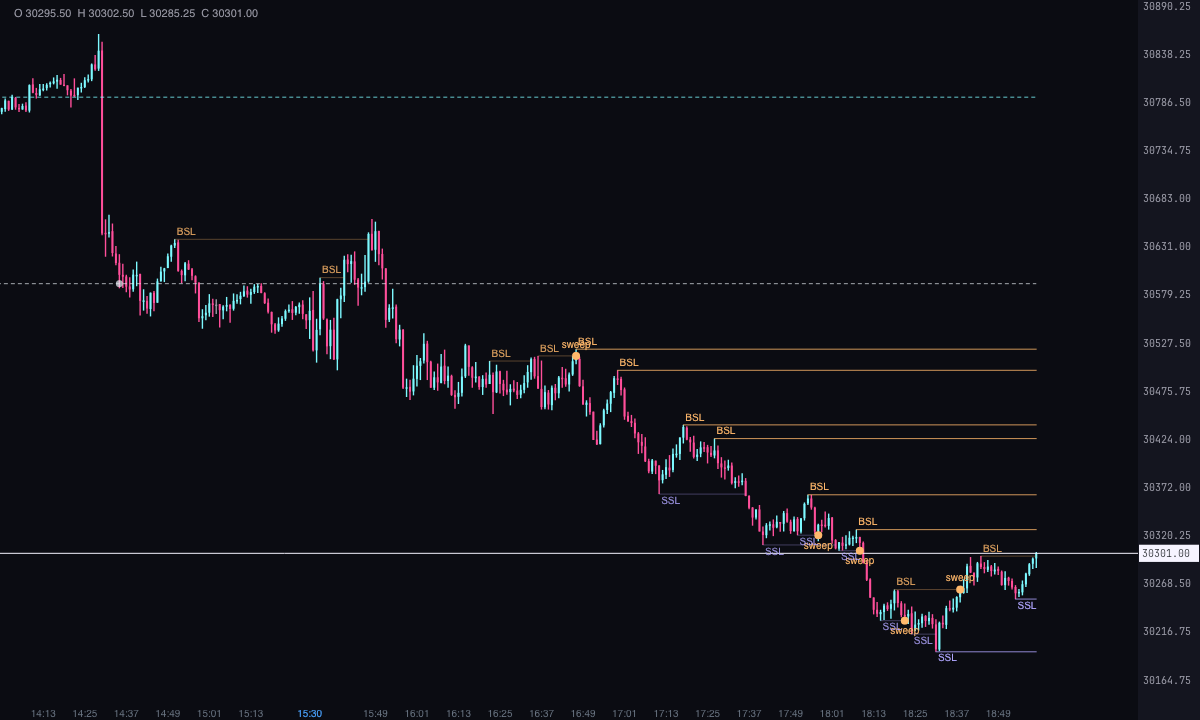
The indicator marks them while they remain untaken and shows when price takes them. A sweep is when a candle takes the level and closes back, on the side it came from.
It’s a Pro plan indicator. It marks what has happened; it isn’t a recommendation or a buy or sell signal.
How it’s calculated
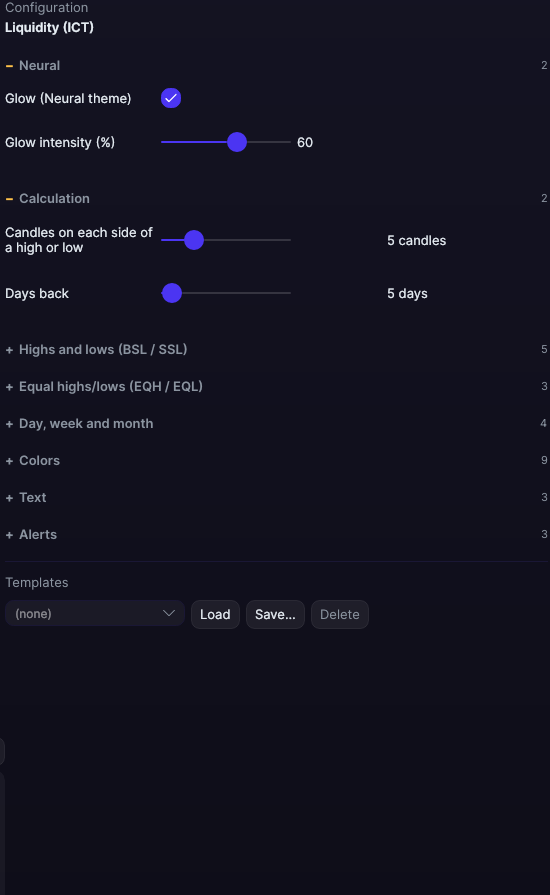
- BSL and SSL: these are the highs and lows of price. A high is higher than each of the candles before it and none of the candles after it exceeds it; a low is the reverse. “Candles on each side of a high or low” sets how many candles on each side: 5 by default, from 1 to 20. They appear when the last of the candles after them closes; the line starts at the candle of the extreme.
- Taken: the first candle, after the level is confirmed, whose high passes the level’s price (whose low passes it, for the SSL). It counts even if that candle is still forming.
- Sweep: the candle that takes the level and closes back: for the BSL, with its close at the level or below; for the SSL, at the level or above. Until that candle closes it isn’t marked. It is only marked on the BSL and SSL, not on the equals or on the period extremes.
- How many are shown: on each side, the 6 most recent untaken ones (even if they are from before the days being looked at, because the liquidity is still there); change it with “How many on each side”. With “Show the ones already taken (up to where they were taken)”, the 6 most recent on each side that were taken within those days are added.
- Equals: two consecutive highs (or two lows) no more than 2 ticks apart, with no more than 300 candles between them, and the first still untaken when the second arrives. Change them with “Maximum difference to count as equal” and “Maximum candles between the two”. The price is that of the higher of the two highs (the lower of the two lows). They appear when the second is confirmed.
- Previous day, week and month: the high and low of the previous trading day (from 6:00 pm to 5:00 pm New York time), of the previous week (it starts on Monday) and of the previous calendar month. They are drawn across the whole current period. The day and the week come on; the month, off.
- How far back it looks: the last “Days back” with candles (5 by default), plus the margin the previous week and month need.
- When they stop being drawn: an untaken level runs to the last candle. Once taken, its line ends at the candle that takes it and fades (or disappears, if you turn off “Show the ones already taken (up to where they were taken)”). The equals do the same. The day, week and month extremes last their whole period, and their being taken is marked with a circle.
- Nothing repaints: a level only exists once the candle that confirms it is closed, and what happens to it afterwards is the first time it happens.
How to read it
- Each BSL (untaken high) is an orange line with the text BSL above it; each SSL (untaken low), a violet line with the text SSL below it. Both start at the candle of the extreme.
- A taken level ends at the candle that takes it and is fainter (change the opacity with “Opacity of the taken ones”). If that candle closes back, there’s a sweep: an orange circle and the text “sweep”.
- The equals are a light grey line between the two extremes, dashed from the second one until they are taken, with the text EQH or EQL.
- The period extremes are dashed lines: light grey for the previous day (PDH and PDL), ice for the week (PWH and PWL) and pink for the month (PMH and PML). A circle marks the candle where they are first touched (“Mark when they are taken”).
- With “Write the price”, each text also carries its price.
Which chart to put it on
Everything is calculated with the chart’s candles: the highs and lows are those of the time frame you put it on, and “Days back” counts days with candles. To have the reference of a higher time frame in view, use the previous day, week and month extremes, which hold on any time frame.
Built-in strategies
What the indicator already has inside and can mark for you on the chart. They show what has happened; they are not recommendations.
Untaken liquidity (BSL and SSL)
On by default- What it marks
- A line on each untaken high (BSL) and low (SSL), up to the last candle; if it was already taken, up to the candle that took it, fainter.
- Alert
- It doesn’t alert: you see it on the chart.
- Turned on with
- “Buy-side liquidity (BSL): highs not yet taken” and “Sell-side liquidity (SSL): lows not yet taken”, in Highs and lows (BSL / SSL).
Sweeps
On by default- What it marks
- A circle and the text “sweep” on the candle that takes a level and closes back.
- Alert
- If you turn it on: an alert on each sweep, with optional sound.
- Turned on with
- “Mark the sweeps (takes the level and closes back)”, in Highs and lows (BSL / SSL); the alert, “When a level is swept”, in Alerts.
Equal highs and lows (EQH and EQL)
On by default- What it marks
- A line between the two extremes at almost the same height, dashed until they are taken, with the text EQH or EQL.
- Alert
- It doesn’t alert: you see it on the chart.
- Turned on with
- “Equal highs and lows”, in Equal highs/lows (EQH / EQL).
Previous day and week (PDH, PDL, PWH, PWL)
On by default- What it marks
- The previous day’s and week’s high and low, dashed across the whole current period, with a circle on the candle that takes them.
- Alert
- If you turn it on: an alert when price takes one of those extremes, with optional sound.
- Turned on with
- “Previous day’s high and low (PDH / PDL)” and “Previous week’s high and low (PWH / PWL)”, in Day, week and month; the alert, “When the previous day’s, week’s or month’s high or low is taken”, in Alerts.
Previous month (PMH, PML)
Off by default- What it marks
- The previous month’s high and low, dashed across the whole current month.
- Alert
- If you turn it on: the same alert as the previous day and week.
- Turned on with
- “Previous month’s high and low (PMH / PML)”, in Day, week and month.
Adding it to the chart
In the chart bar, Indicators ▾ › More Indicators…. You’ll find it in the ICT category. It’s a Pro plan indicator. How to add and adjust an indicator is in Indicators.
Settings
Open them with the ⚙ on its row in Indicators ▾. All times are New York time.
| Setting | Default | Range |
|---|---|---|
| Calculation | ||
| Candles on each side of a high or low | 5 candles | 1 to 20 |
| Days back | 5 days | 1 to 365 |
| Highs and lows (BSL / SSL) | ||
| Buy-side liquidity (BSL): highs not yet taken | Yes | |
| Sell-side liquidity (SSL): lows not yet taken | Yes | |
| How many on each side | 6 | 1 to 50 |
| Show the ones already taken (up to where they were taken) | Yes | |
| Mark the sweeps (takes the level and closes back) | Yes | |
| Equal highs/lows (EQH / EQL) | ||
| Equal highs and lows | Yes | |
| Maximum difference to count as equal | 2 ticks | 0 to 20 |
| Maximum candles between the two | 300 candles | 10 to 3000 |
| Day, week and month | ||
| Previous day’s high and low (PDH / PDL) | Yes | |
| Previous week’s high and low (PWH / PWL) | Yes | |
| Previous month’s high and low (PMH / PML) | No | |
| Mark when they are taken | Yes | |
| Colors | ||
| BSL color | #FFB86B | |
| SSL color | #B0A6FF | |
| Equal highs/lows color | #E6EDF3 | |
| Previous day color | #E6EDF3 | |
| Previous week color | #7DF9FF | |
| Previous month color | #FF4F9A | |
| Sweep color | #FFB86B | |
| Line width | 1 px | 0.5 to 6 |
| Opacity of the taken ones | 40 % | 10 to 100 |
| Text | ||
| Write the name of each level | Yes | |
| Font size | 10 px | 6 to 30 |
| Write the price | No | |
| Alerts | ||
| When a level is swept | No | |
| When the previous day’s, week’s or month’s high or low is taken | No | |
| With sound | No | |
| Neural | ||
| Glow (Neural theme) | Yes, when added | |
| Glow intensity (%) | 60% | 0 to 100 |