 FORGE
FORGEKillzones
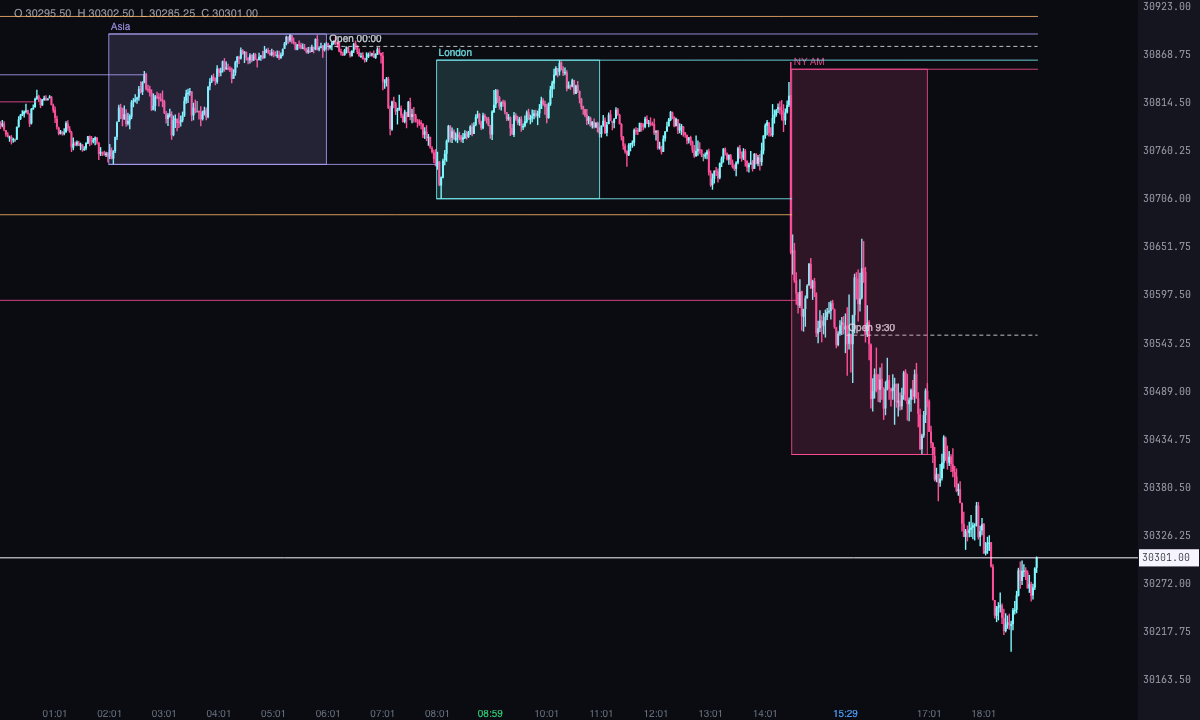
ICT’s four sessions with their high and low, the macros and the key opens, all in New York time.
What it measures
The killzones are the windows of the day in which ICT watches price: Asia, London, New York AM and New York PM. This indicator draws each one with its high and low, which ICT uses as liquidity that price may go looking for. It adds ICT’s macros (eight short windows) and the opening prices that are watched: midnight, 8:30, 9:30, the week and the month.
All times are New York time, daylight saving included. It’s a Pro plan indicator. It marks what has happened; it isn’t a recommendation or a buy or sell signal.
How it’s calculated
- Default killzones: Asia from 20:00 to 00:00, London from 02:00 to 05:00, New York AM from 08:30 to 11:00 and New York PM from 13:30 to 16:00. Each hour and each minute (in steps of 5) is a setting. Asia crosses midnight and belongs to the day it starts on.
- High and low: those of the chart’s candles inside the window. In a session in progress they keep growing while it lasts.
- Taken: the first candle after the session whose high goes past the session’s high (or whose low drops below its low). With “Extend them until they are taken” (on), the lines run to that candle; if they haven’t been taken yet, to the last one.
- Macros: eight fixed windows, 2:33 to 3:00, 4:03 to 4:30, 8:50 to 9:10, 9:50 to 10:10, 10:50 to 11:10, 11:50 to 12:10, 13:10 to 13:40 and 15:15 to 15:45. They’re off by default. Each one is a band between the high and the low of the trading day, which keep growing while the day lasts.
- Opens: the open of the first candle from 00:00, 8:30 or 9:30 each day (if that candle falls within the following hour); the week’s, that of the first candle after Sunday 18:00; the month’s, that of the first candle of the month. Midnight, 9:30 and weekly are on by default. The line runs to the end of its trading day (week, month).
- Days back: 3 by default (today and the two before), up to 60. The week’s or month’s open only appears if its first candle falls in those days.
- Time frame: it uses the chart’s candles. The macros last 20 to 30 minutes, so they call for small candles.
How to read it
- With “Style” set to “High-to-low box” (default), each session is a translucent box with a border, from its first to its last candle. With “Background band” it takes the whole height of the trading day.
- Default colors: Asia in violet, London in ice, New York AM in pink and New York PM in orange. The name (“Asia”, “London”, “NY AM”, “NY PM”) sits above the high.
- With “Lines for the high and low of each session”, two lines leave the box and run right until price takes them.
- The macros, if you turn them on, are very faint light grey bands.
- The opens are dashed lines with their name (“Open 9:30”): light grey for the day’s, violet for the weekly and orange for the monthly.
- The alert, in “Alerts”, is off by default: it fires when the take falls on one of the last two candles.
Which chart to put it on
On an intraday chart of the asset. With big candles, the session edges and the macros fall on whole candles and come out less exact.
Built-in strategies
What the indicator already has inside and can mark for you on the chart. They show what has happened; they are not recommendations.
Killzones
On by default- What it marks
- A box (or a background band) per session (Asia, London, NY AM and NY PM) with its high and low as two lines that extend until price takes them.
- Alert
- If you turn it on: an alert when price takes a session’s high or low, with optional sound.
- Turned on with
- “Show” in “Asia”, “London”, “New York AM” and “New York PM”; the alert, in “Alerts”.
Opens
On by default- What it marks
- A dashed line from the opening price of midnight, 9:30 and the week (and, if you turn them on, 8:30 and the month) to the end of its day, week or month.
- Alert
- No alert: it’s there on the chart.
- Turned on with
- “Midnight open (00:00)”, “The 9:30 open” and “Weekly open (Sunday 18:00)”, in “Opens”.
ICT macros
Off by default- What it marks
- A band over each of the eight macro windows, from the high to the low of the trading day.
- Alert
- No alert: it’s there on the chart.
- Turned on with
- “Show the ICT macros”, in “Macros”.
Adding it to the chart
In the chart bar, Indicators ▾ › More Indicators…. You’ll find it in the ICT category. It’s a Pro plan indicator. How to add and adjust an indicator is in Indicators.
Settings
Open them with the ⚙ on its row in Indicators ▾. All times are New York time.
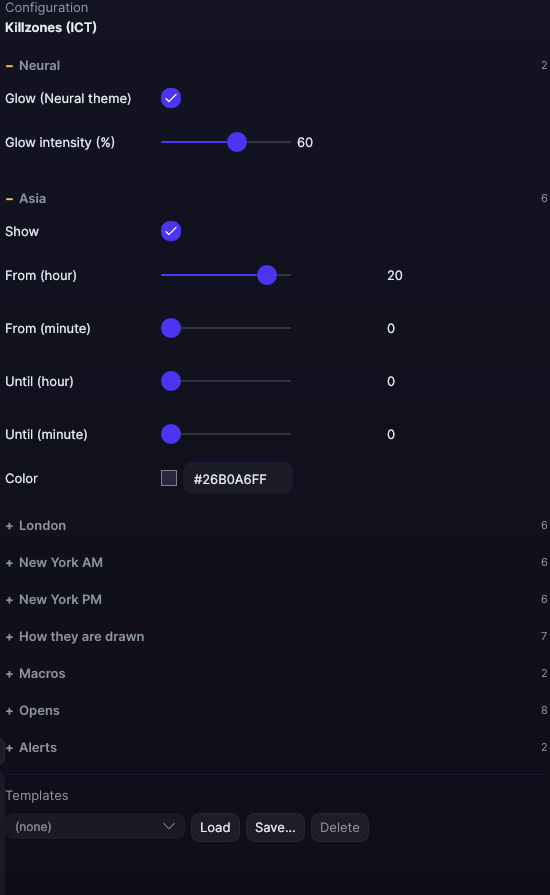
| Setting | Default | Range |
|---|---|---|
| Asia | ||
| Show | Yes | |
| From (hour) | 20 | 0 to 23 |
| From (minute) | 0 | 0 to 55 |
| Until (hour) | 0 | 0 to 23 |
| Until (minute) | 0 | 0 to 55 |
| Color | #B0A6FF | |
| London | ||
| Show | Yes | |
| From (hour) | 2 | 0 to 23 |
| From (minute) | 0 | 0 to 55 |
| Until (hour) | 5 | 0 to 23 |
| Until (minute) | 0 | 0 to 55 |
| Color | #7DF9FF | |
| New York AM | ||
| Show | Yes | |
| From (hour) | 8 | 0 to 23 |
| From (minute) | 30 | 0 to 55 |
| Until (hour) | 11 | 0 to 23 |
| Until (minute) | 0 | 0 to 55 |
| Color | #FF4F9A | |
| New York PM | ||
| Show | Yes | |
| From (hour) | 13 | 0 to 23 |
| From (minute) | 30 | 0 to 55 |
| Until (hour) | 16 | 0 to 23 |
| Until (minute) | 0 | 0 to 55 |
| Color | #FFB86B | |
| How they are drawn | ||
| Style | High-to-low box | High-to-low box · Background band |
| Lines for the high and low of each session | Yes | |
| Extend them until they are taken | Yes | |
| Days back | 3 days | 1 to 60 |
| Line width | 1 px | 0.5 to 6 |
| Write the name | Yes | |
| Font size | 10 px | 6 to 30 |
| Macros | ||
| Show the ICT macros | No | |
| Color | #E6EDF3 | |
| Opens | ||
| Midnight open (00:00) | Yes | |
| The 8:30 open | No | |
| The 9:30 open | Yes | |
| Weekly open (Sunday 18:00) | Yes | |
| Month’s open | No | |
| Color of the day’s opens | #E6EDF3 | |
| Weekly open color | #B0A6FF | |
| Monthly open color | #FFB86B | |
| Alerts | ||
| When a session’s high or low is taken | No | |
| With sound | No | |
| Neural | ||
| Glow (Neural theme) | Yes, when added | |
| Glow intensity (%) | 60% | 0 to 100 |