 FORGE
FORGEHTF Candles
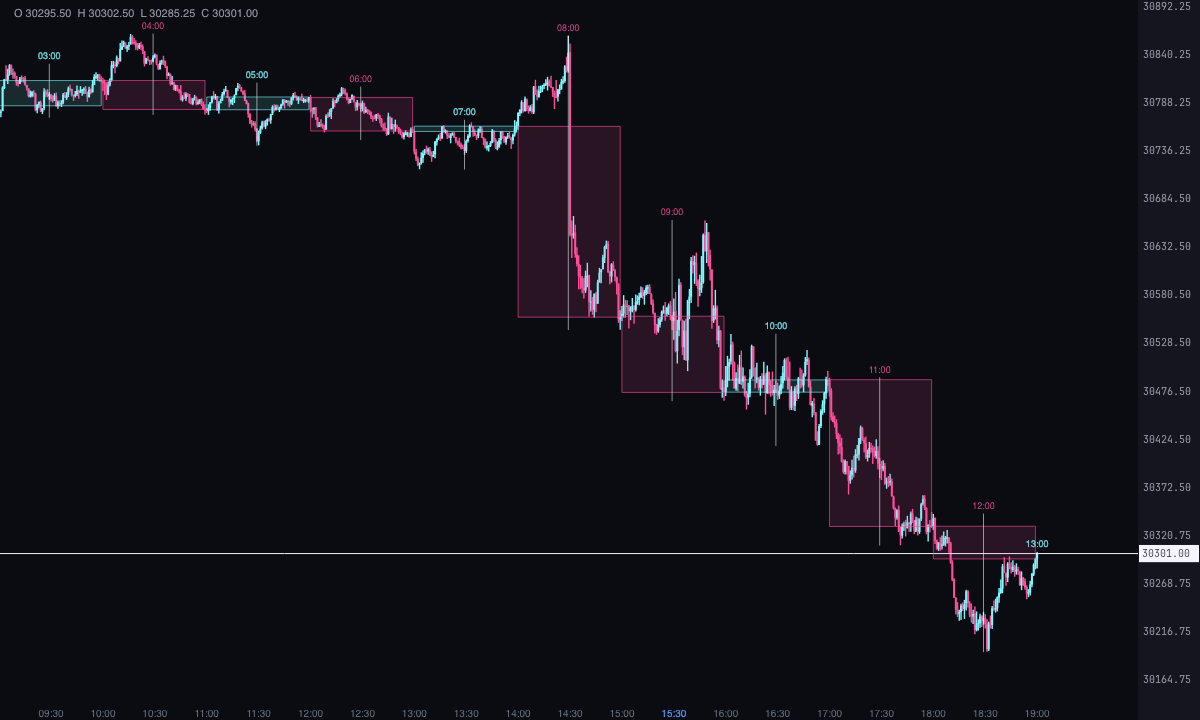
The 1-hour, 4-hour or daily candle drawn over the chart’s own, with the Power of 3 of the one in progress.
What it measures
What an ICT trader watches on a 1-minute chart is the higher time frame candle they’re in: the 1-hour, the 4-hour or the daily one. Where it opened, how far it has gone and whether it has closed yet. This indicator draws it over the chart’s candles: each higher time frame candle spans the candles that make it up, with its body (open to close) and its wick (high to low).
On the candle in progress it marks ICT’s Power of 3: open, manipulation and distribution. It’s a Pro plan indicator. It marks what has happened; it isn’t a recommendation or a buy or sell signal.
How it’s calculated
- Higher time frame candles: built from the chart’s, grouped into New York time slots. The 5, 15 and 30-minute candles and the 1-hour one open on the dot counting from 00:00 (the 1-hour one at 9:00, 10:00…).
- The 4-hour ones count from 18:00, like the futures session: they open at 18:00, 22:00, 02:00, 06:00, 10:00 and 14:00.
- The daily one runs from 18:00 to 18:00; the one that starts on Sunday at 18:00 is Monday’s.
- Each candle: the open is that of its first chart candle, the close is that of the last, and the high and low are across all of them. It’s bullish if it closes at or above the open.
- Closed: when there’s another one after it or its closing time has passed. A closed higher time frame candle doesn’t change; only the last one moves.
- How many: the last 12 by default, up to 100. Default time frame: 1 hour.
- Power of 3 (only of the candle in progress): the open is the price it opens at; the manipulation is the extreme opposite to the direction it’s heading (the low if it’s going up, the high if not), on the chart candle where it sits; the distribution runs from the open to the last close, once the close has moved away from the open.
- Time frame: the chart must be made of candles smaller than the chosen one. With “The chart’s”, or if the chart is already made of candles equal to or bigger than it, nothing is drawn.
How to read it
- Each higher time frame candle is a rectangle over the candles that make it up, with a vertical wick in the middle. By default the bullish ones are ice, the bearish ones pink and the wick light grey. If it opens and closes at the same price, the body is a line.
- Above it goes its start time in New York (“10:00”) or, on the daily, the date of the trading day (“22/10”). Turn it off with “Write the time of each candle”.
- On the candle in progress, a violet dashed line with the text “open”; a circle on the chart candle where the opposite extreme is, with the text “manipulation” (below the low if it’s going up, above the high if it’s going down); and a line from the open to the last close, with the text “distribution”.
- With “Lines for the previous candle’s high and low” you get “previous high” and “previous low”, only if the previous candle is already closed.
Which chart to put it on
On a chart of candles smaller than the one you want to see: a 1-minute chart works for everything from 5 minutes up to daily. If the chart is the same time frame or bigger, the indicator draws nothing.
Built-in strategies
What the indicator already has inside and can mark for you on the chart. They show what has happened; they are not recommendations.
Higher time frame candles
On by default- What it marks
- The latest candles of the chosen time frame (1 hour by default) over the chart candles that make them up: body from open to close, wick from high to low, and its time.
- Alert
- No alert: it’s there on the chart.
- Turned on with
- “Time frame of the candles” and “How many candles”, in “Candles”.
Power of 3
On by default- What it marks
- On the higher time frame candle in progress: the open, the manipulation (the extreme opposite to the direction it’s heading) and the distribution (from the open to the last close).
- Alert
- No alert: it’s there on the chart.
- Turned on with
- “Mark the Power of 3 of the current candle”, in “Power of 3”.
Previous candle’s high and low
Off by default- What it marks
- Two dashed lines at the high and the low of the previous higher time frame candle, out to the chart’s last candle.
- Alert
- No alert: it’s there on the chart.
- Turned on with
- “Lines for the previous candle’s high and low”, in “Power of 3”.
Adding it to the chart
In the chart bar, Indicators ▾ › More Indicators…. You’ll find it in the ICT category. It’s a Pro plan indicator. How to add and adjust an indicator is in Indicators.
Settings
Open them with the ⚙ on its row in Indicators ▾. All times are New York time.
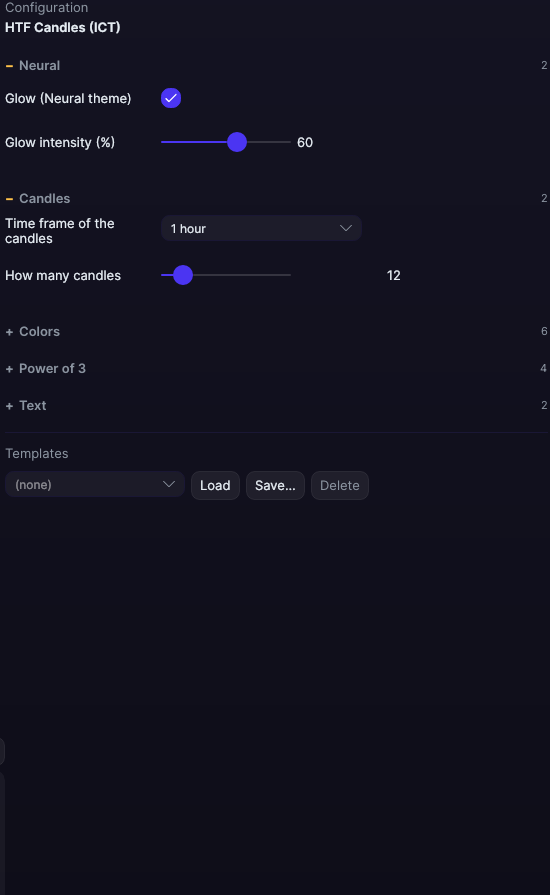
| Setting | Default | Range |
|---|---|---|
| Candles | ||
| Time frame of the candles | 1 hour | The chart’s · 5 minutes · 15 minutes · 30 minutes · 1 hour · 4 hours · Daily (trading day) |
| How many candles | 12 | 1 to 100 |
| Colors | ||
| Bullish fill | 5.2835e+08 | |
| Bullish border | 2.57517e+09 | |
| Bearish fill | 5.36826e+08 | |
| Bearish border | 2.58365e+09 | |
| Wick color | #E6EDF3 | |
| Border width (0 = no border) | 1 px | 0 to 6 |
| Power of 3 | ||
| Mark the Power of 3 of the current candle | Yes | |
| Open color | #B0A6FF | |
| Lines for the previous candle’s high and low | No | |
| Color of those lines | #E6EDF3 | |
| Text | ||
| Write the time of each candle | Yes | |
| Font size | 9 px | 6 to 30 |
| Neural | ||
| Glow (Neural theme) | Yes, when added | |
| Glow intensity (%) | 60% | 0 to 100 |