 FORGE
FORGEHeiken Ashi
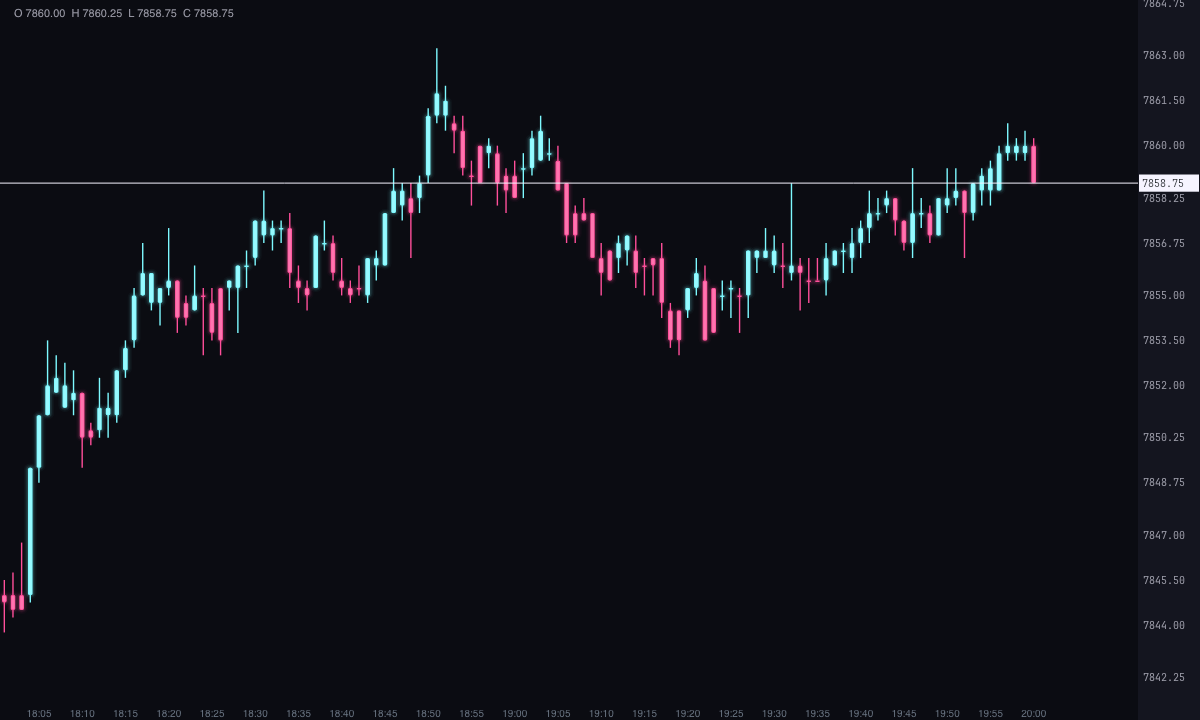
Every candle on the chart, tinted by the direction of its Heiken Ashi candle.
What it measures
The Heiken Ashi (“average bar” in Japanese) smooths candles: each new candle is built from the average of the candle and the previous one. That makes reversals less abrupt, and a trend shows up as a run of candles in the same color.
In Forge it doesn’t change the shape of your candles. Internally it calculates each candle’s Heiken Ashi candle and tints the normal candle one color or another according to its direction: ice if the Heiken Ashi candle is bullish, pink if it’s bearish. The body and wicks stay the real ones.
How it’s calculated
HA close = (open + high + low + close) ÷ 4
HA open = (previous HA open + previous HA close) ÷ 2
- The first loaded candle starts with the average of its own open and close.
- The candle is tinted the Bullish color if the HA close is greater than or equal to the HA open, and the Bearish one if it’s lower. A tie counts as bullish.
- Since each candle depends on the previous one, with more history loaded the colors of the first candles on the chart can change.
How to read it
- Runs of one color: several candles in a row in the same color indicate that the smoothed move has that direction.
- Color change: the smoothed candle has switched direction. Being an average, it arrives with some lag relative to price.
- The color isn’t the real close: a candle can close below its open and still come out ice, because the color comes from the smoothed candle and not from the candle itself.
Adding it to the chart
In the chart bar, Indicators ▾ › More Indicators…. You’ll find it in the Averages / Trend category. It has no strip of its own: it’s drawn over the chart’s candles, changing their color. To see the candles in their usual color again, remove it from the chart with Remove in the indicators window.
Settings
Open them with the ⚙ on its row in Indicators ▾.
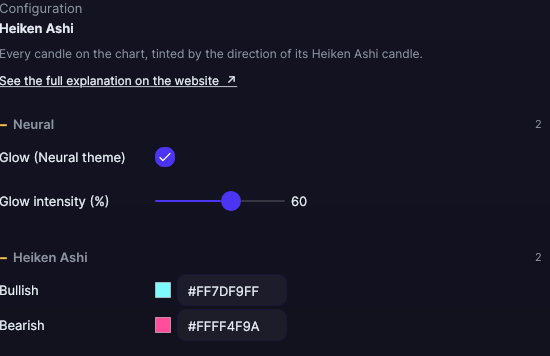
| Setting | Default | What it does |
|---|---|---|
| Heiken Ashi | ||
| Bullish | Ice | The color of the candles whose Heiken Ashi candle is bullish. |
| Bearish | Pink | The color of the candles whose Heiken Ashi candle is bearish. |
| Neural | ||
| Glow (Neural theme) | Yes, when added | A halo of light in the color of each line or mark, like the one on the Neural theme candles. A newly added indicator comes with it checked; the ones you already had saved don’t. |
| Glow intensity (%) | 60% | From 0 to 100%. |
Settings belong to each chart: changing the Heiken Ashi on one chart doesn’t change it on another.