 FORGE
FORGEGrayskull
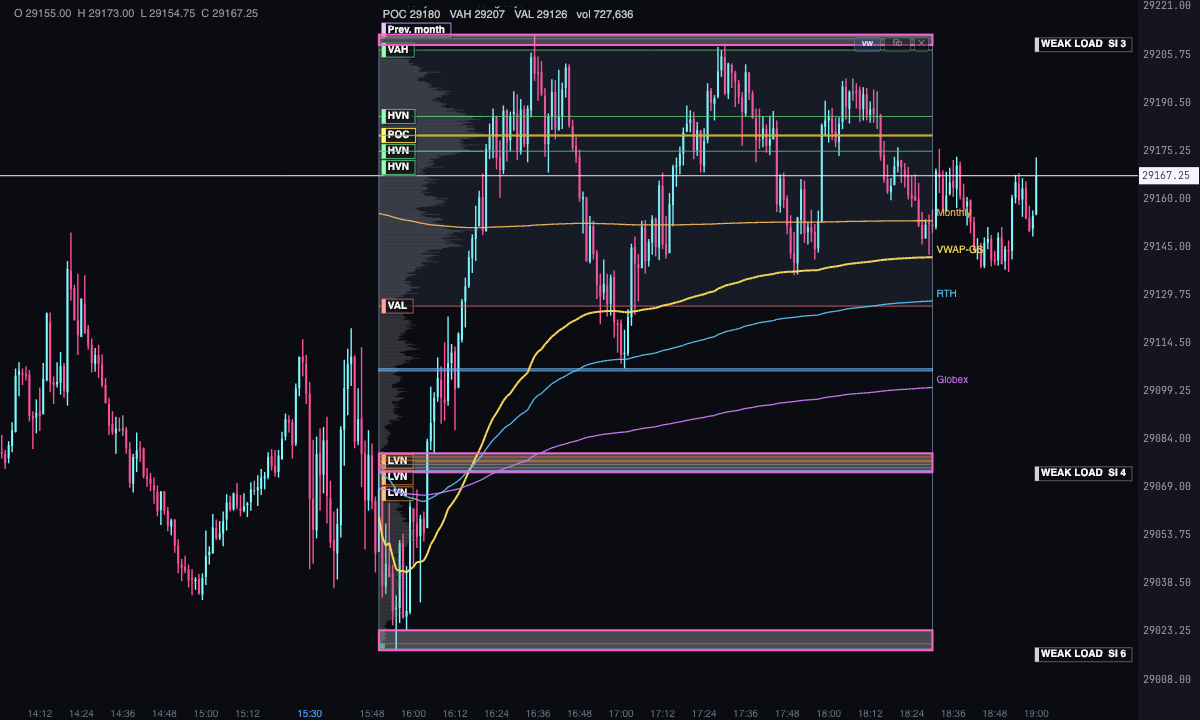
Mark a stretch of the chart with the mouse and Grayskull shows you its profile and what the flow left inside it.
What it measures
Grayskull doesn’t calculate over the whole chart: it calculates over the range you mark with the mouse. From that range’s candles and footprint it builds its profile and looks for what the flow left inside: where most and least was traded, where price went through only once, stacked imbalances, big trades and the zones where all of that lines up.
It’s a Pro plan indicator. It only uses the chart’s candles and footprint: no footprint, no profile. It marks what has happened; it isn’t a recommendation or a buy or sell signal.
Built-in strategies
What the indicator already has inside and can mark for you on the chart. They show what has happened; they are not recommendations.
Range profile
On by default- What it marks
- The range’s volume profile (and, if you turn them on, the TPO and delta profiles), with POC, VAH, VAL and the HVN and LVN nodes.
- Alert
- No alert: you see it on the chart.
- Turned on with
- “Volume profile”, “TPO profile” and “Delta profile”, in the Profile tab.
Single prints
On by default- What it marks
- The prices the market went through only once, by volume and by TPO; premium ones get an arrow on the candle that comes back to them.
- Alert
- No alert: you see it on the chart.
- Turned on with
- Single prints tab.
Stacked imbalances and big trades
On by default- What it marks
- The stacked buy and sell imbalances and the big trades in the range, with their size.
- Alert
- No alert: you see it on the chart.
- Turned on with
- Single prints and Activity tabs.
Loaded zones
On by default- What it marks
- Where a stacked imbalance, a big trade and a VWAP line up: weak load, load or premium load depending on how many coincide.
- Alert
- No alert: you see it on the chart.
- Turned on with
- Activity tab › Loaded zones.
VWAP
On by default- What it marks
- The VWAP anchored to the start of the range (VWAP-GS), with bands if you turn them on, plus the session, weekly, monthly and yearly VWAPs.
- Alert
- No alert: you see it on the chart.
- Turned on with
- VWAP tab.
Putting it on the chart
- On the chart bar, Indicators ▾ › More Indicators… and turn on Grayskull. You’ll find it in the Other category.
- Hold the X key and drag across the chart, from one end of the range to the other. When you let go, the profile stays in place.
- You can place several: each one is calculated on its own range. One that reaches the last candle keeps updating with the market.
- Moving it: you drag it along time. It doesn’t move up or down: what defines it is its time range.
- The buttons in its corner: ✕ deletes it, fib turns its Fibonacci on and off and vw shows or hides the session, weekly, monthly and yearly VWAPs.
- Double-click a profile to open its own settings, which only change that one.
How to add and set up an indicator is in Indicators.
How it’s calculated
- Profile: adds up the volume of every candle in the range, price by price. The TPO profile counts in how many sub-periods (15 minutes by default) each price traded; the delta profile, buys minus sells at each price.
- POC: the price with the most volume. VAH and VAL: the edges of the area holding 70% of the volume, adjustable from 50 to 95%.
- HVN and LVN: high and low volume nodes, profile peaks above 1.5 times the average and troughs below 0.4 times. At most 3 of each.
- Single prints: the prices the market went through only once inside the range, by volume and by TPO. One with a stacked imbalance, a big trade or a session VWAP inside is premium; the arrow marks the first candle that comes back to it.
- VWAP-GS: the VWAP anchored to the start of the range and weighted by footprint volume, with ±1σ and ±2σ bands if you turn them on.
- Stacked imbalances: 3 or more prices in a row where one side beats the other by 300%, with at least 30 contracts in the cell.
- Big trades: those of 50 contracts or more inside the range, largest first.
- Loaded zones: where a stacked imbalance, a big trade and a VWAP line up within 2 ticks. Depending on how many coincide: weak load (one), load (two) or premium load (all three).
Settings
In Indicators ▾, the ⚙ on its line has the Grayskull Settings… button: what you change there applies to new profiles and to the ones already placed. The window has a search box, six tabs and templates: save settings under a name and pick one as the default.
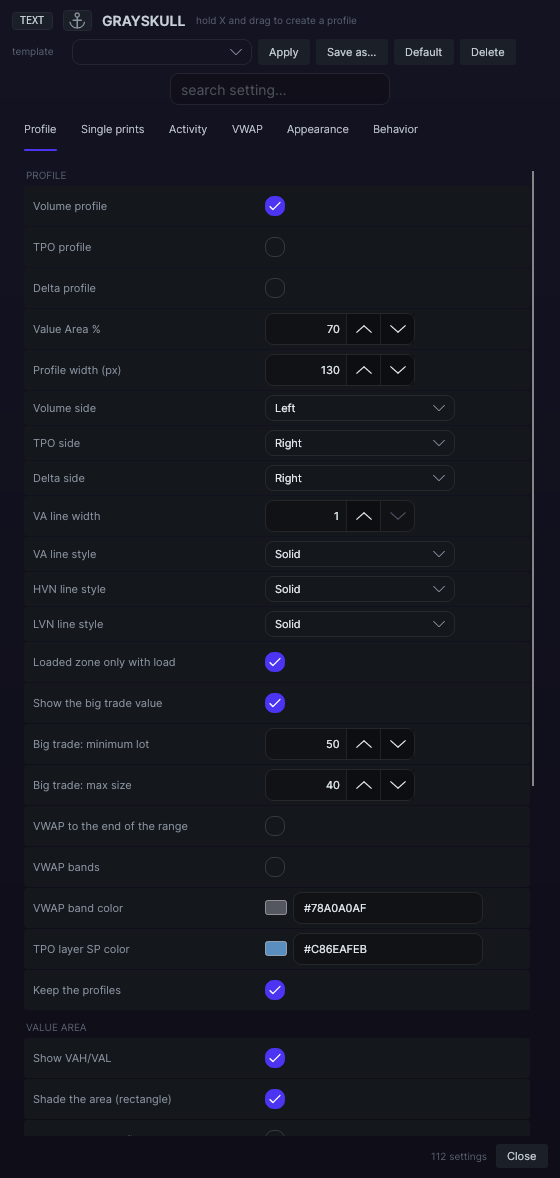
| Setting | Default | Range |
|---|---|---|
| Profile | ||
| Volume profile | Yes | |
| TPO profile | No | |
| Delta profile | No | |
| Value Area % | 70 | 50 to 95 |
| Profile width (px) | 130 | 20 to 400 |
| Volume side | Left | |
| TPO side | Right | |
| Delta side | Right | |
| VA line width | 1 | 1 to 6 |
| VA line style | Solid | |
| HVN line style | Solid | |
| LVN line style | Solid | |
| Loaded zone only with load | Yes | |
| Show the big trade value | Yes | |
| Big trade: minimum lot | 50 | 1 to 5000 |
| Big trade: max size | 40 | 5 to 200 |
| VWAP to the end of the range | No | |
| VWAP bands | No | |
| VWAP band color | #A0A0AF | |
| TPO layer SP color | #6EAFEB | |
| Keep the profiles | Yes | |
| Profile · Value Area | ||
| Show VAH/VAL | Yes | |
| Shade the area (rectangle) | Yes | |
| Draw the area profile | No | |
| Area profile color | #7896BE | |
| VAH color | #5AC878 | |
| VAL color | #E6695F | |
| Fill | #7896BE | |
| Profile · Nodes | ||
| Show HVN/LVN | Yes | |
| HVN factor | 1.5 | 1 to 5 |
| LVN factor | 0.4 | 0.05 to 1 |
| Max nodes | 3 | 1 to 10 |
| HVN color | #5AC878 | |
| LVN color | #E18237 | |
| Show POC | Yes | |
| POC color | #F0C83C | |
| Single prints | ||
| Volume single prints | Yes | |
| Volume fill | #EBEBF5 | |
| Volume border | #EBEBF5 | |
| TPO single prints | Yes | |
| TPO fill | #6EAFEB | |
| TPO border | #6EAFEB | |
| TPO sub-period (min) | 15 | 1 to 120 |
| Anchor TPO to the start of the range | No | |
| Project from its origin candle | No | |
| Premium detector on the SP | Yes | |
| Premium color | #FF5AD2 | |
| Arrow color | #FFD246 | |
| Single prints · Mitigation | ||
| Remove revisited single prints | No | |
| Revisited big trades add no load | No | |
| Single prints · Stacked imbalances | ||
| Show | Yes | |
| Ratio % | 300 | 100 to 1000 |
| Consecutive stacked | 3 | 1 to 20 |
| Minimum volume per cell | 30 | 0 to 5000 |
| Ignore zero cells | Yes | |
| Buy color | #4EC98A | |
| Sell color | #D86B6B | |
| Activity · Big trades | ||
| Show | Yes | |
| Color | #D8A34F | |
| Merge if closer than (px) | 12 | 0 to 60 |
| Markers on the left | Yes | |
| Activity · Loaded zones | ||
| Show | Yes | |
| Cluster tolerance (ticks) | 2 | 0 to 20 |
| Minimum confluences | 1 | 1 to 3 |
| The VWAP counts as a confluence | Yes | |
| Globex and RTH count toward the load | Yes | |
| Only big trades after the SP forms | Yes | |
| Weak load | #9696A0 | |
| Load | #FFAF2D | |
| Premium load | #FF5AD2 | |
| Load text pinned to the axis | Yes | |
| VWAP | ||
| Range VWAP (GS) | Yes | |
| Bands ±1σ/±2σ | No | |
| VWAP-GS color | #F5D75A | |
| VWAP RTH | Yes | |
| RTH open (ET) | 09:30 ET | |
| RTH color | #5ABEF0 | |
| VWAP Globex | Yes | |
| Globex open (ET) | 18:00 ET | |
| Globex color | #C878F0 | |
| Weekly VWAP | Yes | |
| Weekly color | #78DCA0 | |
| Monthly VWAP | Yes | |
| Monthly color | #EBB45A | |
| Yearly VWAP | No | |
| Yearly color | #78A0FF | |
| Previous month VWAP | Yes | |
| Previous month color | #B48CD2 | |
| RTH as VWAP-GS | No | |
| Globex as VWAP-GS | No | |
| Weekly as VWAP-GS | No | |
| Monthly as VWAP-GS | No | |
| Yearly as VWAP-GS | No | |
| Previous month as VWAP-GS | No | |
| Appearance · Frame and layers | ||
| Range frame | Yes | |
| Frame color | #96AAC8 | |
| Histogram color | #82828C | |
| TPO layer | #9682C8 | |
| Positive Delta | #3CC878 | |
| Negative Delta | #DC4646 | |
| Appearance · Style by element | ||
| POC width | 2 | 1 to 6 |
| POC line style | Solid | |
| VAH/VAL width | 1 | 1 to 6 |
| VAH/VAL line style | Solid | |
| HVN/LVN width | 1 | 1 to 6 |
| HVN/LVN line style | Dashed | |
| VWAP width | 2 | 1 to 6 |
| VWAP line style | Solid | |
| VAH/VAL label | Left | |
| Behavior | ||
| Follow the chart (extend to the live edge) | No | |
| Profile Fibonacci | No | |
| Show secondary VWAPs | Yes | |