 FORGE
FORGEFair Value Gap
The gaps a very fast candle leaves behind, marked as boxes until price comes back to fill them.
What it is
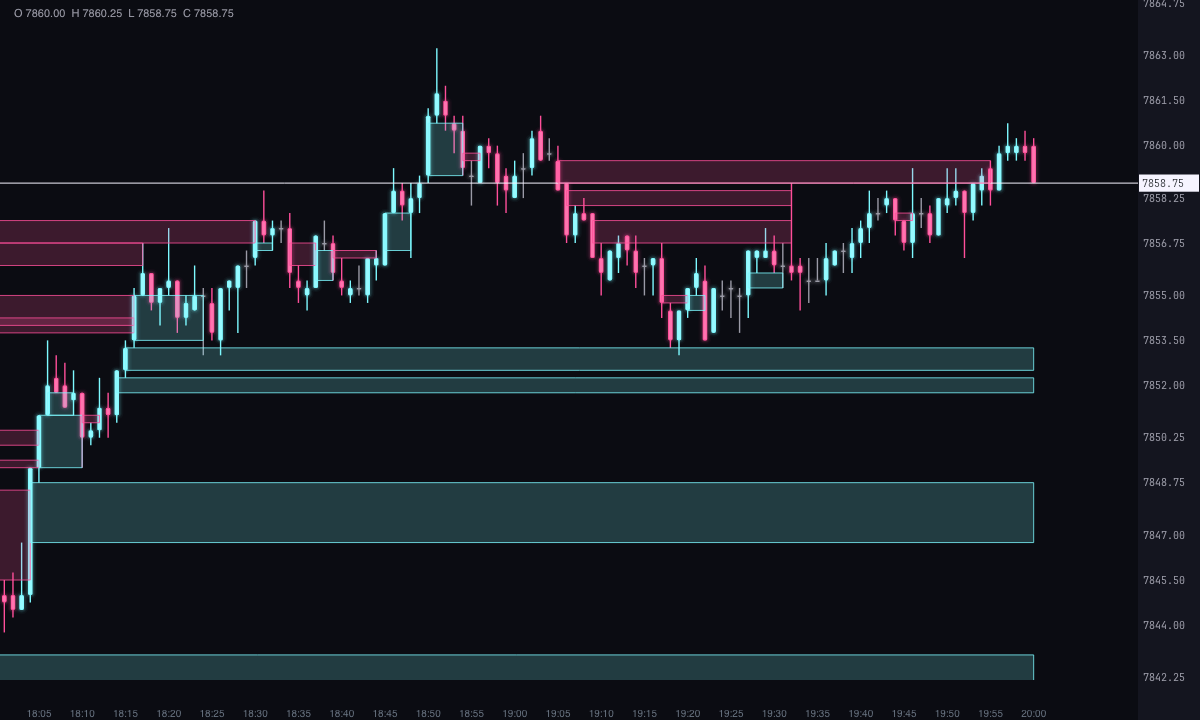
A Fair Value Gap (FVG) is a price gap across three consecutive candles: the middle candle moves so fast that the first and the third never touch.
- Bullish: the third candle’s low stays above the first candle’s high.
- Bearish: the third candle’s high stays below the first candle’s low.
Forge draws a box between those two prices, starting at the middle candle and extending to the right until price comes back to fill the gap. A gap only counts once its third candle has closed: a candle that’s still forming can undo it.
On another timeframe
With FVG time frame you can look for the gaps of a timeframe higher than your chart’s: 5, 15 or 30 minutes, 1 hour, 4 hours or daily (the trading day). Forge combines your chart’s candles into candles of that timeframe, looks for the gaps there, and draws them over your chart. That way, on a 15-minute chart you see the 1-hour FVGs.
When it’s filled
From the candle after the gap, Forge watches whether price comes back. With Counts as filled you choose when: When the price enters, When the price reaches the halfway point or When the price crosses it entirely (the default). Once filled, The box ends at the candle that fills it (the default) or Disappears.
With Box duration, the box lasts Until it is filled (the default), a fixed number of candles or To the end of the chart.
How to read it
- Open gaps: zones price moved through within a single candle, without the candles before and after it overlapping.
- Filling: when price comes back into the box, the gap gets filled; with the default settings, the box is cut when price crosses all of it.
- Timeframe: gaps on higher timeframes are fewer and wider than those on the 1-minute chart.
Alerts
They’re off by default. Forge can alert you when a new gap forms, when price touches one and when it fills it, with or without sound.
Built-in strategies
What the indicator already has inside and can mark for you on the chart. They show what has happened; they are not recommendations.
Fair value gaps
On by default- What it marks
- An ice (bullish) or pink (bearish) box on each three-candle gap, from the middle candle until price comes back to fill it.
- Alert
- If you turn it on, an alert when a new one forms, with optional sound.
- Turned on with
- «Bullish gaps» and «Bearish gaps», in Calculation; the alert, «When a new one forms», in Alerts.
Gap fill
On by default- What it marks
- The box is cut at the candle that fills the gap (or disappears), depending on when you count it as filled: when price enters it, at the middle or when it crosses all of it.
- Alert
- If you turn them on, alerts when price touches the gap and when it fills it.
- Turned on with
- «Counts as filled» and «When it is filled», in How far they extend; the alerts, in Alerts.
Higher-timeframe gaps
Off by default- What it marks
- The gaps from 5, 15 or 30 minutes, 1 hour, 4 hours or the daily chart, drawn over your chart.
- Alert
- The same alerts as the other gaps.
- Turned on with
- «FVG time frame», in Calculation.
Adding it to the chart
In the chart bar, Indicators ▾ › More Indicators…. You’ll find it in the ICT category. It’s drawn over price. How to add and adjust an indicator is in Indicators.
Settings
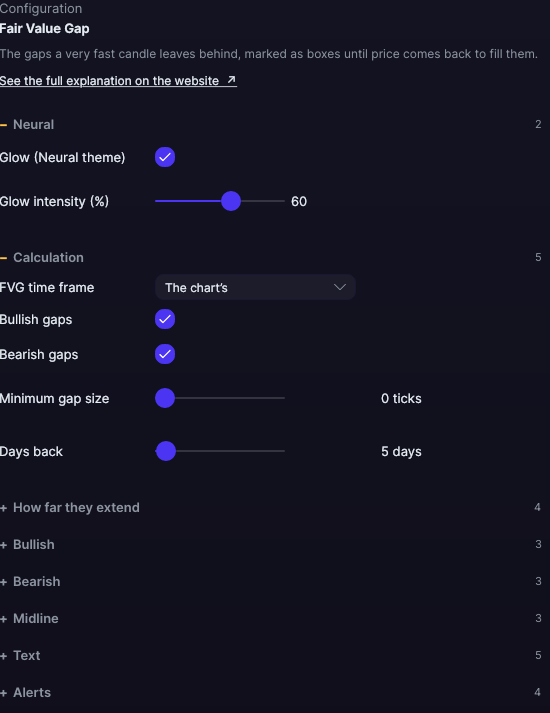
Open them with the ⚙ on its row in Indicators ▾. Each section collapses and expands on its own.
| Setting | Default | What it does |
|---|---|---|
| Calculation | ||
| FVG time frame | The chart’s | Or 5 minutes, 15 minutes, 30 minutes, 1 hour, 4 hours or Daily (trading day). |
| Bullish gaps · Bearish gaps | Yes · Yes | Each direction turns on separately. |
| Minimum gap size | 0 ticks | Smaller gaps aren’t marked, from 0 to 200 ticks. |
| Days back | 5 days | Days with candles that are looked at, from 1 to 365. |
| How far they extend | ||
| Box duration | Until it is filled | Or A fixed number of candles or To the end of the chart. |
| Duration in candles | 20 candles | With A fixed number of candles, from 1 to 500. |
| Counts as filled | When the price crosses it entirely | Or When the price enters or When the price reaches the halfway point. |
| When it is filled | The box ends at the candle that fills it | Or Disappears. |
| Bullish · Bearish | ||
| Fill color | Ice · Pink, translucent | With its transparency. |
| Border color | Ice · Pink | The color of the box’s outline. |
| Border width (0 = no border) | 1 px | From 0 to 6 px. |
| Midline | ||
| Draw the midline | No | A line at the middle price of each box. |
| Color (0 = the border of its box) · Width (0 = its box’s border · thickness) | Its box’s · 1 px | From 0.5 to 6 px. |
| Text | ||
| Write the text of each gap | No | For example, “Bullish FVG · 1 h · 13 ticks”. |
| Font size · Text color (0 = the border of its box) | 10 px · Its box’s | From 6 to 30 px. |
| Write the time frame · Write the size in ticks | Yes · Yes | The parts of the label. |
| Alerts | ||
| When a new one forms · When the price touches it · When it is filled | No · No · No | Each alert separately. |
| With sound | No | The alerts’ bell. |
| Neural | ||
| Glow (Neural theme) | Yes, when added | A halo of light in the color of each line or mark, like the one on the Neural theme candles. A newly added indicator comes with it checked; the ones you already had saved don’t. |
| Glow intensity (%) | 60% | From 0 to 100%. |
Settings belong to each chart: changing the Fair Value Gap on one chart doesn’t change it on another.