 FORGE
FORGEDelta
What was bought at market minus what was sold, candle by candle, with its signals.
What it measures
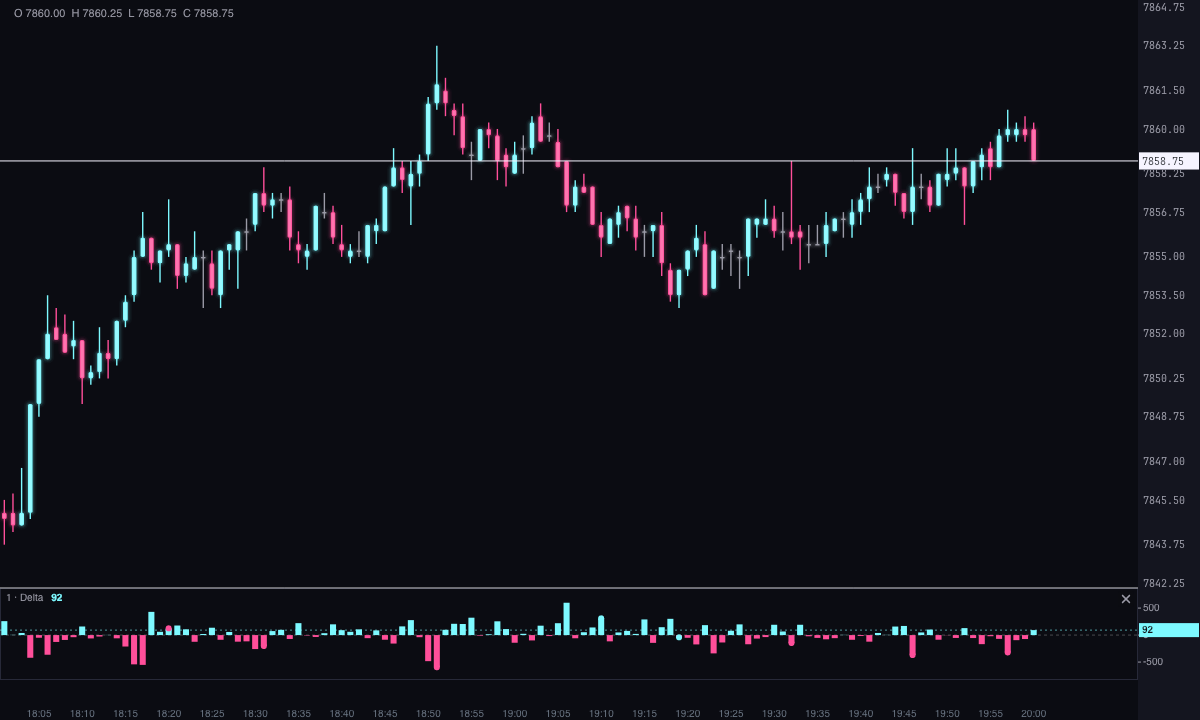
A candle’s delta is what was bought at market minus what was sold at market in it. Positive, in ice, if aggressive buyers were in control; negative, in pink, if sellers were. Volume traded without a known aggressor isn’t counted.
The Delta indicator draws it in its own strip below the candles, Per candle (the default) or Cumulative over the session, and marks four signals on it.
How it’s drawn
There are eight modes: Histogram (the default), Candles, Bars, High low, Line, Area, Step and Dots.
- Candles and bars: each delta candle opens at zero, or where the previous one closed if you draw the cumulative value, and closes at its delta.
- The wick: with Bid-ask it runs from what was sold to what was bought in the candle; with Ticks it’s the actual path of delta within the candle, trade by trade; with None, there’s no wick.
- High low: the size of the delta, without its sign, from zero.
- Numbers: optionally, each candle’s value written above or below it.
The signals
They’re marked with dots in the strip and, optionally, by tinting the price candle. The first two are on by default.
- Divergence: price makes a higher high but the session’s cumulative delta doesn’t follow (bearish), or a lower low and cumulative delta holds up (bullish). A pivot is confirmed once it has 3 candles on each side, so live it appears 3 candles later.
- Absorption: a candle with a delta of at least 2 times the average, but with a small range (at most 0.7 times the average) and closing against its delta. Heavy aggressive buying that doesn’t lift price is selling absorption, and vice versa.
- Trapped (off by default): a candle that closes up with negative delta, or down with positive delta. Whoever was aggressive is stuck on the wrong side.
- Extreme (off by default): a delta of at least 3 times the average.
The average delta and the average range are those of the candles before each one, starting from the first one loaded, and the first 20 candles aren’t evaluated. That way, a signal that has already appeared doesn’t change later.
Built-in strategies
What the indicator already has inside and can mark for you on the chart. They show what has happened; they are not recommendations.
Divergence
On by default- What it marks
- Dots in the strip when price makes a higher high and the session’s cumulative delta doesn’t follow (bearish), or a lower low and cumulative delta holds up (bullish). Optionally, it tints the price candle.
- Alert
- No alert: it shows on the chart.
- Turned on with
- «Detect divergences», in Divergence.
Absorption
On by default- What it marks
- Dots in the strip when a candle has a large delta, a small range and closes against its delta. Optionally, it tints the price candle.
- Alert
- No alert: it shows on the chart.
- Turned on with
- «Detect absorption», in Absorption.
Trapped delta
Off by default- What it marks
- Dots in the strip when the candle closes up with negative delta, or down with positive delta. Optionally, it tints the price candle.
- Alert
- No alert: it shows on the chart.
- Turned on with
- «Detect trapped delta», in Trapped.
Extreme delta
Off by default- What it marks
- Dots in the strip when the candle’s delta is at least 3 times the average.
- Alert
- No alert: it shows on the chart.
- Turned on with
- «Mark extreme delta», in Extremes.
Adding it to the chart
In the chart bar, Indicators ▾ › More Indicators…. You’ll find it in the Volume / Order Flow category. It’s drawn in its own strip, below the candles. How to adjust a strip is in Indicators.
Settings
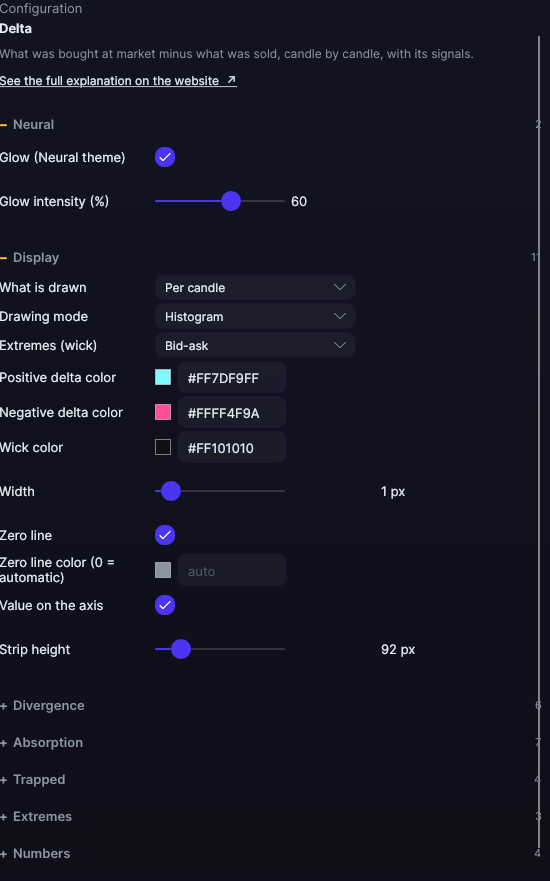
Open them by double-clicking its strip, or with the ⚙ on its row in Indicators ▾. Each section collapses and expands on its own.
| Setting | Default | What it does |
|---|---|---|
| Display | ||
| What is drawn | Per candle | Per candle or Cumulative over the session. |
| Drawing mode | Histogram | Histogram, Candles, Bars, High low, Line, Area, Step or Dots. |
| Extremes (wick) | Bid-ask | Bid-ask, Ticks or None. Only for candles and bars. |
| Positive · negative delta color | Ice · Pink | The fills, bodies, dots and numbers. |
| Wick color | Black | The wick color for candles and bars. |
| Width | 1 px | From 0.5 to 10 px. |
| Zero line · Zero line color (0 = automatic) | Yes · Automatic | Automatic is dark on a light background and light on a dark background. |
| Value on the axis | Yes | The value, on the right edge of the strip. |
| Strip height | 92 px | From 40 to 400 px. |
| Divergence | ||
| Detect divergences | Yes | Turns the signal on. |
| Candles on each side of the turn | 3 | From 1 to 20. |
| Bullish · bearish divergence color | Ice · Pink | The colors of the marks. |
| Mark with dots · Paint the price candle | Yes · No | Where it’s marked. |
| Absorption | ||
| Detect absorption | Yes | Turns the signal on. |
| Times the average delta | 2× | From 0.5 to 10×. |
| Maximum range (times the average) | 0.7× | From 0.05 to 3×. |
| Buying · selling absorption color | Blue · Orange | The colors of the marks. |
| Mark with dots · Paint the price candle | Yes · No | Where it’s marked. |
| Trapped | ||
| Detect trapped delta | No | Turns the signal on. |
| Trapped buyer color · trapped seller color | Pink · Ice | The colors of the marks. |
| Paint the price candle | No | Tints the candle. |
| Extremes | ||
| Mark extreme delta | No | Turns the mark on. |
| Times the average delta | 3× | From 1 to 10×. |
| Color | Yellow | The color of the mark. |
| Numbers | ||
| Show the number · Where | No · Above | Above or Below. |
| Color (0 = same as the delta) · Size (0 = the delta’s · size) | The delta’s · 9 px | From 6 to 24 px. |
| Grid | ||
| Draw grid · Color (0 = automatic) · Divisions | No · Automatic · 4 | Reference lines, from 2 to 10 divisions. |
| Neural | ||
| Glow (Neural theme) | Yes, when added | A halo of light in the color of each line or mark, like the one on the Neural theme candles. A newly added indicator comes with it checked; the ones you already had saved don’t. |
| Glow intensity (%) | 60% | From 0 to 100%. |
Settings belong to each chart: changing the Delta on one chart doesn’t change it on another.