 FORGE
FORGECandle Speed
Marks the candles where the market suddenly speeds up.
What it measures
Candle Speed measures the market’s speed: how much trades in a window of seconds (15 by default). It can count the number of trades, the volume, the buys, the sells or the delta.
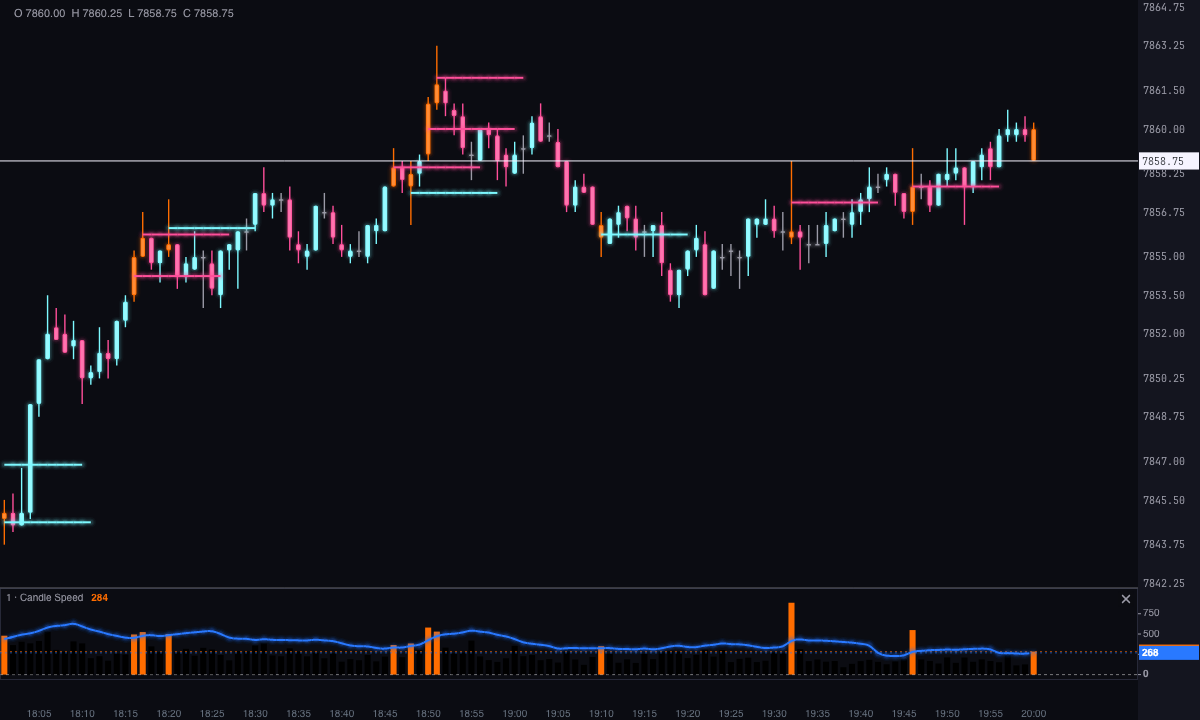
When a candle’s speed clearly exceeds that of the previous ones, the candle is a signal: the market has suddenly sped up. By default the candle is painted orange, so is its histogram bar, and its average price is marked on the chart.
How it’s calculated
- Speed: for each candle, Forge adds up what traded in it and in the previous candles that fit in the window of seconds, and converts it to “amount per window.” On candles longer than the window, for example 1-minute candles with a 15-second window, it’s the candle’s amount scaled to 15 seconds: a quarter of what traded in the minute.
- Filter: the average speed of the last candles (10 by default) multiplied by 1.5. It’s the blue line in the histogram.
- Signal: the candle’s speed goes above the filter, that is, it exceeds the recent average by 50%.
With Automatic filter off, the line is a fixed number you choose (Trades filter), and the signal fires when the speed goes above it.
In Delta mode, the speed is drawn with its sign, but it’s compared with the filter by its size: a bar below zero can also give a signal.
How to read it
- Black bars: candles at a normal pace.
- Orange bar and candle: the market sped up in that candle compared with the previous ones.
- The price mark: a line at the average price of the signal candle, extended a few candles to the right. It’s ice if the candle closed with positive delta and pink if it closed with negative delta. It lets you see later how price reacts at that level.
Speed says the market has sped up, not which way. The mark’s color says which side dominated in that candle.
How many days it looks at
Days back (5 by default) is how many days with candles, counting back from the last one, are calculated and drawn. A weekend doesn’t count. It doesn’t download anything: it works with the candles the chart already has.
Built-in strategies
What the indicator already has inside and can mark for you on the chart. They show what has happened; they are not recommendations.
Market acceleration
On by default- What it marks
- The candle and its histogram bar in orange, and a line at the candle’s average price, ice if it closed with positive delta and pink if negative, when speed exceeds its recent average by 50% (or the fixed threshold you choose).
- Alert
- No alert: it shows on the chart.
- Turned on with
- Always on; «Paint the candle» and «Mark the signal price», in Display, remove the tinted candle or the line.
Adding it to the chart
In the chart bar, Indicators ▾ › More Indicators…. You’ll find it in the Volume / Order Flow category. The histogram and its line go in their own strip, below the candles; the marks and the tinted candles, over price. How to adjust a strip is in Indicators.
Settings
Open them by double-clicking its strip, or with the ⚙ on its row in Indicators ▾.
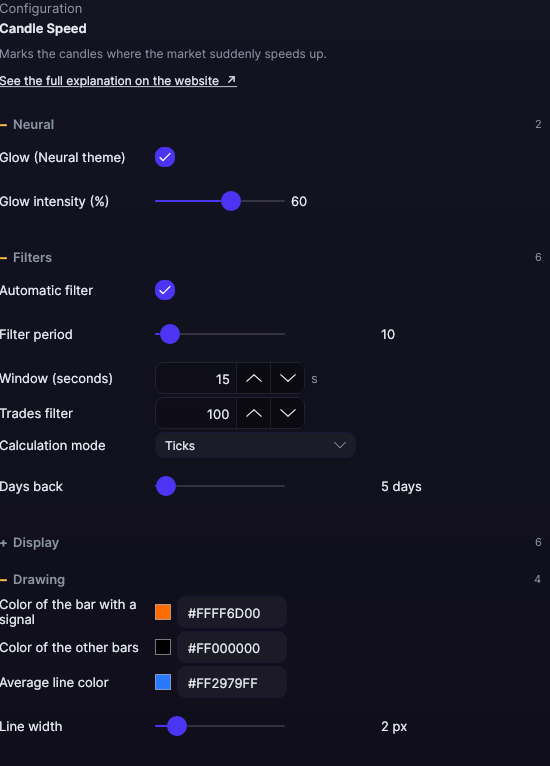
| Setting | Default | What it does |
|---|---|---|
| Filters | ||
| Automatic filter | Yes | The line is the recent average × 1.5. When off, it’s the fixed number in Trades filter. |
| Filter period | 10 | How many candles go into that average, from 1 to 200. |
| Window (seconds) | 15 s | The window in which speed is measured, from 1 to 600 s. |
| Trades filter | 100 | The fixed threshold, with the automatic filter off, from 1 to 10,000. |
| Calculation mode | Ticks | Ticks (number of trades), Volume, Buys, Sells or Delta. |
| Days back | 5 days | Days with candles that are calculated, from 1 to 365. |
| Display | ||
| Mark the signal price | Yes | The line at the average price of the signal candle. |
| Length (candles) | 10 | How many candles it extends, from 1 to 200. |
| Positive Delta · Negative Delta | Ice · Pink | The color of the mark according to the candle’s delta. |
| Paint the candle | Yes | Tints the signal candle. |
| Color of the candle with a signal | Orange | The color of that candle. |
| Drawing | ||
| Color of the bar with a signal | Orange | The histogram bars that give a signal. |
| Color of the other bars | Black | All the other bars. |
| Average line color | Blue | The filter line. |
| Line width | 2 px | That of the filter and the price marks, from 1 to 10 px. |
| Neural | ||
| Glow (Neural theme) | Yes, when added | A halo of light in the color of each line or mark, like the one on the Neural theme candles. A newly added indicator comes with it checked; the ones you already had saved don’t. |
| Glow intensity (%) | 60% | From 0 to 100%. |
Settings belong to each chart: changing the Candle Speed on one chart doesn’t change it on another.