 FORGE
FORGEBollinger Bands
An average with two bands that widen when the market moves and narrow when it calms down.
What it measures
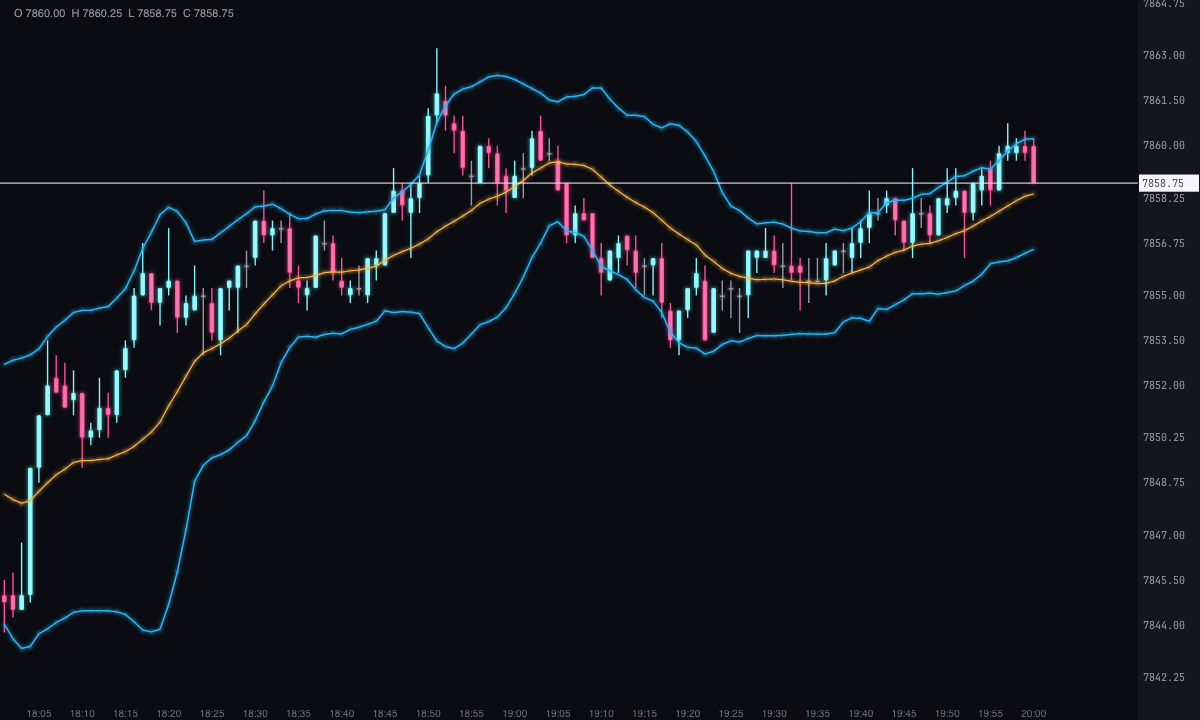
Bollinger Bands are three lines over price: an average in the middle and two bands, one above and one below, set a number of standard deviations of price away from it. When price moves a lot, the bands widen; when it calms down, they narrow.
They show at a glance whether price is far from or close to what is normal for the period, and whether the market is expanding or compressing.
How it’s calculated
With the default settings, for each candle:
- Average: the simple average of the closes of the last 20 candles.
- Upper band: the average plus 2 times the standard deviation of those 20 closes.
- Lower band: the average minus 2 times that deviation.
band = average ± deviations × standard deviation of price
The standard deviation is that of the window’s closes around their simple average. You can change the source price (open, high, low or the candle averages) and the type of average for the middle line (simple, exponential, weighted or Wilder’s). With another average, the middle line changes; the width still comes from the deviation of price.
With the default period, all three lines start on candle 20: before that there aren’t enough candles to measure.
How to read it
- Inside the bands: most of the time price moves between them. Touching a band is not a signal on its own: it says price is at the edge of what is normal for the period.
- Width: narrow bands, a compressed market; wide bands, an expanding market. The width doesn’t say which way.
- Riding a band: in a trend, price can close candle after candle against the upper or the lower band.
- The average: the middle line serves as a reference for the period’s average price.
Strategies on the chart
Forge can mark five common band readings right on the chart. All of them are off by default and each has its own colors. Buys are marked with a triangle below the candle’s low and sells with one above its high. They are marks of what happened on the chart, not recommendations.
- Bounce: a candle closes outside the band and the next one closes back inside. Below, a buy; above, a sell. It can be filtered with the RSI: it only marks buys with the RSI oversold and sells with the RSI overbought.
- Breakout: the first close outside the band, above or below.
- Squeeze: marks with a dot on the average the candle where the band width (relative to the average) is the smallest of the last candles you choose, 120 by default. If you want, it also signals the first breakout that comes after it, within a margin of candles.
- Walking the band: tints the candles from the third in a row that closes above the upper band or below the lower one.
- Average crossover: the close crosses the middle line upward or downward.
Signals are calculated with the bands in place, even if you shift them for drawing: a signal belongs to the candle where it happens.
Built-in strategies
What the indicator already has inside and can mark for you on the chart. They show what has happened; they are not recommendations.
Bounce
Off by default- What it marks
- A buy triangle below the candle, or a sell triangle above it, when a candle closes outside a band and the next one closes back inside. It can be filtered with the RSI: buys only when oversold and sells only when overbought.
- Alert
- No alert: it shows on the chart.
- Turned on with
- «Mark the bounce (closes outside and comes back inside)», in Strategy · Bounce.
Breakout
Off by default- What it marks
- A triangle on the first close above the upper band or below the lower band.
- Alert
- No alert: it shows on the chart.
- Turned on with
- «Mark the breakout (first close outside the band)», in Strategy · Breakout.
Squeeze
Off by default- What it marks
- A dot on the average at the candle where the bands are closest together of the last 120, and a triangle on the first breakout that follows, within a margin of candles.
- Alert
- No alert: it shows on the chart.
- Turned on with
- «Mark the squeeze (width at its minimum)», in Strategy · Squeeze.
Walking the band
Off by default- What it marks
- Tints the candles from the third one in a row that closes above the upper band or below the lower one.
- Alert
- No alert: it shows on the chart.
- Turned on with
- «Color the candles walking along the band», in Strategy · Walking the band.
Average cross
Off by default- What it marks
- A triangle when the close crosses the middle line upward or downward.
- Alert
- No alert: it shows on the chart.
- Turned on with
- «Mark the average crossover», in Strategy · Average crossover.
Adding it to the chart
In the chart bar, Indicators ▾ › More Indicators…. You’ll find it in the Volatility / Range category. It’s drawn over price. How to add and adjust an indicator is in Indicators.
Settings
Open them with the ⚙ on its row in Indicators ▾. Each section collapses and expands on its own.
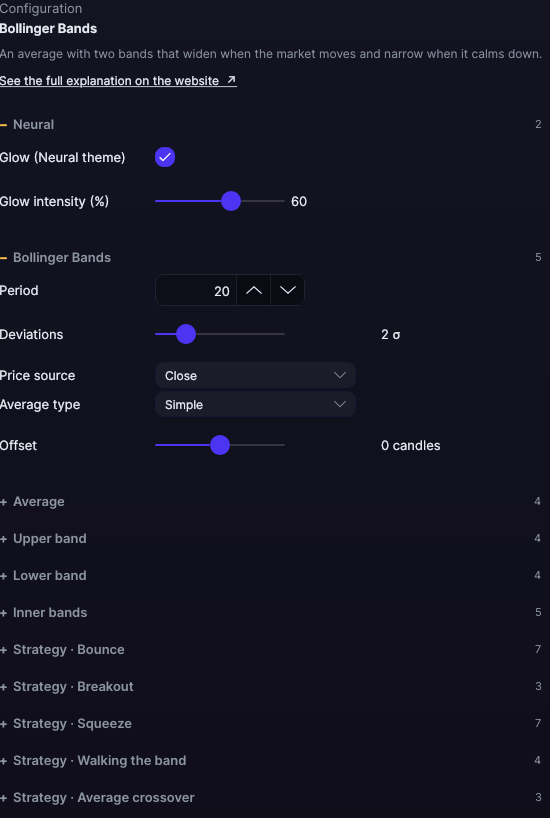
| Setting | Default | What it does |
|---|---|---|
| Bollinger Bands | ||
| Period | 20 | How many candles are used, from 1 to 500. |
| Deviations | 2 σ | How many standard deviations away the bands are, from 0.1 to 10. |
| Price source | Close | Close, Open, High, Low, Median HL2 (high and low), Typical HLC3 (high, low and close) or Average OHLC4 (all four). |
| Average type | Simple | Simple, Exponential, Weighted or Wilder. |
| Offset | 0 candles | Shifts all three lines to the right (positive) or to the left (negative), from −100 to 100. |
| Average · Upper band · Lower band | ||
| Show | Yes | Each line turns on and off separately. |
| Color | Amber · Cyan · Cyan | The color of each line. |
| Width | 1.2 · 1.5 · 1.5 px | From 0.5 to 6 px. |
| Line style | Solid | Solid, Dashed, Dotted, Dash-dot, Long dash, Long dash-dot or Even dashes. |
| Inner bands | ||
| Show | No | Two more bands, inside the others. |
| Deviations | 1 σ | How many deviations away they are, from 0.1 to 10. |
| Color · Width · Line style | Translucent cyan · 1 px · Dashed | How they’re drawn. |
| Strategy · Bounce | ||
| Mark the bounce (closes outside and comes back inside) | No | Turns on the signal. |
| Buy color · Sell color | Ice · Pink | The colors of the marks. |
| Filter with the RSI | No | Only marks the bounce if the RSI agrees. |
| RSI period | 14 | From 2 to 50. |
| Oversold RSI · Overbought RSI | 30 · 70 | Buys with the RSI below the first; sells above the second. |
| Strategy · Breakout | ||
| Mark the breakout (first close outside the band) | No | Turns on the signal. |
| Bullish color · Bearish color | Cyan · Violet | The colors of the marks. |
| Strategy · Squeeze | ||
| Mark the squeeze (width at its minimum) | No | Turns on the mark. |
| Candles to look for the minimum width | 120 | From 10 to 500. |
| Squeeze color | Amber | The color of the dot. |
| Mark the breakout after the squeeze | Yes | The first breakout after a squeeze. |
| Margin candles after the squeeze | 20 | Up to how many candles later the breakout is looked for, from 1 to 100. |
| Bullish breakout color · downside breakout color | Ice · Pink | The colors of the marks. |
| Strategy · Walking the band | ||
| Color the candles walking along the band | No | Turns on the tinting. |
| Consecutive candles to count it | 3 | From 2 to 20. |
| Upper · lower band color | Ice · Pink | The color of the tinted candles. |
| Strategy · Average crossover | ||
| Mark the average crossover | No | Turns on the signal. |
| Color when crossing upward · down | Light ice · Light pink | The colors of the marks. |
| Neural | ||
| Glow (Neural theme) | Yes, when added | A halo of light in the color of each line or mark, like the one on the Neural theme candles. A newly added indicator comes with it checked; the ones you already had saved don’t. |
| Glow intensity (%) | 60% | From 0 to 100%. |
Settings belong to each chart: changing the Bollinger Bands on one chart doesn’t change them on another.