 FORGE
FORGEATR
How much price moves per candle, without saying which way.
What it measures
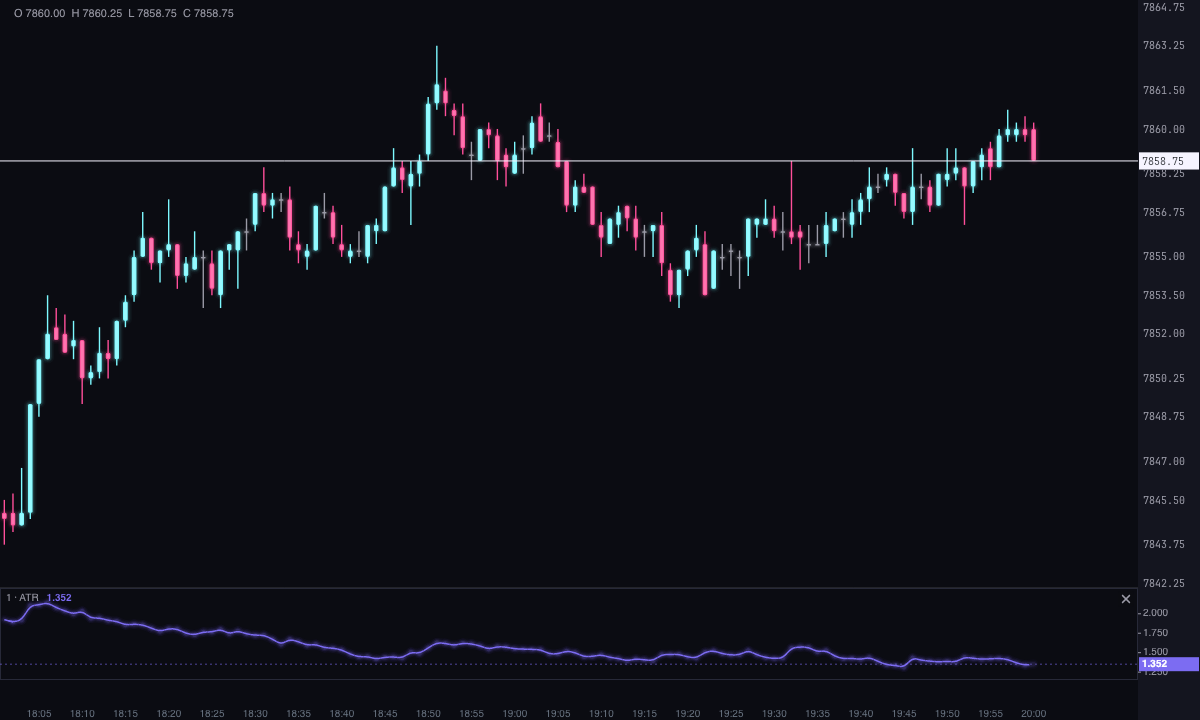
The ATR (Average True Range) measures volatility: how far price travels in each candle, on average, on your chart’s timeframe. It says nothing about direction. A rising ATR means wider candles, whether the market is going up or down.
That’s why Forge paints it in a single color. An ATR that turns green when rising and red when falling would invite you to read a direction that isn’t in the data.
How it’s calculated
For each candle, Forge takes its true range: the largest of these three values.
- The candle’s high minus its low.
- The distance between the high and the previous candle’s close.
- The distance between the low and the previous candle’s close.
The last two capture gaps: if the market opens far from the previous close, that jump counts as movement even if the candle itself is small.
The ATR is the average of those ranges using Wilder’s method. The first value is the simple average of the first ranges in the period. From there, each new candle weighs one part of the period:
ATR = (previous ATR × (period − 1) + true range) ÷ period
This is the classic ATR: with the same settings it gives the same number as any other platform that uses Wilder.
The strip starts blank. With a period of 14, the first value appears on candle 15: the chart’s first candle has no previous close and the next 14 form the first average. Nothing is painted before that, because a half-built average is not an ATR.
How to read it
- Level: the value is a candle’s typical range. An ATR of 12 on a 5-minute NQ chart means that, on average, each 5-minute candle travels about 12 points.
- Changes: a rising ATR shows candles are widening; a falling one, that the market is compressing. In no case does it say which way the next move will go.
- Distances: it works as a ruler to measure the market on its own scale. With Multiplier at 1.5, the strip shows 1.5 times the ATR directly, a common measure for setting a stop away from price.
- Comparing: in Ticks, the ATR of different instruments reads in the same unit orders are counted in.
The ATR depends on the timeframe: the one on a 1-minute chart and the one on a 1-hour chart of the same instrument are very different numbers, and both are correct.
Adding it to the chart
In the chart bar, Indicators ▾ › More Indicators…. You’ll find it in the Volatility / Range category. It’s drawn in its own strip, below the candles. How to move and adjust a strip is in Indicators.
Settings
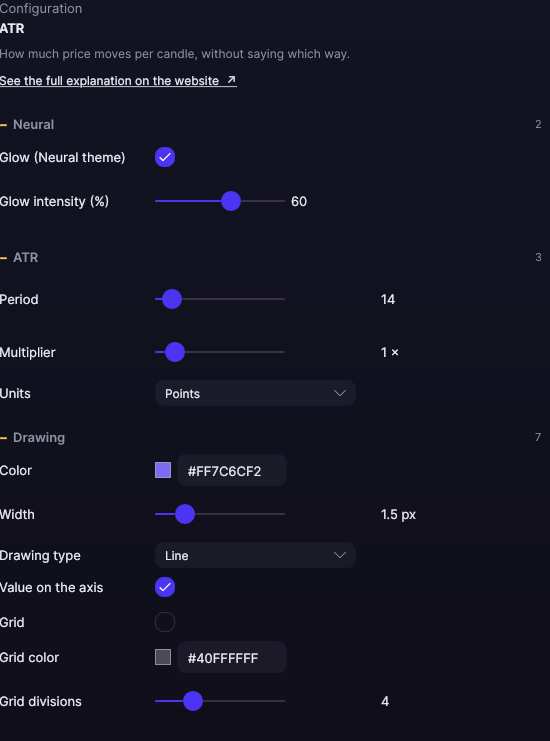
Open them by double-clicking its strip, or with the ⚙ on its row in Indicators ▾.
| Setting | Default | What it does |
|---|---|---|
| ATR | ||
| Period | 14 | How many candles go into the average, from 1 to 200. Shorter reacts sooner; longer is steadier. |
| Multiplier | 1× | Shows the ATR already multiplied, from 0.1 to 10×. |
| Units | Points | Price Points, or Ticks: the points divided by the instrument’s tick size. |
| Drawing | ||
| Color | Violet | A single color for the whole series. It reads on both the dark and the light theme. |
| Width | 1.5 px | From 0.5 to 6 px. |
| Drawing type | Line | Line, Area, Histogram, Stepped or Points. |
| Value on the axis | Yes | The value, on the right edge of the strip: that of the candle under your mouse, or of the last one. |
| Grid | No | Horizontal reference lines inside the strip. |
| Grid color | Translucent white | The color of those lines. |
| Grid divisions | 4 | How many parts the strip is divided into, from 2 to 10. |
| Neural | ||
| Glow (Neural theme) | Yes, when added | A halo of light in the color of each line or mark, like the one on the Neural theme candles. A newly added indicator comes with it checked; the ones you already had saved don’t. |
| Glow intensity (%) | 60% | From 0 to 100%. |
Settings belong to each chart: changing the ATR on one chart doesn’t change it on another.